linkedin-skill-assessments-quizzes
Adobe AI
Q1. What would happen to the fill color of the object shown below if you copied and pasted it into another Illustrator file where the Document Color Mode was set to CMYK?
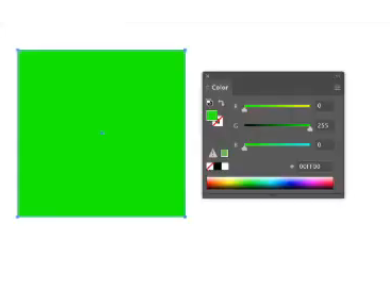
- The fill color would be converted to CMYK values
- The fill color would be unchanged.
- Illustrator would display an error because you can’t paste an object with RGB colors into a CMYK file.
- The fill color would remain RGB but its appearance would change.
Q2. You want to add some stars to the circular background object in the image below, using a scatter brush. How can you ensure that the stars appear only inside the circle?

- Select the Screen blending mode before you brush.
- Select the circle and click the Draw Inside button on the toolbar before you brush.
- Add a fixed spacing value in the Scatter Brush options.
- Select the brush stroke and the circle and make a compound path.
Q3. Why would you use the Save Selection command?
- to preserve vector copies of objects you plan to rasterize
- to save copies of selected objects in a new file
- to preserve a selection of objects you may use again
- to save selected objects in a Creative Cloud library
Q4. Which action closes a path when you are actively drawing with the Pen tool?
- clicking or dragging the first point in the path
- choosing Object > Path > Join
- pressing Return (Mac) or Enter (Windows)
- switching to a different tool
Q5. Which effect was used to give depth to the outline of California below?
A map of California has a light beige main color and a small dark shadow.
- 3D Extrude & Bevel
- Offset Path
- 3D Rotate
- 3D Revolve
Q6. When multiple objects are selected, how do you deselect just one of them?
- Hold down the Option (Mac) or Alt (Windows) key and click the object you want to deselect.
- Use the Lasso tool to deselect the unwanted object.
- Shift-click the object you want to deselect
- Press Command+Shift+A (Mac) or Ctrl+Shift+A (Windows) and click the object you want to deselect.
Q7. You need to change the fill color of all the info circles in the map below. The circles were not created from a symbol. Other than Global Edit, which command would help you accomplish this task efficiently?
A map of Southern California includes many info circles shaded in light blue.
- Recolor Artwork
- Select > Same > Appearance
- Edit Colors
- Live Paint
Q8. How can you reverse the direction of all the arrows on the spiral in the image below?
A red line spirals clockwise in, towards the center. Arrows along the line point in that direction.
- Select Object > Path > Reverse Path Direction.
- Select Effect > 3D > Rotate.
- Use the Flip Horizontal and Flip Vertical commands in the Transform panel menu.
- Drag the path with the Reshape tool.
Q9. What would you do to the left anchor point to make the object symmetrical?
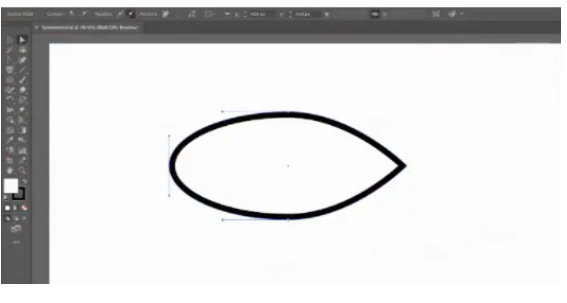
- Remove it.
- Cut the path at the anchor point.
- Convert it to a corner point.
- Convert it to a smooth point.
Q10. When do you use the Knife tool?
- when you want to cut an object at existing anchor points
- when you want to cut an object into equal pieces
- when you want to crop an embedded or linked image
- when you want to quickly divide an object by drawing closed, freehand paths
Q11. You have a full-color RGB document and you need to create a grayscale version that will print only on the black plate. How can you accomplish this?
- Select everything in the document and then apply the Convert to Grayscale command.
- Apply the Convert to Grayscale command and change the Document Color Mode to CMYK.
- Use the Recolor Artwork command and select the 1-Color Job preset.
- Delete all the color swatches from the Swatches panel except for Black and White.
Q12. You have been working in the Essentials workspace and have changed the arrangement of panels, closing some that were open by default and opening others from the Window menu. How can you get back to the default arrangement of panels?
- Switch to any other workspace, and then switch back to Essentials.
- Quit Illustrator, press and hold Command+Shift+Option (Mac) or Ctrl+Shift+Alt (Windows), and relaunch Illustrator.
- Choose Reset Essentials from the Workspace menu or the Workspace switcher.
- Quit and relaunch Illustrator.
Q13. Your boss likes the new logo you’ve designed but would like to see some variations using different color schemes. Which feature could you use to generate these variations quickly?
- Variables
- Recolor Artwork
- Live Paint
- Proof Colors
Q14. What is the fastest and most efficient way to ensure that all the objects shown in the figure below are placed precisely next to one another with no space between them?
- Specify a key object, then use the Horizontal Distribute Space command in the Align panel with a Spacing value of 0
- Turn on Smart Guides and drag each object until it snaps to the one next to it.
- Choose the Move command and in the dialog box set the Distance value to 0.
- Select the objects with the Selection tool, then drag from the side of the selection bounding box until the objects snap together.
Q15. You select a new color in the Color Picker and want to see several variations in different shades and tints. Which feature allows you to do this?
- Adobe Color Themes
- Color Guide
- Color Groups
- Recolor Artwork
Q16. What is the purpose of the Make Pixel Perfect command?
- to create responsive web graphics that can resize with no loss of quality
- to ensure graphics use only web-safe colors
- to have Illustrator automatically choose the right export file format based on the contents of the graphic
- to create sharp web graphics with no anti-aliasing of straight lines
Q17. You have just one object on your artboard. You want to change its fill color from black to yellow, so you open the Color Picker and select a yellow color. But when you click OK, the fill of the object changes to gray, not yellow. Why is this happening?
- The color mode of the fill is set to Grayscale.
- The Luminosity blend mode is applied to the fill.
- One of the Color Blindness options is chosen under Proof Setup in the View menu.
- Overprint Preview is turned on in the Separations Preview panel.
Q18. How can you ensure that proper nouns are not hyphenated in the document you’re working on?
- Turn off Hyphenate Capitalized Words in the Paragraph panel.
- Select Justify All Lines in the Paragraph panel.
- Decrease the Word Spacing in the justification options.
- Increase the Hyphenation Zone value in the Paragraph panel so it is greater than the point size of the text.
Q19. How could you quickly change all the hexagons to triangles in the image below?
- In the Control panel, click the button to start editing similar shapes, then select Object > Path > Simplify.
- In the Properties panel, click Start Global Edit and then use the Transform controls to reduce the Polygon Side Count to 3.
- In the Properties panel, click Expand Shape. Then click Start Global Edit and use the Transform controls to reduce the Polygon Side Count to 3.
- In the Control panel, click the button to start editing similar shapes, then select Object > Transform > Transform Each.
Q20. You’re working with a pen tablet and find that using the Ellipse, Rectangle, and Polygon tools to create objects is somewhat awkward. Which tool would allow you to draw, move, and edit these shapes with intuitive gestures?
- the Smooth tool
- the Shape Builder tool
- the Pencil tool
- the Shaper tool
Q21. When using the Live Paint Bucket tool to fill artwork with colors, you are unable to fill some areas due to the size of gaps between paths. What can you do in the Gap Options dialog box to fix this problem?
- Select Small Gaps.
- Select Close Gaps with Paths.
- Select Large Gaps.
- Turn off Gap Detection.
Q22. You often use brushes from the Pattern Arrows brush library. How can you make it so this library automatically opens when you start Illustrator?
- Select Show Pattern Brushes from the Brushes panel menu.
- Select Persistent from the library’s panel menu.
- Open the library and save a custom workspace.
- Select all the brushes in the Pattern Arrows brush library and choose Add to Brushes from the library’s panel menu.
Q23. In the image below, you are attempting to use the Join tool to remove the overlapping portions of two paths (highlighted in yellow), but nothing seems to be happening. Why is this?
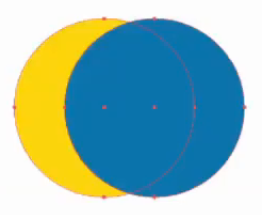
- The paths do not have a fill attribute.
- Only one of the paths is selected, but both need to be selected.
- One of the paths is selected but the Join tool works only with unselected paths.
- Endpoints need to be selected in both paths before they can be trimmed and joined.
Q24. Which colorization method should you choose when using an art, scatter, or pattern brush to apply a spot color?
- None
- Tints
- Tints and Shades
- Hue Shift
Q25. You have drawn a five-pointed star in a design and want to change the inner radius. How would you achieve this?
- An Inner Radius of a Star cannot be modified and would have to be redrawn.
- Use the Scale tool while holding down Option+Shift (Mac) or Alt+Shift (Windows).
- Select the inner points, then use the Scale tool to uniformly change the radius.
- Double-click the Star tool and change the Inner Radius option.
Q26. What is the meaning of the three dots on the cloud icon in the image below?
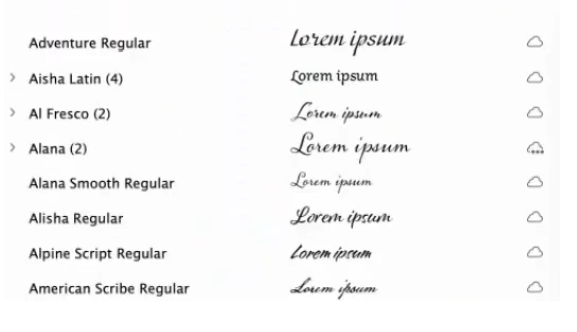
- The Alana fonts are deactivated.
- The Alana fonts are for web-only use.
- The Alana fonts are currently being activated.
- Not all the fonts in the Alana family are activated.
Q27. What command would you apply to make objects beneath the selected artwork visible inside the circle?
A yellow rectangle has a circular selection in the center.
- Make Pattern
- Make Live Paint Group
- Make Compound Path
- Make Clipping Mask
Q28. The Symbol Sprayer tool has been used to apply several symbol instances to an illustration. You would like to modify the appearance of some instances using graphic styles. How would this be achieved?
- Select instances with the Group Selection tool and then choose the desired graphic style.
- Symbol instances in a symbol set cannot be overridden.
- Select instances with the Direct Selection tool and then choose the desired graphic style.
- With the Symbol Styler tool, select a graphic style and paint the style onto symbol instances.
Q29. What happens when you click an existing anchor point with the Pen tool?
- Any control handles are removed, converting the point into a corner point.
- The path is split at that point.
- The point is deleted.
- The point is selected.
Q30. When creating a mesh object, when should you use the Mesh tool instead of the Create Gradient Mesh command in the Object menu?
- when you want to create simpler meshes so the performance of Illustrator is not negatively affected
- when you want to place a highlight at the edge of the object
- when you want to create mesh lines at equally spaced intervals within the object
- when you want to create mesh lines at one or more specific locations within the object
Q31. When viewing the artwork shown below in Outline mode, what can you tell about the word “backpack”?
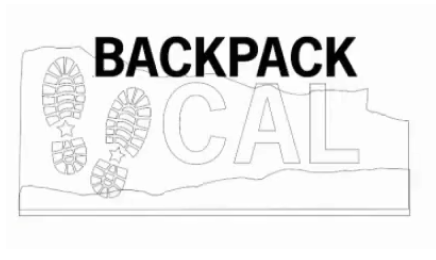
- It has been converted to outlines.
- It is live text.
- It is a compound path.
- It has a fill color of black.
Q32. You would like the columns in a chart to cover the whole length of the category axis. What option would you choose?
- In the Graph Type dialog, choose Category Axis and set the Tick Marks option to Full Width.
- In the Graph Type dialog, under Graph Options, set the cluster width to 100 in the Options section.
- In the first row of data, type 100% in each cell corresponding to the category columns.
- Select the columns with the Direct Selection tool and use the Scale tool to modify the width.
Q33. If you are looking for a tool in the toolbar and it is not visible, what should you do?
- With nothing selected, click the More Tools button in the Properties panel.
- Click the ellipsis at the bottom of the toolbar.
- Turn on the tool in the preferences.
- In the Window menu, click Window > Tools.
Q34. The four flowers shown in the image below were created by applying an art brush to paths of different lengths. How can you prevent the distortion seen in flowers 2, 3, and 4 while keeping the size of the leaves and the width of the stem the same in all the flowers?
- Open the Art Brush Options dialog box and select Scale Proportionally.
- Expand the appearance of the distorted flowers and drag the flowers with the Selection tool.
- Use the Pen tool to add points at the top and bottom of the stem, and then drag the points with the Direct Selection tool to remove the distortion.
- Open the Art Brush Options dialog box, select Stretch Between Guides, and then place the guides so only the stem is between them.
Q35. When printing an image with many out-of-gamut colors, which rendering intent would you choose to best preserve the visual relationship between colors—not the specific color values?
- Absolute Colorimetric
- Perceptual
- Saturation
- Relative Colorimetric
Q36. Why would you use change the Expand Mesh value when using the Puppet Warp tool?
- It allows you to work faster because modifying a larger mesh requires fewer calculations.
- It allows you to modify disjointed objects together
- It allows you to make greater modifications to an object.
- It allows you to see the mesh more clearly.
Q37. When using the Image Trace feature, which option has the most impact on the number of paths that are created in the tracing result?
- Corners
- Noise
- Paths
- Colors
Q38. If you want to create an image map, which panel would you use to make an object into a clickable region?
- CSS Properties
- Attributes
- Links
- SVG Interactivity
Q39. Why use the Simplify command before exporting a web graphic to SVG format?
- to reduce the number of points that must be represented in the code
- to remove invisible points and lines
- to reduce the output resolution so it’s appropriate for web graphics
- to combine redundant objects
Q40. You have designed the product label shown below. Your client wants the black circle to print as dark as possible and requires that none of the colorful logo elements show through the circle when the label is printed. What should you do?
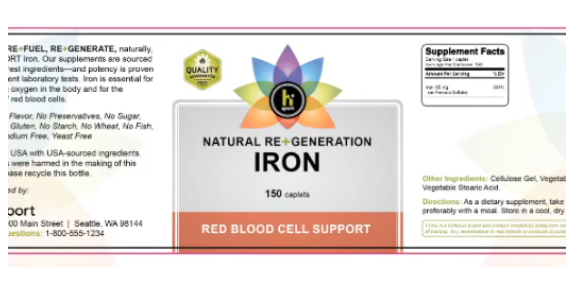
- Select the circle and turn on Overprint Fill in the Attributes panel.
- Select the circle and apply the Multiply blending mode.
- Fill the circle with a rich black color made up of all four process inks.
- Use the Appearance panel to add a second black fill.
Q41. You are working with an Illustrator file that includes a linked Photoshop file. Your client sends a new Photoshop file with a different name and asks you to replace the old one in the Illustrator file. Which command in the Links panel would you use to accomplish this?
- Placement Options
- Edit Original
- Update Link
- Relink
Q42. The fill colors of several instances of a dynamic symbol have been modified. What is the fastest way to return the fill color in every instance to its original appearance?
- set the Export Type to Movie Clip
- delete the symbol and expand all instances
- convert the symbol to a static symbol
- Break the link to the symbol
Q43. In the gift card shown below, the magenta flower petals need to be printed with a varnish. How would you set up the file so the varnish is applied over the magenta color of the petals?

- Use File Info to leave instructions for your print service provider.
- Duplicate the petals to a new layer called “Varnish.”
- Make sure that the magenta color is from a spot color swatch.
- Create copies of the petals on top of the original artwork and fill the petals with a new spot color swatch set to overprint.
Q44. Your client likes the pattern fill in the text below but wants the flowers to overlap more so there are smaller gaps. How could you accomplish that?
- Select Size Tile to Art in the Pattern Options dialog box.
- Increase the number of copies of the flower used to make the pattern.
- Reduce the width and height in the Pattern Options dialog box.
- Use the Overlap buttons in the Pattern Options dialog box.
Q45. Why would you turn on the Ignore Artboards option in the Print dialog box?
- to prevent Illustrator from printing marks showing the borders of the artboards
- to print all artboards on one piece of paper
- to prevent Illustrator from printing the names of artboards
- to scale each artboard to the media size
Q46. You need to process a large batch of Illustrator files, applying the same sequence of transformations to each one. What is the most efficient way to do this?
- Use the Global Edit command.
- Use the Transform Again command.
- Use the Transform Each command.
- Use the Actions panel to record and play back the sequence of steps.
Q47. Why would you choose Enable Guides for 9-slice scaling when creating a symbol?
- to allow portions of the symbol to be exported as separate graphics
- to ensure that each instance of the symbol always maintains its original proportions when scaled
- to include custom guides with the symbol so each instance is placed in the same position relative to the artboard
- to allow instances of the symbol to be scaled without distorting the corners
Q48. What can you do to edit text in just one placed instance of a symbol?
- Click the Edit Symbol button in the Control panel or Properties panel.
- Edit the symbol instance name.
- Double-click the instance with the Type tool.
- Click the Break Link button in the Control panel or Properties panel.
Q49. Your colleague has asked you to provide the CSS code for an object in your document. What must you do to make Illustrator auto-generate the code for that particular object?
- Drag the object into the Asset Export panel.
- Select the object and choose Generate CSS from the CSS Properties panel.
- Select the object and choose Copy Selected Style from the CSS Properties panel.
- Give the object a name in the Layers panel.
Q50. You have drawn objects on planes using the perspective grid, but now want to change the angles of the grid to new vanishing points and have the artwork update automatically. What option should be enabled to achieve this result?
- Enable Perspective Warp.
- Enable Viewing Angle in the Define Grid dialog box.
- Choose View > Perspective Grid > Lock Station Point
- Enable 3D Transform.