linkedin-skill-assessments-quizzes
Bash
Q1. 以下三种方法中,哪一种可以递归地将用户主目录中的名为”photo dir”的目录复制到 /backups?
cp -R "~/photo dir" /backups #method1
cp -R ~"/photo dir" /backups #method2
cp -R ~/"photo dir" /backups #method3
- 只有method 1会将
"~/"展开为用户的主目录,然后附加包含空格的目录名称。 - 只有method 2会将
"~/"展开为用户的主目录,然后附加包含空格的目录名称。 - 只有method 3会将
"~/"展开为用户的主目录,然后附加包含空格的目录名称。 - 三种方法都不会展开为用户的主目录。只有使用
"$HOME/photo dir"才会成功。
Q2. 如果在当前目录中运行 script.sh,它会失败。为什么?
$ ls -1
Beach photo1.jpg
Photo1.jpg
Photo2.jpg
Script.sh

$ cat script.sh
for i in $(ls *.jpg); do
	mv $i ${i}.bak
done
- ls: cannot access nonexistentfile: No such file or directory
- for循环会在单词边界处拆分,而Beach photo1.jpg中有一个空格。
- mv命令会失败,因为大括号是Bash中的特殊字符,不能用于文件名。
- 运行script.sh会成功,因为ls命令会构建当前目录中的文件列表,并通过for循环重命名文件,添加.bak扩展名。
Q3. 要在subshell中运行复制命令,应该使用哪种语法?
( command )sh command{ command; }(( command ))
reference。Subshell是程序员捕获(通常是为了处理)程序或脚本输出的一种方式。要在subshell中运行的命令需要用单括号括起来,并在前面加上美元符号:DIRCONTENTS=$(ls -l) echo ${DIRCONTENTS}
Q4. 使用”awk”,以下命令字符串的输出是什么?
echo "1 2 3" | awk '{for (i=1; i<=NF; i++) s=s+$i};END {print s}'
- 6
- 123
- 3
- 600
reference。AWK是一种编程语言,专为处理基于文本的数据而设计,无论是文件中的数据还是数据流,或者通过shell pipes。换句话说,你可以将awk与shell scripts结合使用,或者直接在shell prompt下使用。
Q5. 以下命令将在根文件系统中搜索名为”finance.db”的文件。在此上下文中,哪些信息被发送到/dev/null?
find / -name "finance.db" 1>results.txt 2>/dev/null
- 不匹配finance.db的文件名
- 发送到standard error的信息,例如find命令运行时显示的错误
- 匹配finance.db的文件名
- 发送到standard output的信息,即find命令找到的文件路径
reference。将stderr(standard error)重定向到文件的语法:command 2> errors.txt。
Q6. 要永久删除名为textfile的文件中的空行,可以使用哪个命令?
sed -i '/^$/d' textfilesed '/^$/d' textfilecat textfile | sed '/^$/dsed -i 's/^$//' textfile
reference
sed:sed是一种stream editor,用于对input stream执行基本的文本转换。
-i[SUFFIX]:此选项指定文件将在原地编辑。
‘/^$/d’:正则表达式位于//之间。^表示行的开头,$表示行的结尾。^$表示开头和结尾之间没有任何内容。
d:删除pattern space;立即开始下一循环。
Warning,上述示例在Mac terminal上由于不同的UNIX flavours可能无法工作。可以通过添加额外的flag -e或--来使其在Mac上工作(参考StackOverflow):sed -i -e '/^$/d' textfile.txt
Q7. 假设user1存在,以下命令字符串的结果是什么?
awk -F: '/user1/{print $1 "-" $3 "-" $6}' /etc/passwd
- 它会显示user1的username、UID和home directory,用冒号分隔。
- 它会打印user1的UID、GID和home directory,用连字符分隔。
- 它会打印user1的UID、comment和home directory,用连字符分隔。
- 它会显示user1的username、UID和home directory,用连字符分隔。
reference。传统上,/etc/passwd文件用于记录每个注册用户的信息,这些用户可以访问系统。/etc/passwd文件是一个colon-separated文件,包含以下信息:1-Username,2-Password,3-User ID (UID),4-Group ID (GID),5-User ID Info (GECOS),6-Home directory,7-Command/shell
Q8. 如果在Bash脚本中使用"set -e"会发生什么?
- 如果函数或subshell返回非零status code,Bash将退出。
- 如果条件返回非零status code,Bash将退出。
- 如果local、declare或typeset赋值返回非零status code,Bash将退出。
- 如果command、list of commands、compound command或可能的pipeline返回非零status code,Bash将退出。
reference。set -e选项指示bash如果任何command [1]返回非零exit status,则立即退出。你可能不希望在command-line shell中设置此选项,但在script中它非常有用。在所有广泛使用的general-purpose programming languages中,未处理的runtime error——无论是Java中抛出的exception,还是C中的segmentation fault,或者Python中的syntax error——都会立即停止程序的执行;后续行不会被执行。
Q9. _ 关键字会暂停脚本以从standard input获取输入。
- get
- argument
- read
- input
Q10. 如果file.sql包含要执行的SQL语句,那么file.txt中会有什么内容?
mysql < file.sql > file.txt
- file.sql的内容副本
- 表示这是无效语法的错误
- MySQL命令的error output
- MySQL命令的non-error output
Note:查看下面的问题以了解变体。
Q11. 屏幕上的输出和out.txt的内容有什么区别?
mysql < file.sql > out.txt
- 屏幕上的输出与out.txt完全相同
- 屏幕上没有输出,因为它被重定向到out.txt。
- 屏幕上的输出与out.txt完全相同,但带有行号。
- out.txt文件将保存STDERR,而STDOUT将显示在屏幕上。
Note:查看上面的问题以了解变体。
Q12. SUID或setuid如何影响可执行命令?
- 当命令创建文件时,这些文件将归命令的group owner所有。
- SUID bit允许任何人执行命令,无论设置了什么其他permissions。
- 当命令被执行时,其running privileges会提升到命令的user owner。
- 当命令被执行时,其running privileges会提升到命令的group owner。
reference。Linux和Unix的access rights flags setuid和setgid(分别是set user identity和set group identity的缩写)[1]允许用户以可执行文件owner或group的file system permissions运行可执行文件,并在directories中更改behavior。
Q13. 要从名为textfile的文件中提取第一列的文本,可以使用哪个命令?
cat {$1,textfile}cat textfile | awk [print $1]cat textfile | awk '{print $1}'awk textfile {print $1}
Q14. 调出Bash history search的键盘快捷键是什么?
(reverse-i-search)`':
- Esc + R
- Ctrl + H
- Ctrl + R
- Alt + R
Note:在Mac上,它会显示bck-i-search:而不是(reverse-i-search)。
Q15. 哪个算术表达式会给出最精确的答案?
var=$( expr 10 / 8 )(( var= 10 /8 ))var=$(( 10 / 8 ))var=$(echo 'scale=2; 10 / 8' | bc)
reference。bc命令用于command line calculator。它类似于basic calculator,可以用来进行基本的数学计算。带有两位precision的division将传递给bc,进行计算,并分配给变量。
Q16. 此脚本的结果是什么?
txt=Penguins
[[ $txt =~ [a-z]{8} ]]; echo $?
- 0,表示’true’,因为变量”txt”包含八个字母
- 0,表示’true’,因为每个人都喜欢penguins!
- 1,表示’false’,因为变量”txt”长度超过八个字符
- 1,表示’false’,因为变量”txt”不包含八个介于a和z之间的小写字母
Q17. 如何将Bash shell prompt更改为以下内容?
HAL>
SHELL="HAL\>"SHELL="HAL>"export PS1="HAL>"PS1="HAL\>"
Q18. 以下代码的输出是什么?
VAR="/var/www/html/website.com/html/"
echo "${VAR#*/html}"
/website.com/html//html/website.com/html//var/www/html/website.com/- 屏幕上不会有任何输出。
reference
根据POSIX shell specification:${parameter#[word]}。Remove Smallest Prefix Pattern。word将被expanded以生成一个pattern。parameter expansion将导致parameter,删除与pattern匹配的最小prefix部分。
例如,${VAR#?}扩展为$VAR的值,删除第一个字符。而${VAR#\*/html}扩展为包含所有字符直到并包括/html的文本,这些内容将从变量中删除,生成输出/website.com/html/。
Q19. 如果在standard input中提示输入文本,可以通过什么键组合告诉命令输入完成?
- Ctrl + A (Windows)或Command + A (Mac)
- Ctrl + E (Windows)或Command + E (Mac)
- Ctrl + D (Windows)或Command + D (Mac)
- Ctrl + Z (Windows)或Command + Z (Mac)
Q20. 为了使Bash脚本像操作系统命令一样执行,它应该以shebang line开头。这是什么样子?
#!/usr/bin/env bash~/usr/bin/env bash'$!/usr/bin/env bash#/usr/bin/env bash
Q21. 以下Bash脚本行可能会生成如下所示的输出:
The date is: Sun Mar 24 12:30:06 CST 2019!
echo "The date is: !"echo "The date is: date!"echo "The date is: (date)!"echo "The date is: $(date)!"
Q22. 假设当前工作目录是您的主目录。如何运行位于主目录中的脚本demo.sh?找出三个正确答案。
A. /home/demo.sh
B. ./demo.sh
C. ~/demo.sh
D. bash /home/demo.sh
E. bash demo.sh
- B, C, E
- A, B, C
- C, D, E
- B, D, E
Q23. 如何获取树状结构中所有.html文件的列表?
find . -type htmlfind . -name *.htmlfind *.htmlfind . -name \*.html -print
第二个选项看起来不错,但如果当前工作目录中有任何.html文件,\*会被扩展。
Q24. out.txt中会有什么内容?
cat < in.txt > out.txt
- 命令行的输出。默认情况下,STDIN来自键盘。
- 什么都没有,因为无法从文件(in.txt)重定向到另一个文件(out.txt)。只能从命令重定向到文件。
- 它会是in.txt的内容。
- 什么都没有。重定向会创建一个新的空文件,但cat命令不会有任何输出进行重定向。
Q25. 这个bash语句的作用是什么?
(( $a == $b ))
echo $?
- 它在
$a和$b的值之间循环。 - 它测试变量
$a和$b的值是否相等。 - 如果
$b的值大于$a,它会返回$b。 - 如果
$a的值大于$b,它会返回$a。
Q26. 在case语句中,您使用什么来告诉Bash完成特定测试?
; ;: :done$$
Q27. 在这个语句中,星号代表什么?
#!/usr/bin/env bash
case $num in
	1)
	echo "one"
	;;
	2)
	echo "two"
	;;
	*)
	echo "a mystery"
	;;
esac
- 一个匹配任何值的case,提供default option,如果没有其他case捕获该值
- 一个仅在星号字符传递到脚本时发生的case
- 所有其他case合并在一起的操作
- 针对任何输入采取的操作,即使它符合指定条件
Q28. 哪个Bash脚本可以正确创建这些文件?
touch file{1+10}.txttouch file{1-10}.txttouch file{1..10}.txttouch file(1..10).txt
Q29. 您会检查哪个变量以验证最后执行的命令是否成功?
$$$?$!$@
Q30. 这个脚本的输出是什么?
#!/bin/bash
fname=john
john=thomas
echo ${!fname}
- john
- thomas
- 语法错误
- 空白
Q31. 这个脚本的输出是什么?

A
B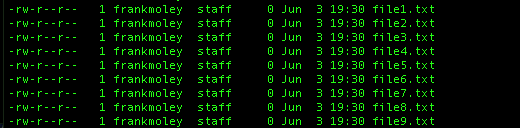
C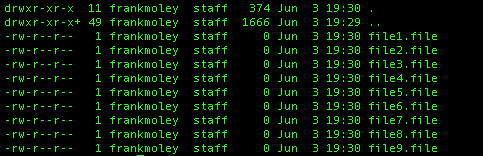
D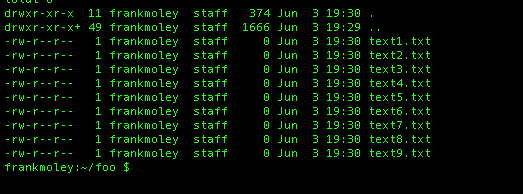
以下是Q.30的文本版本:
ll
-rw-r--r-- 1 frankmolev staff 374   Jun 3 19:30 .
-rw-r--r-- 1 frankmolev staff 1666  Jun 3 19:30 ..
-rw-r--r-- 1 frankmolev staff 0     Jun 3 19:30 file1.txt
-rw-r--r-- 1 frankmolev staff 0     Jun 3 19:30 file2.txt
..

ll | sed -e 's,file,text,g'
- A
  -rw-r--r-- 1 frankmolev staff 374   Jun 3 19:30 .
  -rw-r--r-- 1 frankmolev staff 1666  Jun 3 19:30 ..
  -rw-r--r-- 1 frankmolev staff 0     Jun 3 19:30 file1.file
  -rw-r--r-- 1 frankmolev staff 0     Jun 3 19:30 file2.file
  ..
- B
  -rw-r--r-- 1 frankmolev staff 374   Jun 3 19:30 .
  -rw-r--r-- 1 frankmolev staff 1666  Jun 3 19:30 ..
  -rw-r--r-- 1 frankmolev staff 0     Jun 3 19:30 file1.txt
  -rw-r--r-- 1 frankmolev staff 0     Jun 3 19:30 file2.txt
  ..
- C
  -rw-r--r-- 1 frankmolev staff 374   Jun 3 19:30 .
  -rw-r--r-- 1 frankmolev staff 1666  Jun 3 19:30 ..
  -rw-r--r-- 1 frankmolev staff 0     Jun 3 19:30 text1.file
  -rw-r--r-- 1 frankmolev staff 0     Jun 3 19:30 text2.file
  ..
- D
  -rw-r--r-- 1 frankmolev staff 374   Jun 3 19:30 .
  -rw-r--r-- 1 frankmolev staff 1666  Jun 3 19:30 ..
  -rw-r--r-- 1 frankmolev staff 0     Jun 3 19:30 text1.txt
  -rw-r--r-- 1 frankmolev staff 0     Jun 3 19:30 text2.txt
  ..
Q32. 在目录中搜索文件,这两个find命令有什么不同?
A. find . -name '%text%'
B. find . -name '*text*'
- A会搜索名称与
'%text%'完全匹配的所有文件,而B会搜索名称包含substring “text”的所有文件。 - A会搜索名称包含substring “%text%”的所有文件,而B会搜索名称包含substring “text”的所有文件。
- A会搜索名称包含substring “text”的所有文件,而B会搜索名称与
"*text*"完全匹配的所有文件。 - A和B都会产生相同的结果。
Q33. 什么是STDOUT?
- standard output的首字母缩写
- 用于接收input的Linux系统
- standard output的首字母缩写
- 用于接收output的Linux系统
Q34. /etc/shadow中的密码存储位置是什么?
- hashed
- encrypted
- hashed and salted
- plain text
Q35. 哪个statement描述了此代码?
#!/bin/bash
echo "1=$1"
echo "2=$2"
- 变量是环境变量,通过export传递给script。
- $1和$2是positional parameters传递给script。
- $1是script的第一行,$2是第二行。
- $1是第一个进程的process ID,$2是第二个进程的process ID。
Q36. 脚本可以从user接收input的方式包括_____.
- 使用arguments传递给script
- prompting user以interactively输入data
- 从files读取
- 以上所有方式
Q37. 这个expression的输出是什么?
echo "$(( 4 * 5 + 3 / 2 ))"
- 11.5
- 21
- 21.5
- 11
Q38. 哪个statement用于告诉Bash测试参数的值并运行不同的statement块取决于parameter的值?
forwhilecaseuntil
Q39. stdout和stderr是以下哪个的例子?
- text files
- email files
- output streams
- configuration files
Q40. 哪个command搜索current directory和所有subdirectories中所有名为sales.db的files?
find . -name sales.dbfind . -name sales.dbfind . -db sales.dbfind . -file sales.db
注意:两个正确答案的选项看起来相同,这可能是原始问题的打字错误。
Q41. 当将output redirected到files时,存在这些操作符 > 和 »。它们有什么不同?
- > 将output写入file; » 将output发送到STDOUT。
- > 将output发送到STDOUT; » 将output写入file。
- > 覆盖现有file; » 追加到现有file。
- > 创建新file; » 覆盖现有file。
Q42. 此statement的输出是什么?
VAR="This old man came rolling"
echo "${VAR//man/rolling}"
- This old rolling came rolling
- This old man came man
- This old man came rolling
- This old came
Q43. statement if [ -x "$file" ] 测试什么?
- file是否可编辑
- file是否可执行
- file是否symbolic link
- file是否由root拥有
Q44. 哪个option适用于函数和shell execution environment?
exportsudomodulesecure
Q45. 哪个character允许您在bash中连接命令,以便即使一个命令失败也会运行所有命令?
|\;&
Q46. 哪个选项用于排序和unique?
sort | uniq -usort -usort --uniquesort -uniq
Q47. 假设存在文件file.txt,下列statement的输出是什么?
cat file.txt | while IFS= read -r line; do
  echo $line
done
- file.txt的内容,每行前面有行号
- file.txt的内容
- file.txt的内容,每行后面有行号
- file.txt的内容,所有内容在一行
Q48. 使用command expansion,哪个statement将current shell替换为new shell?
exec bashsource bashnew bashopen bash
Q49. 给定此snippet,哪个statement正确描述了$1?
#!/usr/bin/env bash
echo $1
- 它是表示script name的argument。
- 它是表示传递给script的第一个argument的argument。
- 它是表示process number(PID)的argument。
- 它是表示脚本首次执行的epoch time(以毫秒为单位)的argument。
Q50. 假设文件test.txt包含以下content,这个expression的结果是什么?
cat < test.txt > test.txt
- .txt的内容被显示。
- 出现一个错误,因为无法同时打开相同的file进行reading和writing。
- test.txt被覆盖并变空。
- test.txt的内容不会改变。
Q51. 什么是正确测试变量存在的方法?
if [ -a "$myvar" ]; then echo "Test was true"; fiif [ -n "$myvar" ]; then echo "Test was true"; fiif [ "$myvar" ]; then echo "Test was true"; fi- 以上都不是
注意:一些来源说B是正确的,因为它测试变量是否有值。但是题目问的是”测试变量存在”,所以C可能更准确。
Q52. 除了while和until之外,Bash支持的另一个loop construct是什么?
fordo-whilerepeatloop
Q53. 内部shell变量包含_____。
- currently logged-in user
- currently running process
- system’s hostname
- 以上所有
Q54. 下列哪个不是有效的bash shebang line?
#!/bin/bash#!/bin/sh#!/bin/basher#!/usr/bin/env bash
Q55. 这个command sequence的输出是什么?
cat <<EOF
-------------------------
   This is line 1.
   This is line 2.
   This is line 3.
-------------------------
EOF
- A
This is line 1.
This is line 2.
This is line 3.
- B
-------------------------This is line 1.This is line 2.This is line 3.-------------------------
- C
-------------------------
   This is line 1.
   This is line 2.
   This is line 3.
-------------------------
- D
-------------------------
This is line 1.
This is line 2.
This is line 3.
-------------------------
Q56. 下列哪个不是有效的bash loop?
untildo-untilforwhile
Q57. 哪个特殊variable保存script PID?
$$$!$?$@
Q58. 下列哪个不是test condition常用的特殊parameter?
$?$-$@$0
Q59. 当文件使用tab-delimited fields时,您可能想要设置internal field separator为哪个character?
\t\s\n\d
Q60. 哪个script statement将创建一个可由script写入的file descriptor?
exec 3>word.txtexec 4<word.txtexec 3>word.txtexec 3>&1
Q61. 您可以检查哪个special variable以验证script中最后执行的command成功?
$$$?$!$@
Q62. 此statement的功能是什么?
for i in $(ls); do
  echo $i
done
- 它遍历当前directory中的每个file并echo filename。
- 它遍历当前directory中的每个directory并echo directory name。
- 它遍历当前directory中的每个file并echo file permissions。
- 它遍历当前directory中的每个directory并echo directory permissions。
Q63. 以下哪个characters可以重定向standard error stream?
2>3>1>&>
Q64. 以下哪个statement正确描述了此脚本?
#!/bin/bash
echo $1
- 它输出script的第一行。
- 它输出传递给script的第一个argument。
- 它输出script的process ID(PID)。
- 它输出script的首次执行time(以毫秒为单位)。
Q65. 假设您有一个包含多个.csv files的directory。您想打印出包含字符串”profit”的所有文件的第三列。以下哪个statement可以实现此目的?
for file in *.csv; do awk -F',' '{print $3}' $file | grep profit; donefor file in *.csv; do grep profit $file | awk -F',' '{print $3}'; donefor file in *.csv; do grep -F',' profit $file | awk '{print $3}'; donefor file in *.csv; do awk '{print $3}' $file | grep -F',' profit; done
Q66. 以下命令的输出会是什么?
VAR='Hello World!'
echo ${VAR:6:5}
- World
- Hello
- World!
- Hello World!
Q67. 对于名为jon的user,以下命令的结果是什么?
echo 'Hello, $(whoami)!'
- Hello, $(jon)!
- Hello, jon!
- Hello, $(whoami)!
- Hello, whoami!
Q68. 如何通过压缩将directory复制到另一系统?
tar -ssh user@192.158.1.1 /bin/newfiletar cvzf - /wwwdata | ssh root@192.168.1.201 "dd of=/backup/wwwdata.tar.gz"- 无法压缩stream
scp -r directory user@192.168.1.1:/tmp
Q69. 要将command ls -lah 分配给shortcut command lh,应该使用什么命令?
alias lh='ls -lah'link lh='ls -lah'alias 'ls -lah'=lhlh | ls -lah
Q70. 哪个statement会打印home directory或subdirectories中所有完整路径的.csv files,同时不显示任何errors?
- find $USER_DIR -name “*.csv” 2>/dev/null
- find $HOME -name “*.csv” 1>/dev/null
- find $HOME -name “*.csv” 2>/dev/null
- find HOME -name “*.csv” 1>/dev/null
Q71. 在Bash中,默认prompt string末尾的#表示什么?
- 用户以root身份操作
- 当前working directory是filesystem的root
- 系统有updates可用
- 用户是non-privileged user
Q72. 以下命令的输出是什么?
$ ls -l
file10.txt
file1.txt
fileabc.txt
filea.txt
fileb.txt
filec.txt
$ ls -l file[^abc]*.txt
- A
file1.txt
file10.txt
- B
file10.txt
file1.txt
fileabc.txt
filea.txt
fileb.txt
filec.txt
- C
fileabc.txt filea.txt fileb.txt filec.txt
- D
filea.txt
fileb.txt
filec.txt
reference
此处的caret(^)表示否定brackets内的匹配项。
Q73. 以下command sequence的输出是什么?
cat <<EOF
------------------------
   This is line 1.
   This is line 2.
   This is line 3.
------------------------
EOF
- A
This is line 1.
This is line 2.
This is line 3.
- B
------------------------This is line 1.This is line 2.This is line 3.------------------------
- C
------------------------
   This is line 1.
   This is line 2.
   This is line 3.
------------------------
- D
------------------------
This is line 1.
This is line 2.
This is line 3.
------------------------
Q74. out.txt中会是什么内容?
#!/bin/bash

echo 123446789 > out.txt
exec 3<> out.txt
read -n 4 <&3
echo -n 5 >&3
exec 3>&-
- 123446789
- hyphen character(-)
- 123456789
- 数字5,它通过echo写入文件
Q75. 哪个变量包含script运行时的process ID(PID)?
- $ID
- $#
- $@
- $$
Q76. 通过结合extended globbing和parameter expansion,VAR的值会是什么?
#!/bin/bash
shopt -s extglob
VAR='     This is...     a string of characters     '
VAR=${VAR##+([[:space:]])}; VAR=${VAR%%+([[:space:]])};
echo "$VAR"
<pre> This is... a string of characters</pre><pre> This is...a string of characters</pre><pre>This is... a string of characters</pre><pre>This is...a string of characters</pre>
Reference:
- What is the meaning of the ${0##…} syntax with variable, braces and hash character in bash?
- What does expanding a variable as “${var%%r*}” mean in bash?
Q77. 哪个operator告诉shell在background运行给定command?
- !
- &&
- &
- $
Q78. LINUX系统中的nice number范围是?
- -20到0
- -20到19
- 0到19
- 10到10
Q79. 在Bash中,以下expression的结果是什么?
echo $((4/3))
- 1.3
- 1.3333333333
- 1
- 2
Q80. 要让loop持续运行直到某个condition变为true,你可能会使用什么?
- if
- case
- while
- for
Q81. 以下command sequence的作用是什么?
cat > notes -
- 它创建一个名为”notes”的空file,然后退出。
- 它将”notes” file的内容输出到屏幕,然后删除它。
- 它从standard input接受text并将其放入”notes” file中。
- 它将text追加到一个名为”notes”的现有file中。
Q82. 你想匹配五个字母的palindromes,例如radar、rotor和tenet。应该使用哪个sed option?
sed -E -n '/^(.)(.)\3\2\1$/p'sed -E -n '/^(.)(.)(.).\2\1$/p'sed -E -n '/^(.)(.)(.)\2\1$/p'sed -E -n '/^(.)(.)(.)(.)\3\2\1$/p'
Q83. 要向当前environment添加一个value,应该使用什么command?
- shell_add
- save
- echo
- export
Q84. 以下两个conditional expressions有什么区别?
[[$A==$B]]
[[$A -eq $B]]
- [[$A == $B]]用于numeric comparisons,而[[$a-eq $B]]用于text comparisons。
- [[$A==$B]]是进行comparison的新方法,而[[$a-eq $B]]是legacy syntax。
- 它们是一样的。
- [[$A==$B]]用于text comparisons,而[[$a-eq $B]]用于numeric comparisons。
Q85. 以下代码的输出是什么?
VAR="united states"
echo "${VAR^}"
- unitedstates
- United States
- United states
- UNITED STATES
Q86. 如果按原样运行以下script,会发生什么?
#!/bin/bash
#condition 1
if [ $foo = "bar" ]; then echo "foo is bar"
fi
#condition 2
if [[ $foo = "bar" ]]; then echo "foo is bar"
fi
- 两个conditions都会失败。
- 两个conditions都会成功。
- Condition 1会成功,Condition 2会失败。
- Condition 1会失败,Condition 2会成功。
Explanation:脚本如写的那样会输出line 3: [: =: unary operator expected。定义variable并assign value foo="bar",两个conditions都会成功。
Q87. 哪个variable包含从command line传递给script的arguments数量?
$#$@0$!
Q88. 在Bash scripting中,script开头的”shebang”(#!)表示什么?为什么重要?
- 它指示应使用哪个Bash interpreter来执行script。
- 它指定运行script所需的Bash version。
- 它将script标记为executable。
- 它帮助system识别script的interpreter,确保使用正确的interpreter。
Q89. 哪个variable包含script运行时的process ID(PID)?
$ID$@$#$$
Q90. 如果user想在没有shebang line或execute permissions的情况下执行script sh,user应该输入什么?
- 执行shell script需要shebang line。
- ‘bash script.sh’。
- ‘exec script.sh’。
- 执行shell script需要execute permissions。
Q91. 以下compound command的最可能输出是什么?
cat -n animals | sort -r | head -n 5
- a.
	1	Ant
	2	Bear
	3	Cat
	4	Dog
	5	Elephant
- b.
	9	Ibex
	B	Hippo
	7	Giraffe
	6	Fox
	5	Elephant
	4	Dog
	3	Cat
	2	Bear
	1	Ant10	Jaguar
- c.
	Jaguar
	Ibex
	Hippo
	Giraffe
	Fox
- d.
	9	Ibex
	8	Hippo
	7	Giraffe
	6	Fox
	5	Elephant
Q92. 以下哪个不是有效的Bash variable name?
$HOMEmy_var1var!
Q93. 在Bash中,创建一个one-liner command,递归查找directory及其subdirectories中所有extension为”.txt”的files,并统计这些files的总line数。输出应仅显示总line count。
以下哪个one-liner Bash command可以完成此task?
find . -name "*.txt" -exec wc -l {} \; | awk '{total += $1} END {print total}'grep -r ".*\.txt$" | wc -lfind . -type f -name "*.txt" | xargs wc -l | tail -n 1find . -name "*.txt" -exec cat {} \; | wc -l
Q94. > 和 » redirection operators之间有什么区别?
> 会覆盖target file的内容,而 >> 会将内容追加到target file的末尾。> 用于重定向input,而 >> 用于重定向output。> 用于standard output,而 >> 用于standard error。> 是unary operator,而 >> 是binary operator。