linkedin-skill-assessments-quizzes
CSS
Q1. 以下选择器中,哪个选择器在选择锚链接元素时具有最高的特异性排名?
ul li a
a
.example a
div a
.example adiv aaul li a
Q2. 使用属性选择器,如何选择带有 “title” 属性的 <a> 元素?
a[title]{...}a > title {...}a.title {...}a=title {...}
注意:以下问题的替代问题。
Q3. <a> 标签中包含 title 属性的 CSS 选择器是什么?
a[title]a > titlea=titlea.title
注意:上述问题的替代问题。
Q4. CSS 网格和弹性盒现在越来越流行用于创建页面布局。然而,浮动仍被广泛使用,特别是在处理旧代码库或需要支持旧版浏览器时。清除浮动的两种有效技术是什么?
- 在浮动元素上使用 “clearfix hack”,并在父元素上添加浮动。
- 在浮动元素上使用 overflow 属性,或者在浮动元素或父元素上使用 “clearfix hack”。
- 在浮动元素上使用 “clearfix hack”,或者在父元素上使用 overflow 属性。
- 在父元素上使用 “clearfix hack”,或者使用值不是 “visible” 的 overflow 属性。
Q5. 以下选择器匹配哪些元素?
1) .nav {
  ...;
}
2) nav {
  ...;
}
3) #nav {
  ...;
}
- A
- An element with an ID of “nav”
- A nav element
- An element with a class of “nav”
- B
它们都针对相同的 nav 元素。 - C
- An element with a class of “nav”
- A nav element
- An element with an id of “nav”
- D
- An element with a class of “nav”
- A nav element
- A div with an id of “nav”
Q6. 在添加透明样式时,使用 opacity 属性与使用带有 rgba() 值的 background 属性有什么区别?
- opacity 指定子元素的透明度级别。带有
rgba()值的 background 仅对背景颜色应用透明度。 - opacity 仅对背景颜色应用透明度。带有
rgba()值的 background 指定整个元素的透明度,包括其内容。 - opacity 指定整个元素的透明度级别,包括其内容。带有
rgba()值的 background 仅对背景颜色应用透明度。 - opacity 对父元素和子元素应用透明度。带有
rgba()值的 background 仅指定父元素的透明度。
Q7. 关于块级元素和内联元素,哪种说法是正确的?(替代问题:关于块级元素和内联元素的说法哪一个是正确的?)
- 默认情况下,块级元素的高度和宽度与其标签之间的内容容器相同;内联元素跨越其容器的整个宽度。
- 默认情况下,块级元素跨越其容器的整个宽度;内联元素的高度和宽度与其标签之间的内容相同。
<nav>元素是内联元素的一个例子。<header>是块级元素的一个例子。<span>是块级元素的一个例子。<div>是内联元素的一个例子。
Q8. CSS 网格引入了一种新的长度单位 fr,用于创建灵活的网格轨道。参考以下代码示例,三个列的宽度将是多少?
.grid {
  display: grid;
  width: 500px;
  grid-template-columns: 50px 1fr 2fr;
}
- 第一列的宽度为 50px。第二列的宽度为 50px,第三列的宽度为 100px。
- 第一列的宽度为 50px。第二列的宽度为 150px,第三列的宽度为 300px。
- 第一列的宽度为 50px。第二列的宽度为 300px,第三列的宽度为 150px。
- 第一列的宽度为 50px。第二列的宽度为 500px,第三列的宽度为 1000px。
注意:以下问题的替代问题。
Q9. 如果容器的宽度为 500 像素,那么在这个布局中,三列的宽度将是多少?
.grid { display: grid; grid-template-columns: 50px 1fr 2fr; }
- 50px, 150px, 300px
- 50px, 200px, 300px
- 50px, 100px, 200px
- 50px, 50px, 100px
注意:上述问题的替代问题。
Q10. line-height 属性的用途是什么?
- 控制两行内容之间的间距高度
- 控制标题元素之间的间距高度
- 控制字符大小的高度
- 控制字符之间的间距宽度
Q11. 以下关于类选择器的说法中,哪一个是不正确的?
- 同一个元素可以使用多个类。
- 同一个类可以在页面中多次使用。
- 类选择器以一个前导点开头。
- 类可以在页面中多次使用,但不能在同一个元素中使用。
注意:以下问题的替代问题。
Q12. 以下关于类选择器的说法中,哪一个是不正确的?
- 一个元素只能分配一个类值。
- 一个元素可以有多个类值。
- 类选择器以一个前导点标记。
- 多个元素可以拥有相同的类值。
注意:上述问题的替代问题。
Q13. 有许多属性可以用来对齐元素并创建页面布局,例如 float、position、flexbox 和 grid。在这四个属性中,哪一个应该用于对齐固定在页面顶部的全局导航栏?
- position
- flexbox
- grid
- float
Q14. 在以下简写示例中,哪些单独的背景属性被表示?
background: blue url(image.jpg) no-repeat scroll 0px 0px;
- A
background-color: blue;
background-image: url(image.jpg);
background-repeat: no-repeat;
background-attachment: scroll;
background-position: 0px 0px;
- B
background-color: blue;
background-img: URL(image.jpg);
background-position: no-repeat;
background-scroll: scroll;
background-size: 0px 0px;
- C
background-color: blue;
background-src: URL(image.jpg);
background-repeat: no-repeat;
background-wrap: scroll;
background-position: 0px 0px;
- D
background-color: blue;
background-src: URL(image.jpg);
background-repeat: no-repeat;
background-scroll: scroll;
background-position: 0px 0px;
Q15. 在这个示例中,根据层叠和特异性规则,链接的颜色将是什么?
.example {
  color: yellow;
}
ul li a {
  color: blue;
}
ul a {
  color: green;
}
a {
  color: red;
}
<ul>
  <li><a href="#" class="example">link</a></li>
  <li>list item</li>
  <li>list item</li>
</ul>
- 绿色
- 黄色
- 蓝色
- 红色
Q16. 当元素重叠时,它们在 z 轴上的顺序(即哪个元素覆盖另一个)可以通过 z-index 属性来指定。以下关于 z-index 属性的说法哪一组是正确的?
- 较大的 z-index 值显示在较小 z-index 值的元素之上。可以使用负数和正数。z-index 只能用于定位的元素。
- 较小的 z-index 值显示在较大的 z-index 值的元素之上。可以使用负数和正数。z-index 还必须与定位的元素一起使用。
- 较大的 z-index 值显示在较小 z-index 值的元素之上。只能使用正数。z-index 还必须与定位的元素一起使用。
- 较小的 z-index 值显示在较大的 z-index 值的元素之上。可以使用负数和正数。z-index 可以与定位的元素一起使用,也可以不使用。
注意:以下问题的替代问题。
Q17. 当容器内的元素重叠时,可以使用 z-index 属性来指示这些项目如何堆叠在彼此之上。哪一组说法是正确的?
- A
- Larger z-index values appear on top elements with a lower z-index value.
- Negative and positive numbers can be used.
- The z-index can be used only on positioned elements.
- B
- Smaller z-index values appear on top of elements with a larger z-index value.
- Negative and positive numbers can be used.
- The z-index can be used with or without positioned elements.
- C
- Smaller z-index values appear on top of elements with a larger z-index value.
- Negative and positive numbers can be used.
- The z-index must also be used with positioned elements.
- D
- Larger z-index values appear on top of elements with a lower z-index value.
- Only a positive number can be used.
- The z-index must also be used with positioned elements.
注意:上述问题的替代问题。
Q18. 以下 line-height 设置之间有什么区别?
line-height: 20px;
line-height: 2;
- 值为 20px 将 line-height 设置为 20px。值为 2 将 line-height 设置为对应 font-size 值的两倍。
- 值为 20px 将 line-height 设置为 20px。值为 2 是无效的。
- 值为 20px 将 line-height 设置为 20px。值为 2 将默认设置为 2px。
- 值为 20px 将 line-height 设置为 20px。值为 2 将 line-height 设置为对应 font-size 值的 20%。
Q19. 在以下示例中,段落一和段落二的颜色将是什么?(替代问题:在这个示例中,段落一和段落二的颜色将是什么?)
<section>
  <p>paragraph one</p>
</section>

<p>paragraph two</p>
section p {
  color: red;
}
section + p {
  color: blue;
}
- 段落一将是蓝色,段落二将是红色。
- 两个段落都将是蓝色。
- 段落一将是红色,段落二将是蓝色。
- 两个段落都将是红色。
Q20. 将 CSS 添加到 HTML 页面有三种有效方式,分别是什么?
- A
- External; CSS is written in a separate file.
- Inline; CSS is added to the <head> of the HTML page.
- Internal; CSS is included within the HTML tags.
- B
- External; CSS is written in a separate file and is linked within the <header> element of the HTML file.
- Inline; CSS is added to the HTML tag.
- Internal; CSS is included within the <header> element of the HTML file.
- C
- External; CSS is written in a separate file and is linked within the <head> element of the HTML file.
- Internal; CSS is included within the <header> element of the HTML file.
- Inline; CSS is added to the HTML tag.
- D
- External; CSS is written in a separate file and is linked within the <head> element of the HTML file.
- Inline; CSS is added to the HTML tag.
- Internal; CSS is included within the <head> element of the HTML file.
Q21. 以下关于 SVG 图像格式的说法哪一个是正确的?
- CSS 可以应用于 SVG,但 JavaScript 不能。
- SVG 最适合创建 3D 图形。
- SVG 可以作为矢量图形创建,也可以使用特定的 SVG 元素(如
<svg>、<line>和<ellipse>)进行编码。 - SVG 是一种基于 HAML 的标记语言,用于创建矢量图形。
Q22. 在以下示例中,什么时候会将粉色应用于锚元素?
a:active {
  color: pink;
}
- 链接的颜色将在点击后或鼠标悬停在链接上时显示为粉色。
- 链接的颜色将在鼠标悬停时显示为粉色。
- 链接的颜色将在链接被点击但鼠标点击未释放时显示为粉色。
- 链接的颜色将在点击之前显示为粉色。
Q23. 要使用 CSS 更改 SVG 的颜色,使用哪个属性?
- 使用 background-fill 设置对象内部的颜色,并使用 stroke 或 border 设置边框的颜色。
- 无法使用 CSS 更改颜色。
- 使用 fill 或 background 设置对象内部的颜色,并使用 stroke 设置边框的颜色。
- 使用 fill 设置对象内部的颜色,并使用 stroke 设置边框的颜色。
Q24. 使用 position: fixed 时,元素将始终相对于什么进行定位?
- 最近的 position: relative 元素
- 视口
- 父元素
- 包裹元素
Q25. 默认情况下,背景图像将重复 _
- 仅当 background-repeat 属性设置为 repeat 时
- 无限次,垂直和水平方向
- 无限次,仅在水平轴上
- 一次,在 x 和 y 轴上
Q26. 使用媒体查询时,媒体类型用于定位设备类别。以下选项列出了当前有效的媒体类型?
- print, screen, aural
- print, screen, television
- print, screen, speech
- print, speech, device
Q27. 如何使页面上每个段落的第一个字母变成红色?
p::first-letter { color: red; }p:first-letter { color: red; }first-letter::p { color: red; }first-letter:p { color: red; }
Q28. 在这个示例中,什么是选择器、属性和值?
p {
  color: #000000;
}
-
A “p” is the selector “#000000” is the property “color” is the value
-
B “p” is the selector “color” is the property “#000000” is the value
-
C “color” is the selector “#000000” is the property “#p” is the value
-
D “color” is the selector “p” is the property “#000000” is the value
Q29. rem 单位基于什么?
- rem 单位相对于 p 元素的字体大小。
- 需要通过写声明来设置 rem 单位的值,例如:
rem { font-size: 1px; } - rem 单位相对于包含(父)元素的字体大小。
- rem 单位相对于页面根元素的字体大小。
Q30. 哪种选择可以让块元素有圆角?
corner-radius: 10px;border-corner: 10px;corner-curve: 10px;border-radius: 10px;
Q31. 在以下媒体查询示例中,目标条件是什么?
@media (min-width: 1024px), screen and (orientation: landscape) { … }
- 规则将适用于宽度为 1024px 或更宽的设备,或者是处于横向模式的屏幕设备。
- 规则将适用于宽度为 1024px 或更窄的设备,并且是处于横向模式的屏幕设备。
- 规则将适用于宽度为 1024px 或更宽的设备,并且是处于横向模式的屏幕设备。
- 规则将适用于宽度为 1024px 或更窄的设备,或者是处于横向模式的屏幕设备。
Q32. CSS 的 transform 属性用于改变选定对象的形状和位置。transform-origin 属性指定元素变换的原点位置。默认情况下,原点的位置是什么?
- 元素的左上角
- 元素的中心
- 元素的右上角
- 元素的左下角
Q33. 以下哪项不是有效的颜色值?(或:以下哪项不是有效的颜色值?)
color: #000color: rgb(0,0,0)color: #000000color: 000000
Q34. 以下两个元素之间的垂直间距是多少?
<div style="margin-bottom: 2rem;">Div 1</div>
<div style="margin-top: 2rem;">Div 2</div>
- 2rem
- 32px
- 64px
- 4rem
Q35. 使用 Flexbox 方法时,哪个属性和值用于将 flex 项以列的形式显示?
flex-flow: column;或flex-direction: column;flex-flow: column;flex-column: auto;flex-direction: column;
Q36. 哪种声明会优先?
- 用户代理样式表中的任何声明
- 用户样式表中的重要声明
- 作者样式表中的普通声明
- 作者样式表中的重要声明
Q37. flex-direction 属性用于指定 flex 项显示的方向。在以下示例中,哪些值用于指定项的方向?
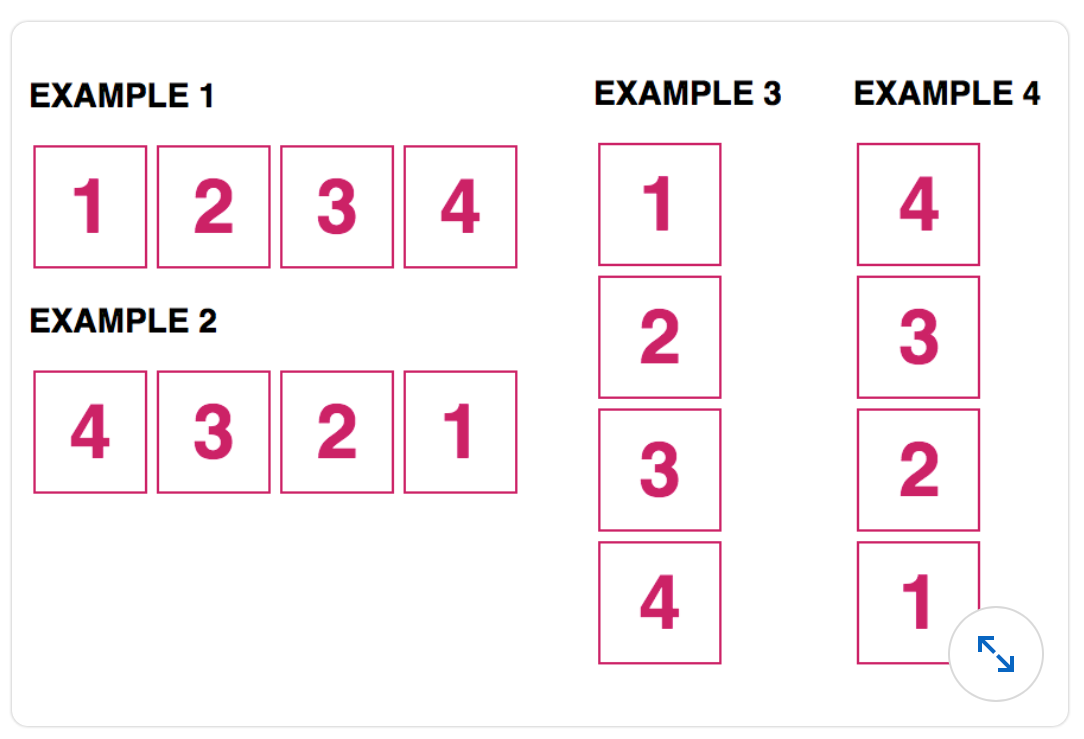
-
- 示例 1:
flex-direction: row; - 示例 2:
flex-direction: row-reverse; - 示例 3:
flex-direction: column; - 示例 4:
flex-direction: column-reverse;
- 示例 1:
-
- 示例 1:
flex-direction: row-reverse; - 示例 2:
flex-direction: row; - 示例 3:
flex-direction: column-reverse; - 示例 4:
flex-direction: column;
- 示例 1:
-
- 示例 1:
flex-direction: row; - 示例 2:
flex-direction: row-reverse; - 示例 3:
flex-direction: column; - 示例 4:
flex-direction: reverse-column;
- 示例 1:
-
- 示例 1:
flex-direction: column; - 示例 2:
flex-direction: column-reverse; - 示例 3:
flex-direction: row; - 示例 4:
flex-direction: row-reverse;
- 示例 1:
Q38. 有两个兄弟选择器可以用于选择同一父元素内的元素:通用兄弟选择器(~)和相邻兄弟选择器(+)。参考以下示例,样式将应用于哪些元素?
h2 ~ p {
  color: blue;
}
h2 + p {
  background: beige;
}
<section>
  <p>paragraph 1</p>
  <h2>Heading</h2>
  <p>paragraph 2</p>
  <p>paragraph 3</p>
</section>
- 段落 2 和段落 3 将变成蓝色。h2 和段落 2 将有米色背景。
- 段落 2 和段落 3 将变成蓝色,段落 2 将有米色背景。
- 段落 2 将变成蓝色。段落 2 和段落 3 将有米色背景。
注意:以下问题的变体。
Q39. 哪些元素会显示为蓝色文本?
h2 ~ p {
  color: blue;
}
<section>
  <p>P1</p>
  <h2>H2</h2>
  <p>P3</p>
  <p>P4</p>
</section>
- P3
- P1, P3 和 P4
- P3 和 P4
- P1
Q40. 使用 Flexbox 时,”justify-content” 属性可以用于沿主轴分配 flex 项之间的空间。以下哪个值应该用于在容器中均匀分布 flex 项?
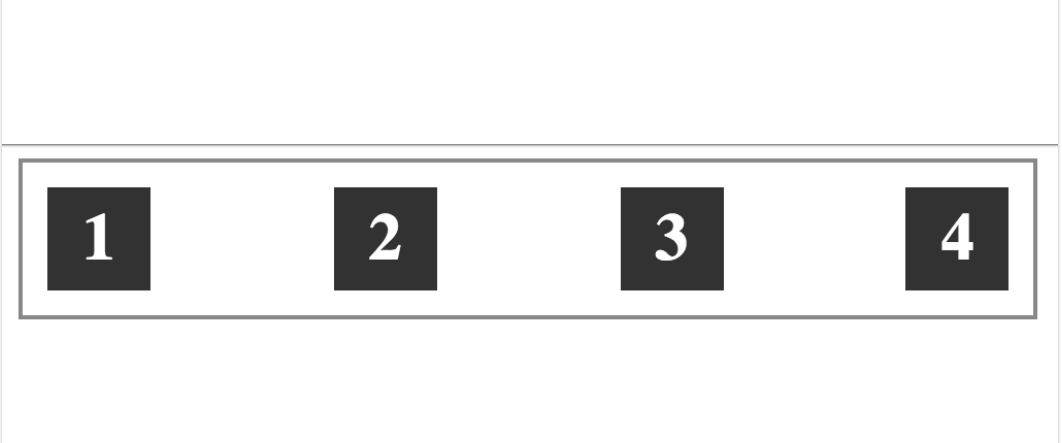
justify-content: space-around;justify-content: center;justify-content: auto;justify-content: space-between;
Q41. 使用图标字体有许多优点,其中一个优点是什么?
- 图标字体提高了可访问性。
- 图标字体可以用来替代自定义字体。
- 图标字体可以使用与排版相关的属性进行样式设置,例如字体大小和颜色。
- 图标字体也是网页安全字体。
Q42. display:none 和 visibility:hidden 之间有什么区别?
- 两者都会隐藏页面上的元素,但 display:none 具有更好的浏览器支持。visibility:hidden 是一个新属性,浏览器支持较差。
- display:none 隐藏元素但保留其之前占用的空间。visibility:hidden 会隐藏元素并将其从文档的正常流中移除。
- display:none 隐藏元素并将其从文档的正常流中移除。visibility:hidden 会隐藏元素但保留其之前占用的空间。
- 没有区别;两者都会隐藏页面上的元素。
Q43. 应使用什么选择器和属性可以在悬停时将元素缩小 50%?
element:hover {scale: 0.5;}element:hover {transform: scale(0.5);}element:hover {scale: 50%;}element:hover {transform: scale(50%);}
Q44. 关于图标字体,以下哪项陈述是正确的?
- 图标字体只能通过 JavaScript 插入。
- 图标字体作为内联图像插入。
- 图标字体需要浏览器扩展。
- 图标字体可以使用与排版相关的属性进行样式设置,例如字体大小和颜色。
Q45. font-weight 属性的值可以是关键字或数字。以下每个数字值对应的关键字是什么?
font-weight: 400;
font-weight: 700;
- bold; normal
- normal; bold
- light; normal
- normal; bolder
Q46. 使用 :nth-child 伪类,最有效的方法是什么来为列表中的每第三项设置样式,无论有多少项,从第 2 项开始?
- A
li:nth-child(3 + 2n) {
  margin: 0 5px;
}
- B
li:nth-child(3n + 2) {
  margin: 0 5px;
}
- C
li:nth-child(2),
li:nth-child(5),
li:nth-child(8) {
  margin: 0 5px;
}
- D
li:nth-child(2n + 3) {
  margin: 0 5px;
}
Q47. 哪个选择器会选择当前页面内的内部链接?
a[href="#"] {...}a[href~="#"]a[href^="#"]a[href="#"]
Q48. margin 和 padding 属性之间有什么区别?
- Margin 在元素周围和内部添加空间;padding 仅在元素内部添加空间。
- Margin 在元素周围添加空间;padding 在元素内部添加空间。
- Margin 在元素周围添加一条线,padding 在元素内部添加空间。
- Margin 在元素内部添加空间,padding 在元素周围添加空间。
Q49. 哪种方式不是声明顶部和底部为 10 像素,左侧和右侧为 0 像素的 padding 值的有效方法?
padding: 10px 10px 0px 0px;padding: 10px 0px;padding: 10px 0;padding: 10px 0px 10px 0px;
Q50. 这段代码中是否有错误?如果有,找到问题的最佳描述。
@font-face {
  font-family: 'Avenir', sans-serif;
  src:
    url('avenir.woff2') format('woff2'),
    url('avenir.woff') format('woff');
}
- 字体文件格式不被现代浏览器支持。
- src 属性需要在 URL 和格式值之间加逗号。
- 示例中没有错误。
- sans-serif 的包含有问题。
Q51. 哪种样式将元素放置在其容器内的固定位置?
position: absolute;display: flex;display: block;float: left;
Q52. calc() CSS 函数通常用于计算相对值。在以下示例中,指定的 margin-left 值是什么?
.example {
  margin-left: calc(5% + 5px);
}
- 左边距值等于其父元素宽度的 5% 加上 5px
- 左边距值等于视口宽度的 5% 加上 5px
- 左边距值等于最近定位元素宽度的 5% 加上 5px
- 左边距值等于选定元素宽度(.example)的 5% 加上 5px
Q53. 哪段代码可以用来绝对定位 logo 类的元素?
.logo { position: absolute; left: 100px; top: 150px; }.logo { position: absolute; margin-left: 100px; margin-top: 150px; }.logo { position: absolute; padding-left: 100px; padding-top: 150px; }.logo { position: absolute; left-padding: 100px; top-padding: 150px; }
Q54. 在这个示例中,段落 1 会是什么颜色?
p:first-of-type {
  color: red;
}
p {
  color: blue;
}
.container {
  color: yellow;
}
p:first-child {
  color: green;
}
<div class="container">
  <h1>Heading</h1>
  <p>Paragraph1</p>
  <p>Paragraph2</p>
</div>
- 蓝色
- 绿色
- 红色
- 黄色
Q55. ::placeholder 伪元素的用途是什么?
- 用于格式化表单控件中占位符文本的外观。
- 指定表单控件的默认输入文本。
- 将文本内容写入超链接工具提示。
- 将文本内容写入任何页面元素。
Q56. 关于伪元素的单冒号(:)或双冒号(::)表示法,例如 ::before 和 :before,以下哪项陈述是正确的?
- 所有浏览器都支持新旧伪元素的单冒号和双冒号表示法。因此可以使用任意一种,但为了保持一致性,建议使用单冒号。
- 在 CSS3 中,引入了双冒号表示法(
::)以在伪元素和伪类之间创建一致性。对于较新的浏览器,使用双冒号表示法。对于 IE8 及以下版本,使用单冒号表示法(:)。 - 只有新的 CSS3 伪元素需要使用双冒号表示法,而 CSS2 伪元素则不需要。
- 在 CSS3 中,引入了双冒号表示法(
::)来区分伪元素和伪类。然而,现代浏览器支持两种格式。较旧的浏览器(如 IE8 及以下版本)不支持。
Q57. 以下哪个选项不是 font-style 属性的有效值?
- normal
- italic
- none
- oblique
Q58. 什么时候会使用 @font-face 方法?
- 设置文本的字体大小
- 将自定义字体加载到样式表中
- 更改在 font-family 中声明的字体名称
- 设置文本的颜色
Q59. 你有一个大图像需要适配到 400 x 200 像素的区域。如果你的用户使用 Retina 显示屏,你应该将图像调整到什么尺寸?
- 2000 x 1400 像素
- 200 x 100 像素
- 800 x 400 像素
- 400 x 200 像素
Q60. 在 Chrome 的开发者工具视图中,默认样式列在哪里?
- 在右侧的 User Agent Stylesheet 部分
- 在 Layout 标签下的第三个面板中
- 在左侧的 HTML 视图中
- 在中间面板中
Q61. HTML 控制文档结构,而 CSS 控制 ___。
- 语义含义
- 内容含义
- 文档结构
- 内容外观
Q62. 推荐为存放项目图片的文件夹命名为?
- images
- #images
- Images
- my images
Q63. 使用内联 CSS 的优势是什么?
- 更容易管理。
- 更容易通过它添加多种样式。
- 可用于快速测试本地 CSS 覆盖。
- 减少与其他 CSS 定义方法的冲突。
Q64. 哪个 W3C 状态代码表示 CSS 规范已被现代浏览器完全实现?
- Proposed Recommendation
- Working Draft
- Recommendation
- Candidate Recommendation
Q65. 以下声明中是否有无效的?
color: red; /* declaration A */
font-size: 1em; /* declaration B */
padding: 10px 0; /* declaration C */
- 声明 A 无效。
- 声明 B 无效。
- 声明 C 无效。
- 所有声明均有效。
Q66. 哪段 CSS 会使链接具有实心蓝色背景,并在悬停时变为半透明?
- A
a:link {
  background: #0000ff;
}
a:hover {
  background: rgba(0, 0, 255, 0.5);
}
- B
a {
  color: blue;
}
a:hover {
  background: white;
}
- C
a:link {
  background: blue;
}
a:hover {
  color: rgba(0, 0, 255, 0.5);
}
- D
a:hover {
  background: rgba(blue, 50%);
}
a:link {
  background: rgba(blue);
}
Q67. 哪个 CSS 规则优先级最高?
div.sidebar {}* {}div#sidebar2 p {}.sidebar p {}
Q68. 页面正文包含一些 HTML 部分。应用以下 CSS 后,它会是什么样子?
body {
  background: #ffffff; /* white */
}
section {
  background: #0000ff; /* blue */
  height: 200px;
}
- 白色背景上的蓝色部分
- 蓝色背景上的黄色部分
- 白色背景上的绿色部分
- 红色背景上的蓝色部分
Q69. 哪个 CSS 关键字可以用来覆盖标准的源顺序和特异性规则?
!elevate!*primeoverride!important
Q70. 你可以使用 ___ 伪类为点击过的链接设置不同的颜色。
a:visiteda:hovera:linka:focus
Q71. 假设背景是白色,以下哪种颜色在屏幕上看起来最亮?
background-color: #aaa;background-color: #999999;background-color: rgba(170,170,170,0.5);background-color: rgba(170,170,170,0.2);
Q72. 哪个 CSS 选择器可以用来选择页面上与两个类 header 和 clear 相关联的所有元素?
."header clear" {}header#clear {}.header.clear {}.header clear {}
Q73. 通用选择器是通过 ___ 指定的。
- “h1” 字符串
- “a” 字符
- “p” 字符
- ”*” 字符
Q74. 在以下 CSS 代码中,'h1' 是 ___,而 'color' 是 ___。
h1 {
  color: red;
}
- 属性;声明
- 声明;规则
- “p” 字符
- 选择器;属性
Q75. 以下 CSS 规则的另一种定义方式是什么?
font-weight: bold;
font-weight: 400;font-weight: medium;font-weight: 700;font-weight: Black;
Q76. 如果你的样式基于包含三个字体的字体栈,通用字体应该放在哪里?
- 它应该是列表中的第一个。
- 不建议在此列表中使用通用字体。
- 它应该是列表中的最后一个。
- 它应该是列表中的第二个。
Q77. 使用字体栈声明字体系列时,值应该以什么顺序出现?
- 第一个值是首选项,后面是备选项,按优先级排序。最后一个选项应该是通用字体。
- 第一个值是首选项。备选项的顺序无关紧要,取决于用户计算机上的可用性。
- 第一个值是首选项,必须至少有一个备选项,然后再添加通用字体。
- 第一个值是首选项,后面最多有三个备选项。
Q78. 使用网络字体服务的一个缺点是什么?
- 需要在自己的服务器上托管字体文件。
- 使用了更多网站的带宽。
- 提供的自定义字体选择范围较窄。
- 并非总是免费服务。
Q79. 如何将 Google 字体添加到你的项目中?
- 使用 HTML 的 link 元素引用 Google 提供的 CSS
- 将字体文件直接嵌入到项目的主 JavaScript 中
- 使用 Google 特定的 CSS 语法直接链接到所需的字体文件
- 使用标准的 font-face CSS 定义,来源于 Google 服务器上的字体文件
Q80. 使用以下 HTML 和 CSS 示例,.em 和 .rem 元素的等效像素值是多少?
HTML {
  font-size: 10px;
}
body {
  font-size: 2rem;
}
.rem {
  font-size: 1.5rem;
}
.em {
  font-size: 2em;
}
<body>
  <p class="rem"></p>
  <p class="em"></p>
</body>
- .rem 的值等于 25px;.em 的值等于 20px。
- .rem 的值等于 15px;.em 的值等于 20px。
- .rem 的值等于 15px;.em 的值等于 40px。
- .rem 的值等于 20px;.em 的值等于 40px。
Q81. 哪个属性用于调整文本字符之间的间距?
font-styletext-transformfont-variantletter-spacing
Q82. 更改光标从箭头到指针手时,正确的语法是什么?
.element {cursor: pointer;}.element {cursor: hand;}.element {cursor: move-hand;}.element {cursor: pointer-hand;}
Q83. 以下样式的效果是什么?
background-position: 10% 50%;
- 背景图像位于容器左侧 10% 和顶部 50% 的位置
- 背景图像位于容器底部 10% 和左侧 50% 的位置
- 背景图像位于容器右侧 10% 和底部 50% 的位置
- 背景图像位于容器顶部 10% 和左侧 50% 的位置
Q84. 网格项将如何显示?
grid-template-columns: 2fr 1fr;
- 第一列的高度是第二列的两倍,并且宽度与内容一致。
- 第一列占容器的一半,第二列吸收剩余空间。
- 第一列的宽度是第二列的两倍,并且在网格容器内按比例适配。
- 第一列的宽度和高度是第二列的两倍,并且在网格容器内按比例适配。
Q85. 哪种样式规则会使图像在悬停时缩小 50%?
<img id="photo" alt="" src="..." />
img#photo:hover {scale: 0.5;}img#photo:hover {transform: scale(0.5);}img#photo {hover-scale: 0.5;}img#photo:hover {size: smaller;}
Q86. 哪些 CSS 属性可以用来仅为元素的左上角和右上角创建圆角?
A. border-radius: 10px 10px 0 0;
B. border-top-left-radius: 10px; and border-top-right-radius: 10px;
C. border-radius: 10px 0;
D. border-top-radius: 10px;
- A 和 C
- C 和 D
- B 和 C
- A 和 B
Q87. 查看以下 HTML 示例。然后选择从最低到最高特异性选择 <p> 的选择器列表。
<section>
  <p class="example">...</p>
</section>
- A
1. section * {...}
2. [class*='example'] {...}
3. p.example {...}
4. section p {...}
- B
1. p {...}
2. p.example {...}
3. section p {...}
4. [class*='example'] {...}
- C
1. p.example {...}
2. section p {...}
3. [class*='example'] {...}
4. section * {...}
- D
1. p {...}
2. section p {...}
3. [class*='example'] {...}
4. p.example {...}
Q88. 哪个属性用于为 HTML 元素创建投影效果?
- element-shadow
- outer-shadow
- dropbox-shadow
- box-shadow
Q89. 正确的选择器是哪个,用于选择所有未禁用的文本输入?
input[type="text"]:not([disabled]) {...}input[type="text"]:not("disabled") {...}input[type*="text"]:not([disabled="disabled"]) {...}input[type="text"]:not([type="disabled"]) {...}
input[type="text"] 选择所有类型为文本的输入,:not([disabled]) 选择所有没有 “disabled” 属性的元素。结合两者,只选择类型为 “text” 且没有 “disabled” 属性的输入元素。
Q90. 如何创建半透明背景颜色?
background-color: hsl(0, 0, 0, 0.5);background-color: rgbx(0, 0, 0, 0.5);background-color: rgba(0, 0, 0, 0.5);background-color: rgba(0, 0, 0, 1);
rgba 是 CSS 中的一个函数。rgba 代表红色、绿色、蓝色和 alpha。alpha 的值可以在 0 到 1 之间(包括 0 和 1),其中 0 表示完全透明,1 表示完全不透明。
Q91. 使用此 HTML 标记,如何仅选择 <header> 元素内的标题?
<header>
  <h1>Heading 1</h1>
  <h2>Heading 2</h2>
</header>
<h2>Heading 2</h2>
header h1, header h2 {...}header h1 + header h2 {...}header h1, h2 {...}h1, h2 {...}
Q92. 假设你想使用 flexbox 将一个项目列表 (.item) 显示为一行并以相反的顺序排列。以下 CSS 中的错误是什么?
.container {
  display: flex;
}
.item {
  border: 1px solid red;
  flex-direction: row-reverse;
}
- flex-direction 的值应该是 reverse-row。
- .container 元素应该有一个属性 flex: display。
- flex-direction 属性应该在 container 中声明。
- display 的值应该是 flex-inline,以便将项目显示为一行。
Q93. 哪个选项不是有效的过渡?
transition: margin 1000ms ease-in-out;transition: color 1.3s ease-in;transition: position 400ms linear;transition: opacity 1s ease-in;
Q94. 在这个例子中,段落会是什么颜色?为什么?
article p {
  color: blue;
}
article > p {
  color: green;
}
<article>
  <p>Paragraph 1</p>

  <aside>
    <p>Paragraph 2</p>
  </aside>
</article>
- 段落 1 是蓝色。段落 2 是绿色。
- 两个段落都是绿色。
- 段落 1 是绿色。段落 2 是蓝色。
- 两个段落都是蓝色。
Q95. 查看下面显示的边框样式声明。对应的长格式语法是什么?
border: 1px solid red;
- A
border-size: 1px;
border-style: solid;
border-color: red;
- B
border-size: 1px;
border-type: solid;
border-color: red;
- C
border-width: 1px;
border-style: solid;
border-color: red;
- D
border-width: 1px;
border-line: solid;
border-color: red;
Q96. 伪类用于 _。
- 设置选定元素的状态样式
- 插入展示内容
- 设置选定元素的特定部分样式
- 使用类选择器设置元素样式
Q97. 在这个例子中,哪些元素会应用哪些样式?
section {
  color: gray;
}
<section>
  <p>paragraph</p>
  <a href="#">link</a>
</section>
- 段落和链接会是灰色。
- section 元素的背景颜色会是灰色。
- 段落会是灰色。链接会是浏览器默认的黑色。
- 只有段落会是灰色。
Q98. 哪个答案是类型选择器(有时也称为元素选择器)的示例?
.header {...}header {...}#header {...}header > h1 {...}
Q99. 在网站上列出不同链接状态的正确顺序是什么,以便这些状态正确显示在页面上?
- A
  a
  a:hover
- B
  :link
  :visited
  :hover
  :active
  :focus
- C
  :active
  :focus
  :hover
  :link
  :visited
- D
  :link
  :visited
  :focus
  :hover
  :active
Q100. 哪个选择器用于选择作为 section 的直接后代的段落元素?
section * psection + psection ~ psection > p
Q101. 对于这段代码,超链接的字体颜色是什么?
ul {
  --color: red;
}
p {
  color: var(--color);
}
a {
  color: var(--color, orange);
}
<p>Paragraph</p>
<ul>
  <li>
    <a href="#">list item a link </a>
  </li>
  <li>list item</li>
</ul>
- 红色
- 橙色
- 蓝色
- 黑色
Q102. 哪个陈述是不正确的?
- 特异性决定了浏览器应用哪个 CSS 规则。
- 当两个选择器应用于同一元素时,特异性较低的选择器获胜。
- 最后定义的规则会覆盖所有之前的规则,包括冲突的规则。
- 特异性更高的选择器规则优先级更高。
Q103. 在这种情况下使用的 margin 值的输出是什么,假设其包含元素的宽度大于 800px?
.example {
  width: 800px;
  margin: 0 auto;
}
- 示例元素的整个元素周围的 margin 空间为 0。auto 值会在容器内水平和垂直居中对齐元素。
- 示例元素的左右 margin 空间为 0。上下的 margin 会自动调整,从而在容器内居中对齐元素。
- 示例元素的上下 margin 空间为 0。左右的 margin 会自动调整,可能会在容器内居中对齐元素。
- margin 值无效,因为它缺少单位测量值后的 0。
Q104. 当前有四种视口百分比长度可以用来定义相对于视口大小的值:vw、vh、vmin 和 vmax。如果当前视口大小的宽度为 800px,高度为 600px,这些值在像素中等价于什么?
10vw = ?px
10vh = ?px
10vmin = ?px
10vmax = ?px
- 10vw = 80px
10vh = 60px
10vmin = 60px
10vmax = 80px - 10vw = 60px
10vh = 80px
10vmin = 80px
10vmax = 60px - 10vw = 8px
10vh = 6px
10vmin = 6px
10vmax = 8px - 10vw = 6px
10vh = 8px
10vmin = 8px
10vmax = 6px
Q105. 参考以下 HTML 标记和 CSS 示例,哪些元素会被选中?
p:first-of-type:first-letter {
  color: red;
}
<body>
  <p>Paragraph 1.</p>
  <p>Paragraph 2.</p>

  <article>
    <h1>Heading</h1>
    <p>Paragraph 3.</p>
    <p>paragraph 4.</p>
  </article>

  <section>
    <p>Paragraph 5.</p>
    <p>Paragraph 6.</p>
  </section>
</body>
- 所有段落的第一个字母会变成红色。
- 只有段落 1 和段落 5 的第一个字母会变成红色。
- 段落 1、3 和 5 的第一个字母会变成红色。
- 只有段落 1 的第一个字母会变成红色。
Q106. 哪五个样式特性与盒模型相关?
- margin, padding, border, width, height
- width, height, z-index, overflow, font size
- margin, padding, font size, line height, border
- font size, line height, letter spacing, width, height
Q107. 哪个选项不会将包含 domain.com 的所有链接设置为粉色?
- A
a[href$='domain.com'] {
  color: pink;
}
- B
a[href='*domain.com'] {
  color: pink;
}
- C
a[href*='domain.com'] {
  color: rgba(255, 155, 155);
}
- D
a[href*='domain.com'] {
  color: pink;
}
Q108. 哪个属性和值对可以用来应用线性渐变效果?
background: linear-gradient(#648880, #293f50);background-image: linear(#648880, #293f50);background: gradient(linear, #648880, #293f50);background-color: linear-gradient(#648880, #293f50);
Q109. 你想在图标后面添加一个背景圆。哪个样式声明是正确的?
- A
.glyphicon-bgcircle {
  circle-radius: 50%;
  margin: 50px;
  background-color: #fdadc6;
  color: rgba(255, 255, 255, 1);
  font-size: 24px;
}
- B
glyphicon-bgcircle {
  border-circle: 50%;
  padding: 50px;
  background-color: #fdadc6;
  color: rgba(255, 255, 255, 1);
  font-size: 24px;
}
- C
.glyphicon-bgcircle {
  border-radius: 50%;
  padding: 50px;
  background-color: #fdadc6;
  color: rgba(255, 255, 255, 1);
  font-size: 24px;
}
- D
.glyphicon-bgcircle {
  radius-rounded: 50%;
  margin: auto;
  background-color: #fdadc6;
  color: rgba(255, 255, 255, 1);
  font-size: 24px;
}
Q110. 哪些是 font-size 属性的有效值?
A. font-size: xsmall
B. font-size: 50%
C. font-size: 1em
D. font-size: 20px
- C, D
- B, C, D
- A, C
- A, B, C, D
Q111. 在这张图片中,蓝色框和示例文本都包含在同一个父元素中。蓝色框浮动在容器的左边缘。为什么它没有包含在容器中?
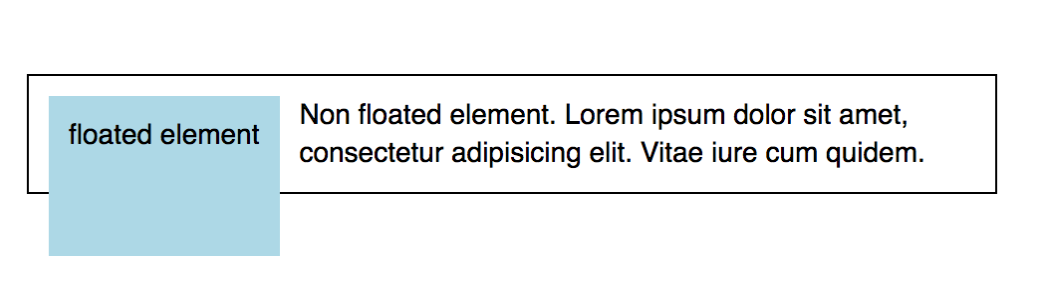
- 蓝色框的浮动增加了它的高度。
- 蓝色框浮动在左边也会向下移动。
- 蓝色框浮动实际上将其向右和向下移动。
- 蓝色框的浮动使其脱离了文档流,容器的大小仅适应示例文本。
Q112. 给定此代码,哪个 .overlay 的 CSS 声明会覆盖其容器的整个宽度和高度?
<style>
.container {
  position: relative;
  height: 200px;
  width: 200px;
  border: 1px solid black;
}
</style>
<div class="container"><div class="overlay"></div></div>
- A
.overlay {
  position: static;
  top: 200px;
  bottom: 200px;
  right: 200px;
  left: 200px;
  background-color: rgba(0, 0, 0, 0.5);
}
- B
.overlay {
  position: absolute;
  top: 200px;
  bottom: 200px;
  right: 200px;
  left: 200px;
  background-color: rgba(0, 0, 0, 0.5);
}
- C
.overlay {
  position: static;
  top: 0;
  bottom: 0;
  right: 0;
  left: 0;
  background-color: rgba(0, 0, 0, 0.5);
}
- D
.overlay {
  position: absolute;
  top: 0;
  bottom: 0;
  right: 0;
  left: 0;
  background-color: rgba(0, 0, 0, 0.5);
}
Q113. 缺少哪一行代码可以将文本放置在图片上方?
<div class="container">
  <img src="grumpy-cat.gif" />
  <p>The z-index property is cool!</p>
</div>
img {
  position: absolute;
  left: 0px;
  top: 0px;
  // Missing line
}
z-index: 1;z-index: -1;z-index: 0;z-index: true;
Q114. 要使元素的字体大小比其容器的字体大小小一个级别,应该应用哪个样式属性?
font-size: reduce;font-size: 8px;font-size: -1em;font-size: smaller;
Q115. 给定此标记,哪个选择器会使文本高亮为黄色?
<span class="highlight">#BLM</span>
- A
.highlight {
  background-color: yellow;
}
- B
#highlight {
  background-color: yellow;
}
- C
.highlight {
  color: yellow;
}
- D
#highlight {
  color: yellow;
}
Q116. 要防止背景图片在任何方向上平铺,应该应用哪个样式属性?
- A
background-repeat: no-repeat;
- B
background-repeat: fixed;
- C
background-repeat: none;
- D
background-tile: none;
Q117. 要将对象逆时针旋转 30 度,应该应用哪个样式属性?
transform: rotate(-30deg);transform: rotate(30deg);rotate: 30deg;spin: 30deg;
Q118. 哪个样式规则可以设置背景图片以显示 wood.png 文件的内容?
background-image: file('wood.png');background-image: url('wood.png');background-image: wood.png;image: wood.png
Q119. 什么样式规则可以将段落二的字体颜色设置为蓝色?
<section><p>paragraph one</p></section><p>paragraph two</p>
- A
section > p {
  color: blue;
}
- B
p {
  color: blue;
}
- C
section + p {
  color: blue;
}
- D
p + section {
  color: blue;
}
Q120. 你想将一个元素向上移动 100px。应该使用哪个 CSS 属性?
transform: translateX(-100px)transform: translateY(-100px)transform: translateY(100px)transform: translateX(100px)
Q121. 哪种样式可以将内层 <div> 在外层 <div> 中水平居中?
<div id="outer">
  <div id="inner">Center Me!</div>
</div>
- A
#inner {
  width: 50%;
}

#outer {
  width: 100%;
}
- B
#inner {
  left: 0;
  right: 0;
  position: center;
}
- C
#inner {
  text-align: center;
}
- D
#inner {
  width: 50%;
  margin: 0 auto;
}
Q122. 当应用这些 CSS 规则时,小狗会出现在哪个角落?
.pen {
  height: 100px;
  width: 100px;
  border: 2px dashed brown;
  position: relative;
}

#puppy {
  position: absolute;
  right: 80px;
  bottom: 0px;
}
<div class="pen">
  <span id="puppy">🐶</span>
</div>
- 右上角
- 右下角
- 左上角
- 左下角
Q123. 哪个选项使用了正确的语法为 <a> 元素添加 hover 伪类?
a:hover {...}a :hover {...}a.hover {...}a hover {...}
Q124. 缺失的代码是什么,可以为 “Cellar Door” 添加阴影?
  <style>
    #cellar-door {
      box-shadow: 3px 5px 10px #000;
    }
    .text-shadow {
      text-shadow: 3px 5px 10px #000;
    }
  </style>

  <h1 _____> Cellar Door</h1>
class="text-shadow"id="cellar-door"id="text-shadow"class="cellar-door"
Q125. 以下哪个选项是 CSS 中有效的注释示例?
-- 此行已取消。/* 此行已取消。 */// 此行已取消。# 此行已取消。
Q126. 哪些元素会显示为蓝色文本?
    h2 ~ p {
      color: blue;
    }
  <section>
    <p>P1</p>
    <h2>H2</h2>
    <p>P3</p>
    <p>P4</p>
  </section>
- P3
- P1, P3 和 P4
- P3 和 P4
- P1
Q127. 当这些伪类选择器应用于链接时,样式会应用于哪些状态?
a:visited {
  ...;
}
a:active {
  ...;
}
a:hover {
  ...;
}
a:focus {
  ...;
}
:visited样式在链接被打开后应用。:active样式在鼠标点击并按住时应用。:hover样式在鼠标悬停或点击并按住时应用。:focus样式在使用键盘 Tab 键导航链接时应用。:visited样式在链接被打开后应用。:active样式在鼠标点击时应用。:hover样式在鼠标悬停时应用。:focus样式在鼠标点击并按住或使用键盘 Tab 键导航链接时应用。:visited样式在链接被打开后应用。:active样式仅在鼠标点击时应用,且在鼠标释放前。:hover样式在鼠标悬停时应用。:focus样式在使用键盘 Tab 键导航链接时应用。:visited样式在鼠标按住时应用。:active样式在链接被打开时应用。:hover样式在鼠标悬停时应用。:focus样式在使用键盘 Tab 键导航链接时应用。
Q128. 应使用什么样式规则将所有验证失败的输入元素显示为红色字体?
- A
input.valid[false] {
  color: red;
}
- B
input:invalid {
  color: red;
}
- C
input.not(valid) {
  color: red;
}
- D
input.invalid {
  color: red;
}
Q129. 应对 img 元素应用什么样式规则以将元素显示为无色的灰度?
- A
img {
  transform: grayscale(1);
}
- B
img {
  filter: grayscale(0);
}
- C
img {
  transform: grayscale(0);
}
- D
img {
  filter: grayscale(1);
}
Q130. 为什么需要创建一个重置样式表?
- 通过移除浏览器样式减少页面大小。
- 通过覆盖任何内置浏览器样式开始设计页面样式。
- 使网页设计内容更容易压缩。
- 通过不依赖内置浏览器样式增加执行时间。
Q131. 如何将 logo 类的元素绝对定位在相对定位的容器内?
- A
.logo {
  position: absolute;
  padding-left: 100px;
  padding-top: 150px;
}
- B
.logo {
  position: absolute;
  left: 100px;
  top: 150px;
}
- C
.logo {
  position: absolute;
  left-padding: 100px;
  top-padding: 150px;
}
- D
.logo {
  position: absolute;
  margin-left: 100px;
  margin-top: 150px;
}
Q132. 带有类 .child 的 <div> 在其容器内会如何定位?
<style>
  .container {
    height: 200px;
    width: 200px;
  }
  .child {
    margin: auto 0;
    height: 100px;
  }
</style>
<div class="container">
  <div class="child">...</div>
</div>
- 水平居中
- 垂直居中,跨越容器宽度
- 位于容器底部,跨越容器宽度
- 位于容器顶部,跨越容器宽度
Q133. 默认情况下,CSS transition 是 __
- 不对称的,所以从初始状态到结束状态的过渡与从结束状态回到初始状态的过渡不同。
- 单向的,所以只有一个过渡,它从初始状态到结束状态。
- 对称的,所以从初始状态到结束状态的过渡与从结束状态回到初始状态的过渡是相反的。
- 单向的,所以只有一个过渡,它从结束状态到初始状态。
Q134. 哪种样式规则可以将 header 元素扩展到整个网格行,从第一列到最后一列?
- A
header {
  grid-column: 1 / auto;
}
- B
header {
  grid-column: 1/-1;
}
- C
header {
  grid-column: -1/1;
}
- D
header {
  grid-column: 1/100%;
}
Q135. 要在网格单元格中水平和垂直居中内容,应应用哪种样式规则?
- A
align-items: start;
justify-items: end;
- B
align-items: center;
justify-items: center;
- C
align-items: middle;
justify-items: middle;
- D
align-items: stretch;
justify-items: stretch;
align-items 参考 justify-items 参考
Q136. 应使用什么样式规则将所有验证失败的输入元素显示为红色字体?
- A
input.valid[false] {
  color: red;
}
- B
input:invalid {
  color: red;
}
- C
input.not(valid) {
  color: red;
}
- D
input.invalid {
  color: red;
}
Q139. 要将一个外部样式表文件插入到另一个样式表文件中,应使用哪个规则?
@import@link@insert@style
Q140. 给定此代码,以下元素的高度将是多少像素?
<style>
  #tall-text {
    display: inline;
    font-size: 20px;
    height: 200px;
  }
</style>

<p id="tall-text">Did I grow?</p>
- 200px
- 20px
- 180px
- 220px
Q141. 哪个样式规则会在网格中放置一个 X 来赢得游戏?
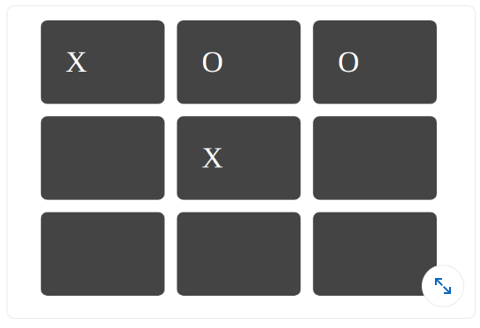
row: 3; column: 3;grid-row: 3; grid-column: 3;row: 2; column: 2;grid-row: 2; grid-column: 2;
Q142. 哪个 CSS 属性用于创建图像反射?
- box-reflect
- img-reflect
- None of the above
- reflect-img
Q143. 编写 var() 函数的一般语法是什么?
var(--name, value)var(--name)var(value)- None of the Above
Q144. 在 CSS Flexbox Layout Module 引入之前,有多少种布局模式?
- 2
- 1
- 4
- 3
Q145. CSS 盒模型的哪些组件是透明的?
- Padding
- Margin
- A 和 B 都是
- 都不是
Q146. 如何使用 CSS 定义自定义字体?
- @Font-Face 规则
- 无法定义自定义字体
- src 标签
- None of the above
Q147. 以下哪个 CSS 属性设置了添加到元素上的线条装饰,例如下划线、上划线等?
- text-decoration
- text-style
- text-decoration-line
- text-line
Q148. 以下哪个 CSS 属性设置了定位元素的堆叠顺序?
- y-index
- z-index
- x-index
- all of the mentioned
Q149. 以下哪个属性允许在文本溢出的情况下使用跑马灯效果?
- overflow-marquee
- overflow-style
- overflow-text
- none of the mentioned
Q150. 以下哪种级联顺序具有最高优先级?
- user agent declarations
- user normal declarations
- author normal declarations
- author important declarations
Q151. CSS 级联为每个样式规则分配了一个权重。
- True
- False
Q152. ____ 表示级联的结果:它是级联中获胜的声明值。
- specified Value
- actual value
- computed value
- cascaded value
Q153. 使用负文本缩进也被称为 _?
- The Scott Kellum method
- The Phark method
- Radu Darvas Technique
- The Langridge method
Q154. 使用边距也被称为 _?
- Fahrner image replacement
- The Lindsay method
- Radu Darvas Technique
- The Langridge method
Q155. 如果某个规则不应被其他规则覆盖,应使用 ____ 指示。
- @important
- !important!
- !important
- important!
Q156. CSS 代表什么?
- Creative Style Sheets
- Colourful Style Sheets
- Cascading Style Sheets
- Colorful Style Sheets
Q157. rgb(255,0,0) 会显示什么颜色?
- Blue
- Green
- Red
- Yellow
Q158. 引用外部样式表的正确 HTML 是什么?
<link rel="stylesheet" type="text/css" href="mystyle.css"><stylesheet>mystyle.css</stylesheet><style src= "mystyle.css">- None of these
| 参考资料:HTML link 标签 | HTML Link 标签语法 |
Q159. <link> 标签应该放在:
- the title section
- the body section
- the head section
- None of the above
Q160. HTML 中定义的 CSS 是什么?
- How to send HTML elements
- How to display HTML elements
- How to save HTML elements
- How to make HTML elements
Q161. 以下关于 CSS 的说法哪一个是正确的?
- 当单个文档有独特样式时,应使用内联样式表
- 当样式应用于多个页面时,外部样式表是理想选择
- Both a and b above
- 外部样式表可以用 HTML 编写
Q162. 在 CSS 中,边距折叠只发生在?
- 正常流中的内联元素的水平边距。
- 正常流中的块级元素的垂直边距。
- 正常流中的块级元素的水平边距。
- 正常流中的内联元素的垂直边距。
Q163. 以下哪个 CSS 选择器选择所有作为 <div> 元素直接子元素的 <p> 元素?
div pdiv > pdiv + pdiv ~ p
Q164. 在 CSS 中,box-sizing 属性用于控制元素的总宽度和高度的计算方式。box-sizing 的哪个值会将元素的内边距和边框包含在总宽度和高度中?
- content-box
- padding-box
- margin-box
- border-box
Q165. 在 CSS 中,以下哪个不是 inert 属性的效果?
- 阻止用户点击元素时触发点击事件。
- 使元素变得可交互。
- 阻止元素获得焦点时触发焦点事件。
- 隐藏元素及其内容,并将其从辅助技术的可访问性树中排除。
Q166. accent-color 属性针对哪些元素?
- Line break tags
- Hyperlink tags
- Input tags
- Image tags
Q167. 在 CSS 中,line-height 属性控制什么?
- 元素的宽度。
- 文本的颜色。
- 字符之间的间距。
- 文本行之间的间距高度。
Q168. CSS visibility 属性的作用是什么?
- 控制弹性容器内元素的顺序。
- 调整元素内容与边框之间的间距。
- 控制元素在 z 轴上的堆叠顺序。
- 控制元素的可见性。
参考资料:CSS visibility 属性 - W3Schools
Q169. 哪个 CSS 属性用于更改鼠标悬停在元素上时光标的样式?
- cursor-style
- mouse-pointer
- pointer-type
- cursor
Q170. CSS outline 属性的作用是什么?
- 控制元素边框的宽度。
- 更改元素的背景颜色。
- 在元素周围创建一个可见的轮廓,通常用于辅助功能或高亮显示。
- 控制元素的透明度。
参考资料:CSS outline 属性 - W3Schools
Q171. text-align 属性的有效值有哪些?
- left, bottom, top, right
- left, right, up, bottom
- left, center, right, justify
- side, justify, up, down
参考资料:CSS text-align 属性 - W3Schools
Q172. visibility: hidden 和 display: none 有什么区别?
- 两者都会隐藏页面上的元素,但 display: none 具有更好的浏览器支持。
- display:none 隐藏元素但保留其之前占据的空间。visibility:hidden 会隐藏元素并将其从文档的正常流中移除。
- visibility: hidden 隐藏元素,但它仍占据布局中的空间。display: none 从文档中移除元素,不占据任何空间。
- 两者没有区别;两者都会隐藏页面上的元素。
参考资料:CSS visibility:hidden vs display:none
Q173. 以下哪个不是有效的 CSS 选择器?
p.class#id-
Q174. 在 CSS 中,class 和 id 有什么区别?
- ID 只能应用于一个 HTML 元素,而 class 可以多次使用。
- ID 用一个点 (.) 加上 ID 名称表示,而 class 使用一个井号 (#)。
- 在 CSS 中,class 的优先级比 ID 高。
- class 和 id 没有区别。