linkedin-skill-assessments-quizzes
HTML
Q1. ¿Cuál es el propósito de la etiqueta <track>, y cuándo debe usarse?
- La etiqueta
<track>se usa para especificar subtítulos. Típicamente se aplica como hijo de las etiquetas<audio>y<video>. - La etiqueta
<track>se usa para especificar subtítulos. Típicamente se aplica como hijo de la etiqueta<video>. - La etiqueta
<track>se usa para especificar subtítulos, captions y otros tipos de texto basado en tiempo. Típicamente se aplica como hijo de la etiqueta<video>. - La etiqueta
<track>se usa para especificar subtítulos, captions y otros tipos de texto basado en tiempo. Típicamente se aplica como hijo de las etiquetas<audio>y<video>.
Q2. ¿Cuáles son los mejores ejemplos de elementos void?
<link><meta><title><br><base><source><input><br><p><area><embed><strong>
Q3. En HTML5, ¿qué etiqueta o etiquetas incrustan una página web dentro de una página web?
<iframe>, <frame>, y <frameset><frame><iframe><frame> y <frameset>
Q4. ¿Dónde ocurren típicamente las etiquetas <header> y <footer>?
- como hijos de las etiquetas
<body>, <article>, <aside>, y <section> - como hijos de las etiquetas
<body>, <article>, y <section> - como hijos de las etiquetas
<body>, <article>, <aside>, <nav>, y <section> - como hijos de las etiquetas
<body>, <article>, <table>, y <section>
Q5. ¿Cuál es la mejor manera de aplicar estilo en negrita al texto?
<strong>- Usar CSS.
<bold><b>
Q6. ¿Cuál es el uso de la etiqueta <link>?
- al vincular hojas de estilo, JavaScript e iconos para aplicaciones móviles
- al vincular hojas de estilo, favicons y precargar assets
- al vincular una página web a otra
- al vincular hojas de estilo, URLs externas y favicons
Q7. ¿Qué debe llenar los dos espacios en blanco en el código HTML a continuación?
<address ______ _____>
  <span itemprop="streetAddress">6410 Via Real</span><br />
  <span itemprop="addressLocality">Carpinteria</span>,
  <span itemprop="addressRegion">CA</span>
  <span itemprop="addressCode">93013</span>
</address>
itemscopeitemtype="http://schema.org/PostalAddress"itemsref="http://schema.org/PostalAddress"itemid="address"itemscopeitemref="http://schema.org/PostalAddress"itemid="address"itemtype="http://schema.org/PostalAddress"
Q8. ¿Cuál es el uso del elemento <aside>?
- cuando el contenido puede ser removido sin restar del mensaje de la página
- para cualquier cosa que quieras mover al lado, como una caja de cita destacada, una barra lateral, o una imagen con texto envolviendo alrededor
- para cualquier cosa en paréntesis
- para cualquier cosa en una barra lateral
Q9. ¿Con qué etiquetas está asociado el elemento <source>?
<svg>, <picture>, <audio>, y <video><picture>, <audio>, y <video>- Es intercambiable con el atributo
src, así que cualquier elemento que usesrcpuede usar<source> <audio> y <video>
Q10. ¿Qué NO es un atributo válido para el elemento <textarea>?
- readonly
- max
- form
- spellcheck
Q11. ¿Cuál es la mejor manera de codificar la muestra mostrada?
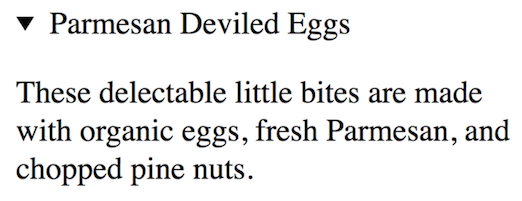
- A
<details>
  <summary>Parmesan Deviled Eggs</summary>
  <p>
    These delectable little bites are made with organic eggs, fresh Parmesan, and chopped pine nuts.
  </p>
</details>
- B
<h4>▸ Parmesan Deviled Eggs</h4>
<p>
  These delectable little bites are made with organic eggs, fresh Parmesan, and chopped pine nuts.
</p>
- C
<details open>
  <summary>Parmesan Deviled Eggs</summary>
  <p>
    These delectable little bites are made with organic eggs, fresh Parmesan, and chopped pine nuts.
  </p>
</details>
- D
<details>
  <h4>▸ Parmesan Deviled Eggs</h4>
  <p>
    These delectable little bites are made with organic eggs, fresh Parmesan, and chopped pine nuts.
  </p>
</details>
Q12. ¿Cuál es el propósito del elemento <samp>?
- Conecta el navegador web a un servidor SA-MP.
- Identifica texto encerrado como un sampler o un ejemplo.
- Identifica salida de muestra de un programa de computadora.
- Usa un protocolo simple de mensajería de aplicación para conectar el navegador a un dispositivo de mensajería de texto.
Q13. ¿Cuándo debes usar los elementos <ol> y <ul>?
- Usa
<ul>cuando quieras una lista con viñetas y<ol>cuando quieras una lista numerada. - Usa
<ul>cuando tengas una lista de elementos en la que el orden de los elementos importa. Usa<ol>cuando tengas una lista de elementos que podrían ir en cualquier orden. - Usa
<ol>cuando quieras una lista con viñetas y<ul>cuando quieras una lista numerada. - Usa
<ol>cuando tengas una lista de elementos en la que el orden de los elementos importa. Usa<ul>cuando tengas una lista de elementos que podrían ir en cualquier orden.
Q14. ¿Cuál es la diferencia entre los métodos post y get en un formulario?
- post se usa para enviar información al servidor. get se usa para recuperar información del formulario del servidor.
- get se usa para enviar información al servidor. post se usa para recuperar información del formulario del servidor.
- Con get, los datos se incluyen en el cuerpo del formulario cuando se envían al servidor. Con post, los datos van a través de la URL.
- Con post, los datos se incluyen en el cuerpo del formulario cuando se envían al servidor. Con get, los datos van a través de la URL.
Q15. ¿Cuál es la diferencia entre las etiquetas <div> y <span>?
<div>se usa donde se necesita una etiqueta genérica de nivel de bloque, mientras que<span>se usa donde se necesita una etiqueta genérica en línea.<div>se usa para divisiones principales en una página, mientras que<span>se usa para abarcar columnas.<div>es la etiqueta predeterminada estándar de la industria, pero podrías usar<span>si lo prefieres.<div>se usa donde se necesita una etiqueta genérica en línea, mientras que<span>se usa donde se necesita una etiqueta genérica de nivel de bloque.
Q16. ¿Qué debe llenar el espacio en blanco en el código HTML a continuación?
<form method="post" action="mailto:info@linkedin.com" ____="text/plain"></form>
- enctype
- media
- type
- rel
Q17. ¿Cuál es el marcado correcto para el atributo alt de una imagen?
- A
<img src="cubism.jpg" alt="Version of ""Whistler's Mother"" in cubist style">
- B
<img src="cubism.jpg" alt="Version of "Whistler's Mother" in cubist style">
- C
<img src="cubism.jpg" alt='Version of "Whistler's Mother" in cubist style' />
- D
<img src="cubism.jpg" alt="Version of \"Whistler's Mother\" in cubist style">
Q18. En el código a continuación, ¿cuál es el propósito del atributo id?
<p id="warning">Be careful when installing this product.</p>
- Establece que id es un identificador único en el documento, usado para estilos CSS, scripting y enlaces dentro de una página web.
- Establece que id es un identificador único en el documento, usado para estilos CSS y con código JavaScript.
- Establece que id puede ser usado para estilos CSS varias veces por página.
- Establece que id es un identificador único en el sitio web, usado para estilos CSS, scripting y enlaces dentro de una página web.
Q19. ¿Cuál es el mejor marcado semántico para la oración mostrada?
On July 21, 1969, Neil Armstrong said, "One small step for man, one giant leap for mankind."
- A
<p>
  On <time datetime="1969-07-21">July 21, 1969</time>, Neil Armstrong said,
  <q cite="https://www.hq.nasa.gov/alsj/a11l/a11.html"
    >One small step for man, one giant leap for mankind.</q
  >
</p>
- B
<p>
  On July 21, 1969, Neil Armstrong said,
  <q cite="https://www.hq.nasa.gov/alsj/a11l/a11.html"
    >"One small step for man, one giant leap for mankind."</q
  >
</p>
- C
<p>
  On July 21, 1969, Neil Armstrong said,
  <q>"One small step for man, one giant leap for mankind."</q>
</p>
- D
<p>
  On <time datetime="07-21-1969">July 21, 1969</time>, Neil Armstrong said,
  <q cite="https://www.hq.nasa.gov/alsj/a11l/a11.html"
    >One small step for man, one giant leap for mankind.</q
  >
</p>
Q20. ¿Qué debe llenar el espacio en blanco en este código HTML?
<a href="https://es.yahoo.com/" hreflang="____" target="_blank">Visita Yahoo</a>
- es
- es-spanish
- es-es
- spanish
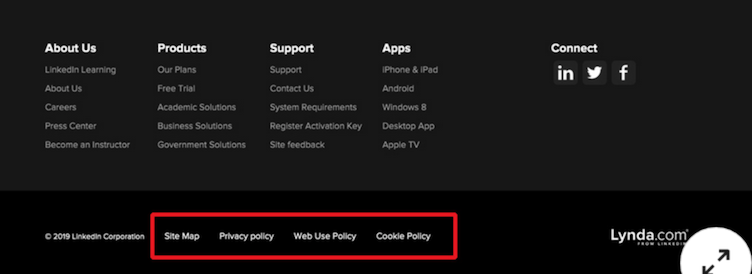
Q21. Revisa el texto en el cuadro rojo en la imagen mostrada. ¿Cuál es la mejor manera de codificar esto en HTML?
- lista ordenada
- lista no ordenada dentro de un elemento nav
- lista ordenada dentro de un elemento nav
- lista no ordenada
Q22. ¿Cuál es la mejor manera de codificar tres opciones dentro de un formulario para que el usuario pueda seleccionar solo un elemento?
- A
<label for="example">Make a choice:</label>
<datalist id="example">
  <option value="Choice 1"></option>
  <option value="Choice 2"></option>
  <option value="Choice 3"></option>
</datalist>
- B
<p>Make a choice:</p>
<input id="choices" name="example" />

<datalist value="choices">
  <option value="Choice 1"></option>
  <option value="Choice 2"></option>
  <option value="Choice 3"></option>
</datalist>
- C
<label for="example">Make a choice:</label>
<input list="example" id="choices" name="choices" />

<datalist id="choices">
  <option value="Choice 1">Choice 1</option>
  <option value="Choice 2">Choice 2</option>
  <option value="Choice 3">Choice 3</option>
</datalist>
- D
<label for="example">Make a choice:</label>
<input list="choices" id="example" name="example" />

<datalist id="choices">
  <option value="Choice 1"></option>
  <option value="Choice 2"></option>
  <option value="Choice 3"></option>
</datalist>
Q23. ¿Cómo confirmas que un documento está escrito en HTML5?
- El servidor envuelve la página web en un wrapper HTML5.
- Usar la declaración
<!DOCTYPE html>que comienza el documento. - El navegador recibe la codificación del servidor para mostrar el documento con HTML5.
- Está encerrado en una etiqueta
<html>.
Q24. ¿Qué logra el código mostrado a continuación?
<picture>
  <source srcset="image1.jpg" media="(min-width: 1000px)" />
  <source srcset="image2.jpg" media="(min-width: 750px)" />
  <img src="image3.jpg" />
</picture>
- Muestra image1.jpg a 1000px y superior, image2.jpg a 750-999px, e image3.jpg a 749px e inferior.
- Muestra image1.jpg a 1000px y superior e image2.jpg a 750-999px, image3.jpg es un predeterminado en caso de que
<picture>no sea compatible. - Muestra image1.jpg a 1000px y superior e image2.jpg a 750px y superior, image3.jpg es un predeterminado en caso de que
<picture>no sea compatible. - Muestra image1.jpg, image2.jpg e image3.jpg a 1000px y superior.
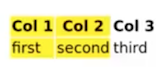
Q25. ¿Qué código producirá esta tabla?
- A
<table>
  <scope cols="2" style="background-color: yellow">
  <tr>
    <th>Col 1</th>
    <th>Col 2</th>
    <th>Col 3</th>
  </tr>
  <tr>
    <td>first</td>
    <td>second</td>
    <td>third</td>
  </tr>
</table>
- B
<table>
  <colgroup span="2" style="background-color: yellow">
  <tr>
    <th>Col 1</th>
    <th>Col 2</th>
    <th>Col 3</th>
  </tr>
  <tr>
    <td>first</td>
    <td>second</td>
    <td>third</td>
  </tr>
</table>
- C
<table>
  <group cols="2" style="background-color: yellow">
  <tr scope="row">
    <th>Col 1</th>
    <th>Col 2</th>
    <th>Col 3</th>
  </tr>
  <tr scope="row">
    <td>first</td>
    <td>second</td>
    <td>third</td>
  </tr>
</table>
- D
<table>
  <columns colspan="2" style="background-color: yellow">
  <tr>
    <th>Col 1</th>
    <th>Col 2</th>
    <th>Col 3</th>
  </tr>
  <tr>
    <td>first</td>
    <td>second</td>
    <td>third</td>
  </tr>
</table>
Q26. ¿Para qué se usa típicamente la etiqueta <hr>? / Alt.: ¿Cuál es el significado semántico de la etiqueta <hr>?
- Esta etiqueta está depreciada y no debe usarse.
- Designa un cambio de tema dentro de una sección al nivel del párrafo.
- Dibuja una línea horizontal.
- Designa un cambio de tema al nivel de la sección. / Alt.: Designa una separación de secciones dentro de un
<article>.
Esta es una pregunta confusa y puede haber argumentos para que tanto la segunda como la tercera opción sean correctas.
MDN: El elemento HTML <hr> representa una ruptura temática entre elementos de nivel de párrafo. Históricamente, esto se ha presentado como una regla o línea horizontal. Aunque todavía puede mostrarse como una regla horizontal en navegadores visuales, este elemento ahora se define en términos semánticos, en lugar de términos de presentación, por lo que si deseas dibujar una línea horizontal, debes hacerlo usando CSS apropiado.
Q27. ¿Qué debe llenar los dos espacios en blanco en el código HTML a continuación?
<section itemscope itemtype="http://schema.org/Restaurant">
  <h1 itemprop="name">Nadia's Garden</h1>
  <p itemscope ______ ______>
    <span itemprop="ratingValue">4.5</span> stars - based on
    <span itemprop="reviewCount">120</span> reviews
  </p>
</section>
itemprop="aggregateRating" itemref="http://schema.org/AggregateRating"itemprop="aggregateRating" itemtype="http://schema.org/AggregateRating"itemid="aggregateRating" itemtype="http://schema.org/AggregateRating"itemid="aggregateRating" itemref="http://schema.org/AggregateRating"
Q28. ¿Qué fragmento HTML enlaza de vuelta a la parte superior de una página web?
- A
<a id="top"></a>

<!-- placed at the top of the page -->

<a href="#top">back to top</a>
- B
<a name="top"></a>

<!-- placed at the top of the page -->

<a href="#top">back to top</a>
- C
<a href="#">back to top</a> <a href="#top">back to top</a>
- D
<button href="#">back to top</button> <button href="#top">back to top</button>
Q29. ¿Qué tres etiquetas fueron depreciadas en HTML4 pero regresaron a HTML5?
<rb> <rp> <rt><acronym> <code> <wbr><hgroup> <q> <wbr><b> <i> <u>
Q30. La etiqueta _ se usa para marcar un fragmento de código corto, mientras que la etiqueta _ se usa para marcar un bloque de código más largo
<kdb>,<pre><pre>,<code><kdb>,<mark><code>,<pre>
Q31. ¿Qué hace el elemento <label>?
- Etiqueta páginas web con información importante.
- Crea un ID para un elemento input correspondiente.
- Anula el valor del atributo name en un elemento input hijo.
- Asocia programáticamente una etiqueta de texto con un elemento de interfaz.
Q32. Para que un enlace se abra en una nueva ventana o pestaña, usa el atributo _
_blank_self_new_parent
Q33. ¿Cuál es la forma más semánticamente precisa de marcar la oración mostrada a continuación? Nota: “TLAs” significa “three-letter acronyms.”
We are fond of our TLAs in web design.
- A
<p>We are fond of our <span title="three-letter acronyms">TLAs</span> in web design.</p>
- B
<p>We are fond of our TLAs in web design.</p>
- C
<p>we are fond of our <abbr title="three-letter acronyms">TLAs</abbr> in web design.</p>
- D
<p>we are fond of our <acronym title="three-letter acronym">TLAs</acronym> in web design.</p>
<acronym> ha sido eliminado en HTML5 y ya no debe usarse. En su lugar, los desarrolladores web deben usar el elemento <abbr>.
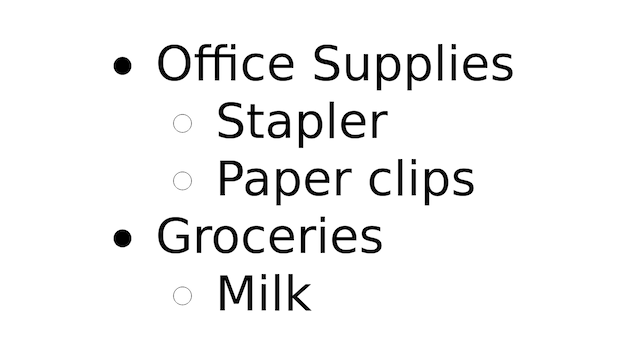
Q34. ¿Cuál es el marcado correctamente anidado para esta lista?
- A
<ul>
  <li>
    office
    <ol style="circle">
      <li>staple</li>
      <li>paper</li>
    </ol>
  </li>
  <li>
    groceries
    <ol style="circle">
      <li>milk</li>
    </ol>
  </li>
</ul>
- B
<ul>
  <li>
    Office Supplies
    <ul>
      <li>Stapler</li>
      <li>Paper clips</li>
    </ul>
  </li>
  <li>
    Groceries
    <ul>
      <li>Milk</li>
    </ul>
  </li>
</ul>
- C
<ul>
  <li>office</li>
  <li>staple</li>
  <li>paper</li>
  <li>groceries</li>
  <li>milk</li>
</ul>
Q35. ¿Qué debe llenar el espacio en blanco a continuación?
<link href="phone.css" rel="stylesheet" _____="print" />
- title
- type
- device
- media
Q36. ¿Cuál es la forma semánticamente correcta de marcar este diseño?
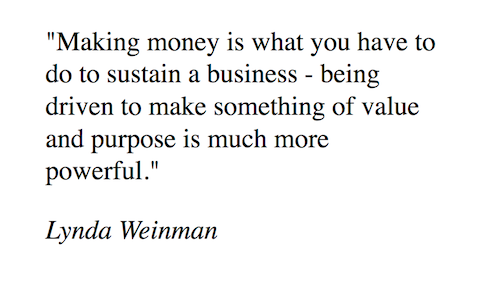
- A
<p>
  "Making money is what you have to do to sustain a business—being driven to make something of value
  and purpose is much more powerful."
</p>
<p><em>Lynda Weinman</em></p>
- B
<blockquote>
  <q
    >"Making money is what you have to do to sustain a business—being driven to make something of
    value and purpose is much more powerful."</q
  >
  <cite><em>Lynda Weinman</em></cite>
</blockquote>
- C
<blockquote>
  <p>
    "Making money is what you have to do to sustain a business—being driven to make something of
    value and purpose is much more powerful."
  </p>
  <cite>Lynda Weinman</cite>
</blockquote>
- D
<section>
  <q
    >"Making money is what you have to do to sustain a business—being driven to make something of
    value and purpose is much more powerful."</q
  >
  <cite>Lynda Weinman</cite>
</section>
Q37. ¿Qué opción usa la terminología correcta al describir este marcado: <p>info</p>?
- El abridor del elemento es
<p>, el cerrador del elemento es</p>, y la información del elemento es info. - La etiqueta de inicio es
<p>, la etiqueta de fin es</p>, y el HTML encerrado es info. - La etiqueta de inicio es
<p>, la etiqueta de fin es</p>, y el contenido del elemento es info. - El elemento de inicio es
<p>, el elemento de fin es</p>, y el contenido de la etiqueta es info.
Q38. ¿Cuál es la diferencia entre <input type="submit" value="click me"> y <button type="submit">Click me</button>?
- No hay diferencia. Ambos renderizarán un botón que envía un formulario.
- Ambos enviarán un formulario. Sin embargo, el
<button>puede tener contenido diferente al texto, como una imagen o elementos HTML anidados, mientras que el<input>no puede. <input type="button">ha sido depreciado en HTML5. Debes usar la etiqueta<button>en su lugar.- Ambos enviarán un formulario. Sin embargo, el
<input>puede tener contenido diferente al texto, como una imagen o elementos HTML anidados, mientras que el<button>no puede.
Q39. ¿Cuál es la mejor manera semántica de indicar que el texto se refiere a la entrada del teclado?
<p>Press the <tt>Enter</tt> key to proceed.</p><p>Press the <kbd>Enter</kbd> key to proceed.</p><p>Press the <samp>Enter</samp> key to proceed.</p><p>Press the Enter key to proceed.</p>
Q40. ¿Qué hace este código?
<audio controls>
  <source src="sound.mp3" type="audio/mpeg" />
  <source src="sound.ogg" type="audio/ogg" />
  <source src="sound.wav" type="audio/wav" />
</audio>
- El navegador elige el primer formato compatible para reproducir con los controles predeterminados del navegador.
- El navegador elige el mejor formato de audio para reproducir con controles proporcionados por JavaScript.
- El navegador reproduce cada archivo de sonido en orden automáticamente. El usuario tiene controles para detener la reproducción.
- El navegador elige el primer archivo de sonido compatible y repetirá el sonido hasta que el usuario lo detenga.
Q41. ¿Qué atributo aplica una sugerencia de atajo de teclado al elemento actual?
accesskeyshortcutkeyboardaccess
Q42. ¿Cuál es la forma correcta de codificar un enlace que, al hacer clic, enviará un correo electrónico a email@example.com con el asunto de “Hello”?
<a href="mailto:email@example.com&subject=Hello">Click me</a><a href="mailto:email@example.com">Hello</a><a href="mailto:email@example.com?subject=Hello">Click me</a><a href="mailto:email@example.com?&subject=Hello">Click me</a>
Q43. ¿Qué etiqueta es el elemento raíz de un documento HTML?
<!DOCTYPE html><html><body><root>
La etiqueta <html> es el elemento raíz de un documento HTML, lo que significa que contiene todos los contenidos y etiquetas del documento HTML dentro de ella. El elemento HTML representa la raíz de un documento.
Q44. ¿Qué fragmento de código crea el diseño mostrado, comenzando en <table> y terminando en </table>?
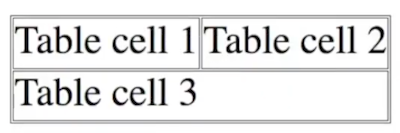
- A
<tr>
  <td>Table cell 1</td>
  <td>Table cell 2</td>
</tr>
<tr>
  <td rowspan="2">Table cell 3</td>
</tr>
- B
<tr>
  <td>Table cell 1</td>
  <td>Table cell 2</td>
  <td>Table cell 3</td>
</tr>
- C
<tr>
  <td>Table cell 1</td>
  <td>Table cell 2</td>
</tr>
<tr>
  <td colspan="2">Table cell 3</td>
</tr>
- D
<tr>
  <td>Table cell 1</td>
  <td>Table cell 2</td>
</tr>
<tr>
  <td>Table cell 3</td>
</tr>
Q45. ¿Qué opción NO es un valor legal para el atributo name dentro de una etiqueta <meta>?
- charset
- viewport
- generator
- author
Q46. ¿Qué formulario está codificado correctamente?
- A
<form>
  <legend>Title</legend>
  <fieldset>
    <label for="name">Your name:</label>
    <input type="text" name="name" id="name" />
    <button type="submit">Submit</button>
  </fieldset>
</form>
- B
<form>
  <fieldset>
    <legend>Title</legend>
    <p>Your name:</p>
    <input type="text" name="name" id="name" />
    <input type="submit" value="Submit" />
  </fieldset>
</form>
- C
<form>
  <fieldset>
    <legend>Title</legend>
    <label for="name">Your name:</label>
    <input type="text" name="name" id="name" />
    <button type="submit">Submit</button>
  </fieldset>
</form>
- D
<form>
  <legend>Title</legend>
  <label for="name">Your name:</label>
  <input type="text" name="name" id="name" />
  <input type="submit" value="Submit" />
</form>
Q47. ¿Qué hace el atributo poster en la etiqueta <video>?
- Especifica una imagen que debe mostrarse mientras se descarga el video y hasta que se reproduzca el video.
- Especifica una imagen que solo se muestra si hay un problema con el video.
- Especifica una imagen que debe mostrarse hasta que se reproduzca el video.
- Especifica una imagen que debe mostrarse mientras se descarga el video.
Q48. ¿Qué hace este código?
<audio controls src="sound.mp3" type="audio/mpeg">When does this text display?</audio>
- El texto se muestra sobre los controles de audio a menos que se use CSS para posicionarlo en otro lugar.
- El texto se muestra bajo los controles de audio.
- El texto se muestra cuando el navegador no puede reproducir el sonido.
- El texto nunca se muestra.
Q49. ¿Cuál es el propósito principal de la etiqueta <canvas>?
- Permite que las imágenes raster se rendericen en la página web.
- Muestra imágenes anotadas.
- Permite dibujar en un bitmap a través de JavaScript.
- Permite que las imágenes vectoriales se rendericen en la página web.
Q50. ¿Qué opción contiene tres elementos válidos de nivel de bloque?</li>
<details> <abbr> <figcaption><canvas> <select> <noscript><dt> <table> <pre><kbd> <p> <main>
Q51. En el código a continuación, ¿cuál es el propósito del atributo lang?
<p lang="en-GB">Welcome to our wonderful website.</p>
- Establece el idioma para el sitio web—en este caso, inglés.
- Establece el idioma y dialecto para el sitio web—en este caso, inglés británico.
- Establece el idioma y dialecto para el párrafo—en este caso, inglés británico.
- Establece el idioma para el párrafo—en este caso, inglés.
Q52. ¿Qué formatos de imagen pueden ser mostrados por todos los navegadores web?
- JPG, GIF, TIF
- JPG, TIF, BMP
- TIF, BMP, GIF
- PNG, GIF, JPG
Q53. Revisa el código a continuación. ¿Cuál es la URL absoluta para una página llamada page.html?
<base href="http://www.linkedin.com/dir/" />
http://www.linkedin.com/dir/page.htmlpage.htmlhttp://www.linkedin.com/page.htmldir/page.html
Q54. ¿Cuál es la forma correcta de incluir una hoja de estilos llamada style.css en el <head> de tu documento?
<style link="style.css"><link rel="stylesheet" href="style.css"><style src="style.css"></style><link style="style.css">
Q55. Quieres tener espaciado simple entre algunas líneas, como en un poema o una dirección. ¿Qué enfoque debes usar?
- Envolver el texto en una caja que tenga el ancho correcto para que todo se ajuste correctamente. Establecer el ancho de la caja con CSS.
- Separar las líneas con un
<p>, luego usar CSS para hacer espaciado simple. - Usar la etiqueta
<pre>para hacer que el espaciado de línea se vea exactamente como quieres. - Separar las líneas con la etiqueta
<br>.
De MDN (<br>: El elemento Line Break):
Preocupaciones de accesibilidad

Crear párrafos separados de texto usando <br> no solo es una mala práctica, es problemático para las personas que navegan con la ayuda de tecnología de lectura de pantalla. Los lectores de pantalla pueden anunciar la presencia del elemento, pero no cualquier contenido contenido dentro de <br>s. Esto puede ser una experiencia confusa y frustrante para la persona que usa el lector de pantalla.

Usa elementos <p>, y usa propiedades CSS como margin para controlar su espaciado.
Q56. ¿Qué hace la etiqueta <wbr>?
- Requiere que el navegador ajuste la línea actual en ese punto.
- Divide una palabra en dos partes, usando un guión para conectar las palabras.
- Formatea una oración para que sea fácilmente divisible.
- Presenta una oportunidad para una ruptura en una palabra muy larga si es necesario para la visualización adecuada de la página.
Q57. Revisa el código a continuación. ¿Cómo incluyes subnavegación para Link 2 que incluya un enlace?
<nav>
  <ul>
    <li><a href="#">Link 1</a></li>
    <li><a href="#">Link 2</a></li>
    <li><a href="#">Link 3</a></li>
  </ul>
</nav>
- A
<nav>
  <ul>
    <li><a href="#">Link 1</a></li>
    <li><a href="#">Link 2</a></li>
    <ul>
      <li><a href="#">Link 2a</a></li>
    </ul>
    <li><a href="#">Link 3</a></li>
  </ul>
</nav>
- B
<nav>
  <ul>
    <li><a href="#">Link 1</a></li>
    <li>
      <a href="#">Link 2</a>
      <ul>
        <li><a href="#">Link 2a</a></li>
      </ul>
    </li>
    <li><a href="#">Link 3</a></li>
  </ul>
</nav>
- C
<ul>
  <nav>
    <li><a href="#">Link 1</a></li>
    <li>
      <a href="#">Link 2</a>
      <ul>
        <nav>
          <li><a href="#">Link 2a</a></li>
        </nav>
      </ul>
    </li>
    <li><a href="#">Link 3</a></li>
  </nav>
</ul>
- D
<nav>
  <ul>
    <li><a href="#">Link 1</a></li>
    <li><a href="#">Link 2</a></li>
    <nav>
      <ul>
        <li><a href="#">Link 2a</a></li>
      </ul>
    </nav>
    <li><a href="#">Link 3</a></li>
  </ul>
</nav>
Q58. ¿Cuál es la forma correcta de codificar un comentario en HTML?
//this is a comment/* this is a comment */<! this is a comment -><!-- this is a comment -->
Q59. ¿Qué afirmación es falsa?
- Los elementos en línea pueden anidarse dentro de elementos en línea.
- Los elementos de bloque pueden anidarse dentro de elementos de bloque.
- Los elementos en línea pueden anidarse dentro de elementos de bloque.
- Los elementos de bloque pueden anidarse dentro de elementos en línea.
Q60. ¿Cuál es la mejor semántica para usar citas en HTML?
Steve Kruz said: "He will Win"
<q><quote><blockquote><notation>
Q61. ¿Cómo se verá un video mostrado en una página web completamente cargada si se usa la etiqueta <video> y el atributo autoplay no está configurado?
- Mostrará un fotograma aleatorio del video, a menos que se establezca el atributo poster.
- Mostrará el primer fotograma del video, a menos que se establezca el atributo poster.
- No mostrará nada a menos que se establezca el atributo poster.
- Mostrará una ventana negra a menos que se establezca el atributo poster.
Q62. ¿Cuál es la forma correcta de describir un elemento vacío / Alt.: ¿Cuál es la forma correcta de describir un elemento vacío, como una etiqueta de salto de línea?
- Tiene etiquetas de apertura y cierre pero no tiene contenido hijo.
- No muestra nada en un sitio web.
- No tiene contenido hijo ni etiqueta de cierre.
- Tiene contenido hijo pero no etiqueta de cierre.
Q63. ¿Cuál es el propósito de async en este código?
<script async src="myscript.js"></script>
- Descarga el script del servidor cuando los recursos lo permiten.
- Ejecuta el script después de que se complete el análisis HTML.
- Ejecuta el script cuando el script está listo.
- Pausa el análisis del código HTML mientras se ejecuta el script.
Q64. ¿Qué hace este código en una página que visitas por primera vez?
<audio autoplay loop src="sound.mp3" type="audio/mpeg"></audio>
- Cuando se presiona el botón Play, el navegador reproduce el sonido una y otra vez hasta que el usuario lo detiene.
- El navegador reproduce el sonido una vez automáticamente en segundo plano. El usuario no tiene control sobre el sonido.
- El navegador reproduce el sonido automática y continuamente en segundo plano. El usuario puede detener el sonido en cualquier momento.
- No hace nada. Los navegadores modernos requieren alguna forma de interacción antes de permitir que una página reproduzca automáticamente con audio.
Q65. ¿Cuál es la diferencia entre las etiquetas <head> y <header>?
- Solo hay una etiqueta
<head>por página, mientras que puede haber muchas etiquetas<header>. - La etiqueta
<head>puede contener enlaces CSS y JavaScript, mientras que la etiqueta<header>puede contener encabezados y enlaces de navegación. - La etiqueta
<head>contiene meta información, mientras que la etiqueta<header>contiene navegación, logos y otro contenido identificativo de la página. - Todas las anteriores.
Q66. En este código, ¿cuál es el propósito de defer?
<script defer src="myscript.js"></script>
- Descarga el script del servidor cuando los recursos lo permiten.
- Ejecuta el script después de que se complete el análisis HTML.
- Ejecuta el script cuando el script está listo.
- Pausa el análisis del código HTML mientras se ejecuta el script.
Q67. El código a continuación contiene algunos errores. ¿Qué opción corrige todos los errores?
<table>
  <tr>
    Cell 1
  </tr>
  <td>Cell 2</td>
  <caption>
    A table
  </caption>
</table>
- A
<caption>
  A table
</caption>
<table>
  <td>
    <tr>
      Cell 1
    </tr>
    <tr>
      Cell 2
    </tr>
  </td>
</table>
- B
<caption>
  A table
</caption>
<table>
  <tr>
    <td>Cell 1</td>
    <td>Cell 2</td>
  </tr>
</table>
- C
<table>
  <caption>
    A table
  </caption>
  <tr>
    <td>Cell 1</td>
    <td>Cell 2</td>
  </tr>
</table>
- D
<table>
  <tr>
    <td>Cell 1</td>
    <td>Cell 2</td>
  </tr>
  <caption>
    A table
  </caption>
</table>
Q68. Dada la estructura de archivos y directorios mostrada aquí, ¿cuál es el elemento correcto para colocar en el archivo profit.html para enlazar a info.html?
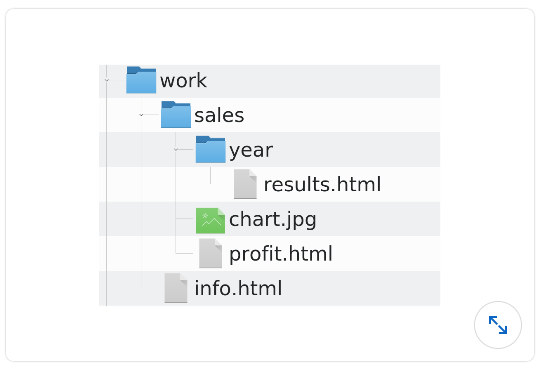
<a href="../work/info.html">Ver Información </a><a href="../info.html">Ver Información </a><a href="../../info.html">Ver Información </a><a href="info.html">Ver Información </a>
Q69. ¿Cuándo deberías usar el elemento <article>?
- Para publicaciones de blog y otros elementos de redes sociales
- Para el área de contenido principal de tu sitio web
- Cuando el contenido se sostiene solo como una unidad, es adecuado para sindicación, o es reutilizable
- Para asociar comentarios con una publicación de blog
Q70. ¿Qué lista comprende tres elementos vacíos?
- A
<area />
<embed />
<strong></strong>
- B
<input />
<br />
<p></p>
- C
<link>
<meta>
<title>
- D
<wbr />
<base />
<source />
Q71. ¿Qué fragmento de HTML, al hacer clic, realiza una llamada telefónica en un dispositivo móvil?
<a href="tel:802-555-1212">Llámame</a><a href="phone">802-555-1212</a><a href="tel">802-555-1212</a><a href="phone:802-555-1212">Llámame</a>
Q72. ¿Cuál es el propósito del atributo class?
- Las clases permiten a CSS seleccionar elementos específicos en la página. Puedes listar tantos nombres de clase dentro del atributo class como desees, separados por espacios.
- Las clases permiten a CSS y JavaScript seleccionar elementos específicos en la página. Puedes listar solo un nombre de clase por atributo class.
- Las clases permiten a CSS seleccionar elementos específicos en la página. Puedes listar solo un nombre de clase por atributo class.
- Las clases permiten a CSS y JavaScript seleccionar elementos específicos en la página. Puedes listar tantos nombres de clase dentro del atributo class como desees, separados por espacios.
Q73. ¿Qué opción no es un atributo type legal para la etiqueta <input>?
<input type="color"><input type="tel"><input type="week"><input type="num">
Q74. ¿Cuál es la forma más semántica de marcar esta oración para que “happy talk must die” se renderice como una cita en línea?
As Steve Krug once said, happy talk must die.
<p>As Steve Krug once said,<b>happy talk must die.</b></p><p>As Steve Krug once said,<i>happy talk must die.</i></p><p>As Steve Krug once said,<blockquote>happy talk must die.</blockquote></p><p>As Steve Krug once said,<q>happy talk must die.</q></p>
Etiqueta <q>
La mayoría de los navegadores mostrarán las etiquetas q como elementos en línea con comillas
Q75. ¿Cuál es la forma más semánticamente precisa de crear una barra de navegación principal, mostrada en dirección horizontal?
- A
<p>
  <a href="index.html">Home</a>
  <a href="about.html">About</a>
  <a href="contact.html">Contact</a>
</p>
- B
<nav>
  <a href="index.html">Home</a>
  <a href="about.html">About</a>
  <a href="contact.html">Contact</a>
</nav>
- C
<nav>
  <ol>
    <li><a href="index.html">Home</a></li>
    <li><a href="about.html">About</a></li>
    <li><a href="contact.html">Contact</a></li>
  </ol>
</nav>
- D
<nav>
  <ul>
    <li><a href="index.html">Home</a></li>
    <li><a href="about.html">About</a></li>
    <li><a href="contact.html">Contact</a></li>
  </ul>
</nav>
Q76. ¿Cuál opción es la mejor manera de marcar este diseño?
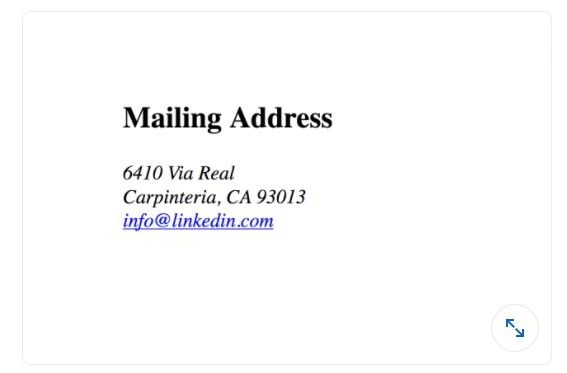
- A
<h4>Mailing Address</h4>
<address>
  6410 Via Real <br />
  Carpinteria, CA 93013<br />
  <a href="mailto:info@linkedin.com">info@linkedin.com</a>
</address>
- B
<h4><strong>Mailing Address</h4>
<address><em>
  6410 Via Real <br>
  Carpinteria, CA 93013<br>
  <a href="mailto:info@linkedin.com">info@linkedin.com</a>
</em></address>
- C
<h4>Mailing Address</h4>
<p>
  <em>
    6410 Via Real <br />
    Carpinteria, CA 93013<br />
    <a href="mailto:info@linkedin.com">info@linkedin.com</a>
  </em>
</p>
- D
<p><strong>Mailing Address</strong></p>
<p>
  <em>
    6410 Via Real <br />
    Carpinteria, CA 93013<br />
    <a href="mailto:info@linkedin.com">info@linkedin.com</a>
  </em>
</p>
La etiqueta <address> define la información de contacto para el autor/dueño de un documento o un artículo. La información de contacto puede ser una dirección de correo electrónico, URL, dirección física, número de teléfono, identificador de redes sociales, etc. El texto en el elemento <address> generalmente se renderiza en cursiva, y los navegadores siempre agregarán un salto de línea antes y después del elemento <address>.
Q77. ¿Cuál es el propósito principal de HTML?
- HTML estructura la página web, identificando sus elementos como párrafos, encabezados y listas.
- HTML estructura y proporciona una apariencia rudimentaria a las páginas web.
- HTML es responsable de la estructura, estilo e interactividad de las páginas web.
- HTML es responsable de la estructura y estilo de las páginas web.
Q78. Para el código HTML a continuación, ¿cuándo se mostrará “Sample Text” al navegador?
<noscript>Sample Text</noscript>
- cuando no se use JavaScript en esta página web
- cuando JavaScript no es compatible con el navegador o si JavaScript está deshabilitado en el navegador
- cuando JavaScript está deshabilitado en el navegador web
- cuando JavaScript no es compatible con el navegador web
Q79. ¿Cómo se renderizará este código por defecto en la mayoría de los navegadores web?
<details>
  <h4>Mixed Berry Tart.</h4>
  <p>
    Raspberries, blueberries, and strawberries on top of a creamy filling served in a crispy tart.
  </p>
</details>
- A
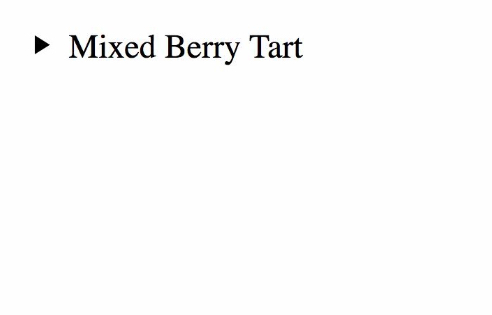
- B
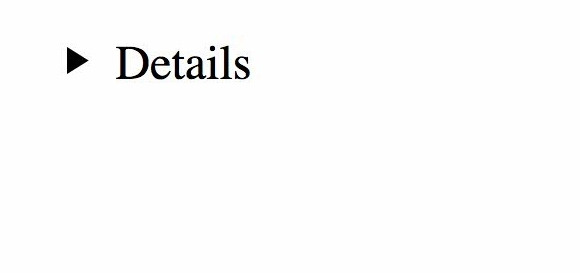
- C
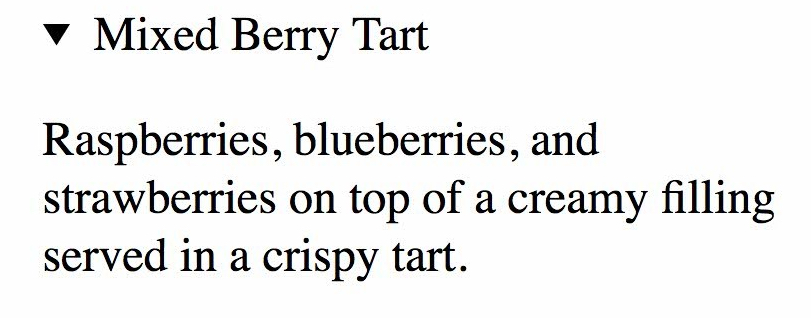
- D
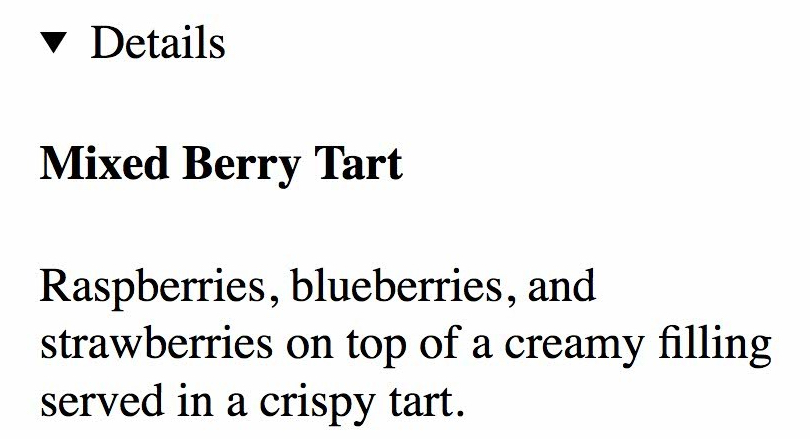
Q80. ¿Cuál es la diferencia entre <svg> y <canvas>?
<svg>produce gráficos vectoriales, mientras que<canvas>produce gráficos raster.<svg>se integra con JavaScript, mientras que<canvas>no.<svg>produce gráficos raster, mientras que<canvas>produce gráficos vectoriales.<svg>no puede usarse como imagen de fondo, mientras que<canvas>puede usarse como fondo
Q81. ¿Cuál es la diferencia entre los atributos readonly y disabled para el elemento <textarea>?
- readonly permite hacer clic en el elemento
<textarea>. disabled previene toda interacción con el control. - readonly es un atributo inválido para
<textarea>, mientras que disabled es un atributo válido. - disabled permite hacer clic en el elemento
<textarea>. readonly previene toda interacción con el control. - disabled es un atributo inválido para
<textarea>, mientras que readonly es un atributo válido.
Q82. En este código, ¿qué es target?
<a target="_blank">...</a>
- un atributo
- una etiqueta
- contenido
- un elemento
Q83. ¿Cuál es la forma correcta de agregar una URL de envío a un elemento button?
- A
<button submit="http://example.com/process">Process data</button>
- B
<button action="http://example.com/process">Process data</button>
- C
<button formaction="http://example.com/process">Process data</button>
- D
<button method="http://example.com/process">Process data</button>
formaction — La URL que procesa la información enviada por el botón. Anula el atributo action del propietario del formulario del botón. No hace nada si no hay propietario del formulario. Fuente
Q84. ¿Cuál es el mejor marcado para producir este texto?
x<y&z>w
<p>x<y&z>w</p><p>x<y&z>w</p><p>x<<y&&z>>w<p>x<y&z>w</p>
Esta pregunta tiene un problema, sin embargo esta respuesta contará como correcta
Es una pregunta demasiado extraña porque todos esos métodos no funcionan. El método correcto es usar &, <, >.
Q85. ¿Qué está mal con este fragmento de código?
<label>Address:</label> <input type="text" name="address" id="address-input" />
- El
<label>y<input>deberían estar anidados dentro de un elemento<fieldset>. - “address” no es un valor válido para el atributo name en un elemento
<input>. - Al elemento
<label>le falta un id establecido en “address-input”. - Al elemento
<label>le falta un atributo for establecido en “address-input”.
Q86. ¿Cuál es el método predeterminado para el envío de formularios?
- GET
- POST
- PUT
- SUBMIT
Q87. ¿Cuál es el marcado más semánticamente correcto para un comentario lateral en letra pequeña?
<p>Obtén 10% de descuento<small>no válido en Francia</small></p><p>Obtén 10% de descuento<!--no válido en Francia--> </p><p>Obtén 10% de descuento<comment>no válido en Francia</comment></p><p>Obtén 10% de descuento<aside>no válido en Francia</aside></p>
Q88. ¿Qué opción producirá la palabra española canción?
<p lang="es">canción</p><p lang="es">canción</p><p lang="es">cancio'n</p><p lang="es">canci'on</p>
Q89. ¿Cuál es el propósito de <caption>?
<caption>proporciona captions para<audio>,<video>,<img>, y<table>.<caption>proporciona captions para<table>.<caption>proporciona captions para<audio>,<video>, y<table>.<caption>proporciona captions para<img>,<audio>, y<video>.
Q90. El atributo value está asociado con qué conjunto de etiquetas?
- A
<li>
  <input />
  <option></option>
</li>
- B
<input>
<option>
<textarea>
- C
<button>
  <input />
  <form></form>
</button>
- D
<input /> <label> <meter></meter></label>
Q91. ¿Qué está mal con este código?
<img src="https://source.unsplash.com/random">
<img>debe estar emparejado con una etiqueta<caption>.- Al elemento
<img>le falta un atributo alt. <img>no es un elemento HTML válido. En su lugar, usa<image src="..."/>.<img>debe estar anidado dentro de una etiqueta<figure>.
Q92. ¿Cuál opción es el marcado más semánticamente correcto para especificar la primera definición de un término?
<p>The<dl>focal length</dl>of a lens gives the distance from the lens to the image sensor.</p><p>The<dfn>focal length<dfn>of a lens gives the distance from the lens to the image sensor.</p><p>The<dt>focal length</dt>of a lens gives the distance from the lens to the image sensor.</p><p>The<dd>focal length</dd>of a lens gives the distance from the lens to the image sensor.</p>
Elemento Definition => El elemento HTML <dfn> se usa para indicar el término que se define dentro del contexto de una frase o oración de definición.**Elemento Description Term => El elemento HTML <dt> especifica un término en una lista de descripción o definición, y como tal debe usarse dentro de un elemento <dl>.**Elemento Description Details => El elemento HTML <dd> proporciona la descripción, definición o valor para el término precedente (<dt>) en una lista de descripción (<dl>).
Q93. ¿Cuál opción es la mejor manera de codificar tres opciones dentro de un formulario para que el usuario pueda seleccionar múltiples elementos?
- A
<input type="radio" name="example" /> Choice 1 <br />
<input type="radio" name="example" /> Choice 2 <br />
<input type="radio" name="example" /> Choice 3
- B
<input type="checkbox" name="example" /> Choice 1 <br />
<input type="checkbox" name="example" /> Choice 2 <br />
<input type="checkbox" name="example" /> Choice 3
- C
<label><input type="checkbox" name="example" /> Choice 1</label><br />
<label><input type="checkbox" name="example" /> Choice 2</label><br />
<label><input type="checkbox" name="example" /> Choice 3</label>
- D
<label><input type="radio" name="example" /> Choice 1</label><br />
<label><input type="radio" name="example" /> Choice 2</label><br />
<label><input type="radio" name="example" /> Choice 3</label>
Los elementos <input> de tipo checkbox se renderizan por defecto como cajas que están marcadas (tildadas) cuando se activan como podrías ver en un formulario oficial del gobierno. La apariencia exacta depende de la configuración del sistema operativo bajo el cual se ejecuta el navegador. Generalmente, es un cuadrado pero puede tener esquinas redondeadas.
Q94. ¿Cómo marcarías una pieza de arte ASCII (un emoticono) de manera accesible?
<pre role="emoticon" aria-label="ASCII emoticon of a shrug">¯\_(ツ)_/¯</pre><pre role="img" aria-label="ASCII emoticon of a shrug">¯\_(ツ)_/¯</pre><dfn title="ASCII emoticon of a shrug">¯\_(ツ)_/¯</dfn><label for="art">ASCII emoticon of a shrug</label><pre role="img" id="art">¯\_(ツ)_/¯</pre>
Q95. ¿Cuál ejemplo es una forma estándar en HTML5 para agregar metadatos de autor a una página?
<metadata name="author" content="Author Name"><meta name="author">Author Name</meta><meta name="creator" content="Author Name"><meta name="author" content="Author Name">
Q96. Dados los siguientes requisitos, selecciona la configuración correcta de input: Un input que permite al usuario seleccionar de un rango de valores enteros entre 0 y 100 (inclusive) en incrementos de 5
<input type="range" min="0" max="100" by="5" /><input type="range" min="0" max="100" step="5" /><input type="number" min="0" max="100" step="5" /><input type="number" min="0" max="100" by="5" />
Los elementos <input> de tipo range permiten al usuario especificar un valor numérico que no debe ser menor que un valor dado y no mayor que otro valor dado. El atributo step es un número que especifica la granularidad a la que debe adherirse el valor.
Q97. ¿Cuál opción es un marcado válido para un elemento <head>?
<head class="Page Section Information" id="head"><title>Page Title</title></head><head><title>Page Title</title> <img src="favicon.icon" alt=""></head><head><title>Page Title</title> <data value="email">email@example.com</data></head><head><title>Page Title</title><address>email@example.com</address></head>
El elemento HTML <head> contiene información legible por máquina (metadatos) sobre el documento, como su título. La etiqueta <data> se usa para agregar una traducción legible por máquina de un contenido dado.
Fuente 1/
Fuente 2
Q98. Necesitas agregar comentarios al blog de la empresa. ¿Cuál es el marcado más semántico para una lista de comentarios?
- A
<aside>
  <h3>Comments</h3>
  <article>First comment.</article>
  <article>Second comment.</article>
</aside>
- B
<div aria="dpub-comments">
  <h3>Comments</h3>
  <div aria="dpub-comment">First comment.</div>
  <div aria="dpub-comment">Second comment.</div>
</div>
- C
<aside>
  <h3>Comments</h3>
  <aside>First comment.</aside>
  <aside>Second comment.</aside>
</aside>
- D
<div typeof="comments">
  <h3>Comments</h3>
  <div typeof="comment">First comment.</div>
  <div typeof="comment">Second comment.</div>
</div>
El elemento HTML <article> representa una composición autocontenida en un documento, página, aplicación o sitio, que está destinada a ser distribuible o reutilizable de forma independiente (por ejemplo, en sindicación). Ejemplo: un comentario enviado por el usuario.
Fuente
Q99. Para hacer algo editable por el usuario, necesitas establecer el atributo _ en _
access; allowdesignMode; truecontenteditable; truecontenteditable; yes
El atributo global contenteditable es un atributo enumerado que indica si el elemento debe ser editable por el usuario. Si es así, el navegador modifica su widget para permitir la edición. El atributo debe tomar uno de los siguientes valores: true o una cadena vacía, que indica que el elemento es editable; false, que indica que el elemento no es editable.
Fuente
Q100. ¿Cuál opción es la forma estándar de incluir un valor en un formulario sin hacerlo visible o editable por el usuario?
<input type="invisible" name="important" value="information"><input type="text" style="display: none;" name="important" value="information"><input type="hidden" name="important" value="information"><input type="text" hidden name="important" value="information">
Los elementos <input> de tipo hidden permiten a los desarrolladores web incluir datos que no pueden ser vistos o modificados por los usuarios cuando se envía un formulario. Por ejemplo, el ID del contenido que se está ordenando o editando actualmente, o un token de seguridad único. Los inputs ocultos son completamente invisibles en la página renderizada, y no hay forma de hacerlos visibles en el contenido de la página. Fuente
Q101. ¿Cuál es la forma semántica de agregar un título identificativo a una tabla?
<table><label>Heading</label>...</table><table><title>Heading</title>...</table><table><legend>Heading</legend>...</table><table><caption>Heading</caption>...</table>
El elemento HTML <caption> especifica el caption (o título) de una tabla. Fuente
Q102. ¿Qué archivo de imagen referenciado en el atributo srcset de este elemento img debería cargar un navegador en un teléfono móvil pequeño?
<img
  srcset="medium.jpg 320w, large.jpg 1280w"
  src="small.jpg"
  alt="Our favorite image"
  sizes="(min-width: 1200px) 640px, 100vw"
/>
- small.jpg
- medium.jpg
- none of them
- large.jpg
El navegador: 1. Mirará el ancho de su dispositivo. 2. Determinará qué condición de medios en la lista de tamaños es la primera en ser verdadera. 3. Mirará el tamaño del slot dado a esa media query. 4. Cargará la imagen referenciada en la lista srcset que tenga el mismo tamaño que el slot o, si no hay una, la primera imagen que sea más grande que el tamaño del slot elegido. Fuente
Q103. ¿Qué descripción está codificada correctamente?
- A
<dl>
  <dt>Server</dt>
  <dd>Software used to serve webpages, like Apache.</dd>
  <dd>Hardware used to provide data to other computers.</dd>
  <!-- Other terms and descriptions -->
</dl>
- B
<dt>
  <dl>Server</dl>
  <dd>Software used to serve webpages, like Apache.</dd>
  <dd> Hardware used to provide data to other computers.</dd>
  <!-- Other terms and descriptions -->
</dt>
- C
<dl>
  <dt>Server</dt>
  <dd>Software used to serve webpages, like Apache.</dd>
  <dt>Hardware used to provide data to other computers.</dt>
  <!-- Other terms and descriptions -->
</dl>
- D
<dl>
  <dd>Server</dd>
  <dt>Software used to serve webpages, like Apache.</dt>
  <dt>Hardware used to provide data to other computers.</dt>
  <!-- Other terms and descriptions -->
</dl>
Q104. ¿Qué está mal con este código?
<ul>
  <h2>Espresso Drinks</h2>
  <li>Espresso</li>
  <li>Latte</li>
  <li>Cappuccino</li>
  <li>Mocha</li>
</ul>
- Nada está mal.
<ul>no puede contener un elemento de encabezado como hijo directo.- Se debería usar un
<h1>aquí en lugar de una etiqueta<h2>. - Solo
<ol>permite que los descendientes directos contengan elementos distintos a<li>, así que usa un<ol>aquí en su lugar.
El modelo de contenido de ul solo acepta "Cero o más elementos li y elementos de soporte de script". Fuente
Q105. Un diseñador te dio código CSS que solo debe ejecutarse cuando el dispositivo que renderiza la página está en modo oscuro. ¿Cómo incrustarías ese código?
<style media="light-mode: false">/* CSS code */</style><style media="color-mode: dark">/* CSS code */</style><style media="prefers-color-scheme: dark">/* CSS code */</style><style media="color-scheme: dark">/* CSS code */</style>
Q106. ¿Cómo marcarías un encabezado para una fila de tabla?
- A
<table>
  <thead scope="row">
    <th row="1">Header</th>
  </thead>
  <tr>
    <td>10</td>
    <td>18</td>
  </tr>
</table>
- B
<table>
  <tr>
    <th scope="row">Header</th>
    <td>10</td>
    <td>18</td>
  </tr>
</table>
- C
<table>
  <tr>
    <thead scope="row">
      Header
    </thead>
    <td>10</td>
    <td>18</td>
  </tr>
</table>
- D
<table>
  <tr>
    <th>Header</th>
    <td>10</td>
    <td>18</td>
  </tr>
</table>
Q107. ¿Qué declaración es correcta?
- El elemento
<main>representa el contenido dominante de un<article>en un documento. - El elemento
<main>representa el contenido dominante de una<section>de un documento. Puedes tener un elemento<main>por sección. - El elemento
<main>representa el contenido dominante de tu documento. Solo puede haber un elemento<main>que no esté oculto. - El elemento
<article>representa el contenido dominante de tu documento. Solo puede haber un elemento<article>que no esté oculto.
Q108. Los usuarios informan que un formulario no funciona. ¿Cuál es el culpable?
<form action="/choices" disabled>
  <fieldset disabled>
    <legend>choices</legend>
    <label>Choice 1 <input type="radio" name="choice" value="choice1" /></label>
    <label>Choice 2 <input type="radio" name="choice" value="choice1" /></label>
    <label>Choice 3 <input type="radio" name="choice" value="choice1" /></label>
    <label>Choice 4 <input type="radio" name="choice" value="choice1" /></label>
    <button>Choose!</button>
  </fieldset>
</form>
- El elemento form está deshabilitado.
- No hay elemento .
- El fieldset está deshabilitado.
- No hay método establecido en el formulario.
Un fieldset deshabilitado es inutilizable y no se puede hacer clic en él. Fuente
Q109. ¿Qué lista de descripción está codificada correctamente?
- A
<dl>
  <dt>Server</dt>
  <dd>Software used to server webpages, like Apache.</dd>
  <dd>Hardware used to provide data to other computers.</dd>
  <!--Other terms and descriptions -->
</dl>
- B
<dl>
  <dd>Server</dd>
  <dt>Software used to server webpages, like Apache.</dt>
  <dt>Hardware used to provide data to other computers.</dt>
  <!--Other terms and descriptions -->
</dl>
- C
<dt>
    <dl>Server</dl>
    <dd>Software used to server webpages, like Apache.</dd>
    <dd>Hardware used to provide data to other computers.</dd>
    <!--Other terms and descriptions -->
</dt>
- D
<dl>
  <dt>Server</dt>
  <dd>Software used to server webpages, like Apache.</dd>
  <dt>Hardware used to provide data to other computers.</dt>
  <!--Other terms and descriptions -->
</dl>
Q110. ¿Qué significa la a en la etiqueta HTML?
- asignar
- agregar etiqueta
- etiqueta anchor
- Ninguna de las anteriores
Q111. ¿Cuál es el elemento HTML correcto para insertar un salto de línea?
<break><lb><br><a>
Q112. El atributo global HTML, “contenteditable” se usa para
- Actualizar contenido desde el servidor
- Especifica un menú contextual para un elemento. El menú aparece cuando un usuario hace clic derecho en el elemento.
- Especificar si el contenido de un elemento debe ser editable o no
- Devolver la posición de la primera ocurrencia encontrada de contenido dentro de una cadena
Q113. Los elementos HTML que no están destinados a almacenar contenido u otros elementos se llaman elementos _
- void
- independent
- empty
- paragraph
Q114. El atributo _ de un elemento label HTML es un mecanismo de referencia para indicar a qué input o elemento está vinculada la etiqueta
- to
- of
- with
- for
Q115. Codificar en HTML proporciona cuál de los siguientes?
- La capacidad de respuesta del sitio web
- El estilo del sitio web
- La estructura central del sitio web
- El comportamiento de los elementos web
Q116. ¿Qué elemento HTML es el contenedor para todos los aspectos renderizables del documento?
- head
- body
- title
- meta
Q117. La “h” en la etiqueta HTML h1 es abreviatura de _
- head
- horizontal
- hypertext
- heading
Q118. ¿Cuál es un uso inválido del elemento <a>?
- A
<a href="#additional-information" class="Card">
  <video src="media.mp4" width="400" height="300"></video>
</a>
- B
<a href="#additional-information" class="Card">
  <details>
    <summary>Additional Information</summary>
  </details>
</a>
- C
<a href="#additional-information" class="Card">
  <p>Additional Information</p>
  <p></p
></a>
- D
<a href="#additional-information" class-"Card">
  <img src="media.jpeg" alt="More information"></video>
</a>
Q119. ¿Cómo mostrar texto preformateado en HTML?
<p><pre><hr>- Todas las anteriores
Q120. ¿Cuál es un elemento title válido?
<title><em>Exciting</em> title</title><title></title><title name="Exciting Title" /><title>Exciting title</title>
Q121. ¿Qué enlace contiene una URL válida?
<link rel="stylesheet" href="/styles for me/styles.css"><link rel="stylesheet" href="/styles|for|me/styles.css"><link rel="css" href="\styles for me\styles.css"><link rel="stylesheet" href="/styles%20for%20me/styles.css">
Q122. ¿Qué ejemplo falta una etiqueta de cierre obligatoria, haciéndolo inválido?
<p>Simple paragraph<ul><li>Simple list</li><ul><li>Simple list<ul><dl><dt>Simple term<dd>Simple description</dl>
Q123. ¿Cuál es el método semántico para marcar un video con caption en navegadores que lo soporten?
<video src="video.mp4" caption="video.vtt"></video><video src="video.mp4"><track caption="video.vtt" /></video><video src="video.mp4"><track default kind="captions" srclang="en" src="video.vtt" /></video><video src="video.mp4"><caption default srclang="en" src="video.vtt" /></video>
Q124. Un white paper tiene una barra lateral y notas finales, ambas complementarias al texto principal. ¿Cómo las marcarías para hacer sus roles distintos más ampliamente accesibles?
- A
<custom-sidebar aria-label-"Sidebar"›Sidebar...</custom-sidebar><custom-footnote aria-
label="Endnotes">Endnotes...</custom-footnote>
- B
<aside role="sidebar">Sidebar...</aside>
<aside role="notes">Endnotes...</aside>
- C
<aside role="complementary">Sidebar...</aside>
<aside role="supplementary">Endnotes...</aside>
- D
<aside aria-label-"Sidebar">Sidebar...</aside><aside aria-label="Endnotes">Endnotes...</aside>
Q125. Un white paper tiene una barra lateral y notas finales, ambas complementarias al texto principal. ¿Cómo las marcarías para hacer sus roles distintos más ampliamente accesibles?
<aside aria-label="Sidebar">Sidebar...</aside><aside aria-label="Endnotes">Endnotes...</aside><custom-sidebar aria-label="Sidebar">Sidebar...</custom-sidebar><custom-footnote aria-label="Endnotes">Endnotes...</custom-footnote><aside role="Sidebar">Sidebar...</aside><aside role="Endnotes">Endnotes...</aside><aside role="complementary">Sidebar...</aside><aside role="supplementary">Endnotes...</aside>
Q126. ¿Qué ejemplo de video se reproducirá automáticamente en la mayoría de los navegadores?
<video src="video.mp4" autoplay muted></video><video src="video.mp4" background></video><video src="video.mp4" autoplay></video><video src="video.mp4" autoplay="force"></video>
Q127. ¿En qué orden se ejecutarán estos scripts, asumiendo que todos toman el mismo tiempo para descargar?
<script type="module" src="module.js"></script>
// external module
<script type="async" src="module.js"></script>
// async
<script type="defer" src="module.js"></script>
// defer
<script type="module" src="module.js">
  // inline module
</script>
- async, external module, defer, inline module
- async, inline module, external module, defer
- external module, async, defer, inline module
- inline module, external module, defer, async
Q128. ¿Cuál es el método compatible hacia atrás de convertir un círculo en un SVG en un enlace?
<html:a href="/our-circle/"><circle cx="10" cy="10" r="5"/></html:a><a svg:href="/our-circle/"><circle cx="10" cy="10" r="5"/></a><a href="/our-circle/"><circle cx="10" cy="10" r="5"/></a><a href="/our-circle/" xlink:href="/our-circle/"><circle cx="10" cy="10" r="5"/></a>
Q129. Los usuarios informan que un formulario no funciona. ¿Cuál es el culpable?
  <form action="/choices" disabled>
    <fieldset disabled>
      <legend>Choices</legends>
      <label>Choice 1 <input type="radio" name="choice" value="choice1" /></label>
      <label>Choice 2 <input type="radio" name="choice" value="choice2" /></label>
      <label>Choice 3 <input type="radio" name="choice" value="choice3" /></label>
      <label>Choice 4 <input type="radio" name="choice" value="choice4" /></label>
      <button>Choose!</button>
    </fieldset>
  </form>
- No hay elemento .
- No hay método establecido en el formulario.
- El elemento form está deshabilitado.
- El fieldset está deshabilitado.
Q130. ¿Qué está mal con esta tabla?
<table>
  <legend>A two body table!</legend>
  <col />
  <col />
  <tbody>
    <tr>
      <td>Cell 1</td>
      <td>Cell 1</td>
    </tr>
  </tbody>
  <tbody>
    <tr>
      <td>Cell 1</td>
      <td>Cell 1</td>
    </tr>
  </tbody>
</table>
- Una tabla solo puede tener un elemento tbody.
- legend debe aparecer al final de un elemento table.
- legend no está permitido en un elemento table.
- Todos los elementos col deben estar envueltos en un elemento colgroup.
Q131. En este código, ¿cuál es el propósito del atributo id?
<p id="warning">Be careful when installing this product.</p>
- Establece que
warninges un identificador único en el documento, usado para estilos CSS, scripting y enlaces dentro de una página web. - Establece que
warninges un identificador único en el documento, usado para estilos CSS y con código JavaScript. - Establece que
warningpuede ser usado para estilos CSS varias veces por página. - Establece que
warninges un identificador único en el sitio web, usado para estilos CSS, scripting y enlaces dentro de una página web.
Q132. ¿Qué representa el elemento HTML <em>?
- Énfasis de estrés, generalmente mostrado como texto en cursiva
- Texto en cursiva
- Un hipervínculo
- Un salto de línea
Q133. El elemento **_** se usa para renderizar gráficos simples como arte lineal, gráficos y otros elementos gráficos personalizados en el lado del cliente.
- metadata
- css
- canvas
- art
Q134. ¿Qué atributo no es esencial bajo <iframe>?
- frameborder
- width
- height
- src
Q135. ¿Qué significa HTML?
-
Hypertext Machine language.
-
Hypertext and links markup language.
-
Hypertext Markup Language.
-
Hightext machine language.
Q136. ¿Cuál de los siguientes elementos HTML se usa para crear una lista no ordenada?
-
<ui> -
<i> -
<em> -
<ul>