linkedin-skill-assessments-quizzes
Microsoft Project
Q1. Where can you set fixed duration, effort driven, and manually scheduled?
- Team Planner
- Project Information dialog box
- task form
- Resource Sheet
Q2. You would like the ability to edit your typed entries in the Entry Bar, which appears below the ribbon and above the default Entry table in the Gantt Chart view. You recently received a new computer and noticed that the Entry Bar is missing. How do you fix this?
- Use the Display tab in the Project Options dialog box to enable the Entry Bar.
- Change the from Gantt Chart view to Tracking Gantt view.
- Use the Advanced tab in the Project Options dialog box to enable the Entry Bar.
- On the View tab on the ribbon, in the Split View group, select Details.
Q3. Which of the following defines the project scope in terms of deliverables and components, and provides the framework on which the project status is based?
- work package
- work breakdown structure
- baseline
- milestone
Q4. When setting the Calculate multiple critical paths option in a master project’s Advanced settings, which statement is correct?
- Subprojects will have critical paths calculated individually.
- Individual resources will have critical paths calculated.
- Milestones will have critical paths fixed.
- Only one critical path will be calculated for a linked project.
Q5. What Microsoft Project view is shown in the image below?
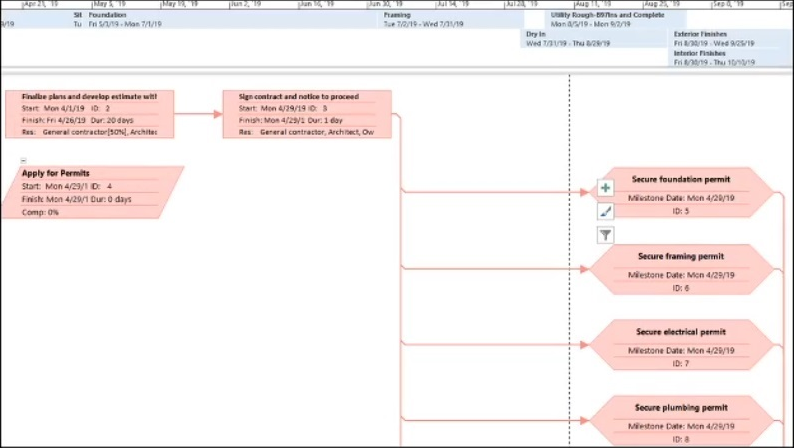
- Network Diagram
- Task Dependency Report
- Flow Chart
- Gantt Chart
Q6. You want to switch the scheduling mode for a project from scheduling from a start date to scheduling from a finish date. This action will change the default constraint from As Soon As Possible to As Late As Possible. Which dialog box should you use to make this change?
- Resource Information
- Project Information
- Task Information
- Change Working Time
Q7. A project contains many elements. What is used to describe the sum of the work required?
- task links
- Resource Sheet
- work breakdown structure
- baseline
Q8. Which option is not available in the Report tab on the ribbon?
- New Report
- Network Diagram
- Recent
- Custom
Q9. You are troubleshooting a schedule on someone else’s computer The schedule has 10,000 tasks. When a change is made to a task’s duration on a Fixed Units task, the start and finish dates do not change. change highlighting does not appear, and the Gantt Chart bat does not update. What is the cause of this issue?
- Inserted projects are calculated like summary tasks is selected.
- Calculate multiple critical paths is not selected.
- One of the Com add-ins is not selected.
- Calculate project after each edit is set to Off.
The hint being "The schedule has 10,000 tasks" and the fact that the Gantt Chart does not update.
Q10. You would like to understand which tasks are critical and which are not. When looking at the Gantt chart, how are these tasks identified by default?
- Critical tasks are indicated in red and other tasks are indicated in blue.
- Critical tasks are indicated in dark blue end other tasks are indicated in light blue.
- Critical tasks are indicated in a report while the Gantt chart indicates all tasks in blue.
- Critical tasks are indicated with an icon and other tasks are indicated in blue.
Q11. You are working on a project that has tasks with no flexibility. Which constraint type offers no flexibility?
- Must Finish On
- Start No Earlier Than
- As Soon As Possible
- Finish No Earlier Than
Q12. In a project, duration can have different units. Which duration unit is not valid?
- weeks
- hours
- days
- quarters
Q13. Microsoft Project uses calendars to schedule a project. Which project components can be assigned a calendar?
- tasks and work
- work and units
- resources and work
- tasks and resources
Q14. You are working on a project file that contains many linked subprojects. When saving the files, what option can you use to immediately save the open files, including those that have not changed?
- Yes to All
- Yes
- Save As
- Save
Q15. A resource is assigned to a task that is scheduled for 2 days. The resource is scheduled for 8 hours (8h) per day at 100%. The resource performs actual work of 10 hours on the first day. How has the Peak for this resource changed?
- It has changed to 10h.
- It has changed to 6h.
- It has changed to 125%.
- It has changed to 110%.
Q16. What is another name for a work breakdown structure?
- a hierarchy of tasks
- a linking of tasks
- a duration of tasks
- a leveling of tasks
Q17. A report for Earned Value Over Time has been requested, You decide to use a Microsoft Project visual report. What values does this report template compare when run?
- Earned Value. Planned Value, and Actual
- Earned Value and Planned Value
- Earned Value and Actual Cost
- Planned Value and Actual Cost
Q18. You are preparing a meal comprising a main dish and multiple side dishes. You want the finish of the main dish to drive the finish of the side dishes. The main dish will start before and take longer than the side dishes. You need to create a link from the main dish to each of the side dishes. Which link type is appropriate?
- Start-to-Finish (SF)
- Finish-to-Finish(FF)
- Finish-to-Start (FS)
- Start-to-Start (SS)
Reasoning: the problem states that the finish of the secondary dishes should be the same with the finish of the main course. The main course takes longer to complete than the secondary dishes. If we set Start-to-Finish, the secondary dishes will begin after the main dish is complete and this is not what the problem stated.
Q19. A resource is overallocated in a project. This resource is responsible for two tasks that are to happen at the same time. The first of these tasks is on the critical path. Which solution should you use to remedy the overallocation?
- Use the Leveling Gantt view adjust the edays field for the second task.
- Use the Task usage view to change the second task contour to an early Peak.
- Use the Task usage view to change the second task contour to a bell.
- Use the Leveling Gantt view adjust the edays field for the first task.
Q20. How do you mark a task’s progress and have that progress reflected in the task’s summary task?
- Use the Task tool on the ribbon’s Task tab for the subtask.
- Enter a value in the %Complete field.
- Use the Task tool en the ribbon’s Task tab for the summary task.
- Use the Project Information dialog box.
Q21. You have many tasks in a project file and want to convert them into milestones. How can you do this?
- Recreate the tasks and set them as summary tasks.
- Set the tasks as summary tasks.
- Unassign any resources from the tasks, as resources are not needed for milestone task.
- Change the tasks’ duration to 0.
Q22. A project has been delayed by three months. In this project, you have set deadlines that also need to be delayed by three months. What feature should you use to accomplish both of these delays?
- On the Project tab, click Project Information.
- On the Task tab, click Move Task.
- On the Report tab, click Compare Projects.
- On the Project tab, click Move Project.
Q23. How many default base calendars does Microsoft Project set up for a project?
- five
- three
- two
- six
Q24. A task has a fixed duration If the units on the task are changed, what value for the task will automatically change as a result?
- allocation
- work
- contour
- effort
Q25. You are working with subproject files (the master project file is not open) and have saved the changes you made. What happens to the master project when it is opened?
- The master project will not reflect any changes until the subproject files ate opened as well.
- The master project will display an error.
- The master project will display message stating that changes were made and the subproject files must be opened first.
- The master project will reflect the changes made to the subproject files.
Q26. You need to modify a resource pool. When opening the file that contains the pool, which option is not valid?
- Open as read-write into d new master project file.
- Open as read-write and allow others to use the pool.
- Open as read-only and allow others to use the pool.
- Open as read-write while locking others from updating the pool.
Q27. On your computer, Automatically add new views, tables. filters. and groups to the global is selected. You are using a custom filter that you created in one of your schedules, and you modify it to better meet your needs. You now notice that this modification is not available in other schedules. How do you fix this?
- Using More Filters, make a copy of the modified filter.
- In the Project Options dialog bays clear and reselect Automatically add new views, tables, filters. and groups to the global.
- Using the Organizer, copy the modified filter from your schedule to global.mpt and replace the filter when prompted.
- Using Compare Projects, select the appropriate options from the Task Table and Resource Table lists.
Q28. A graduated scale of rates can be created for a resource by using cost rate tables. What is the maximum number of cost rate tables each resource in a project have?
- five
- ten
- six
- two
Q29. A project currently has a software developer performing two tasks at the same time. The first task is 5 days long; the second task is day long. It has been decided that the developer can take some time to work on the shorter task in the middle the longer task without impacting the schedule. What is the best way to this!
- Create a link between the tasks with dependency.
- Change the first task’s contour to Double Peak.
- Add lag time of -1d to the second task.
- Split the longer task to accommodate the shorter task.
Q30. You want to change the view of the timescale on Gantt chart to be more granular. How many tiers does the timescale support?
- three
- five
- ten
- four
Q31. You are assigned the ownership of schedule comprising approximately 12,000 tasks. You need to know exactly, with detail, which tasks have a constraint other than ASAP. The most effective method do this is to create a filter that tests for which set of conditions?
- Constraint TypeSummaryRecurring% CompleteActive
1. does not equal As Soon As Possible.
2. equals Yes.
3. equals No.
4. equals 100%.
5. equals Yes. - Constraint TypeSummaryRecurring% CempleteActive
1. is less than As Soon As Possible.
2. does not equal Yes.
3. equals No.
4. is equal to 0%.
5. equals Yes. - Constraint TypeDetailRecurringDurationActive
1. is greater than As Soon As Possible.
2. equals Yes.
3. equals Yes.
4. equals 0d.
5. equals Ongoing. - Constraint TypeSummaryRecurring% CompleteActive
1. does not equal As Soon As Possible.
2. does not equal Yes.
3. equals No.
4. is 1ess than 100%.
5. equals Yes.
Q32. You are working with two project files. You want the second project to contain some of the same tasks, along with their work assignments, as the first project. You Choose to copy the tasks between the projects. What else is copied along with the task when performing basic copy and paste action?
- resources
- baseline
- calendars
- work breakdown structure
Q33. You are working with a master project that contains subprojects, and you want to see a list of tasks on which a subproject file is dependent. How can you do this in Microsoft Project?
- On the Project tab, click Subproject.
- On the View tab, click Group by.
- On Project tab. click Links Between Projects.
- On the View tab, click Filter.
Q34. You want to manage multiple projects with one project designated as the master project. Which button on the ribbon do you use?
- Subproject
- Share Resources
- Move project
- Link Between Projects
Q35. When you create a new blank project in Microsoft Project, what is the default view?
- Resource Sheet
- Task Form
- Gantt Chart with Timeline
- Detail Gantt
Q36. A project contains numerous linked tasks. What is the name for a task that is controlled or driven by another task(s)?
- overlapped
- predecessor
- callout
- successor
Q37. You have several Microsoft Project files open. One contains sensitive information, so you hide that file. What is true regarding the hidden file?
- The Switch Window lists the hidden file.
- The Switch Window command does not list the hidden file.
- To unhide the file, select Switch Window.
- To view a hidden file, on the View tab, click Arrange Windows.
Q38. In the image below, what does the indicator in Task ID 9 represent?
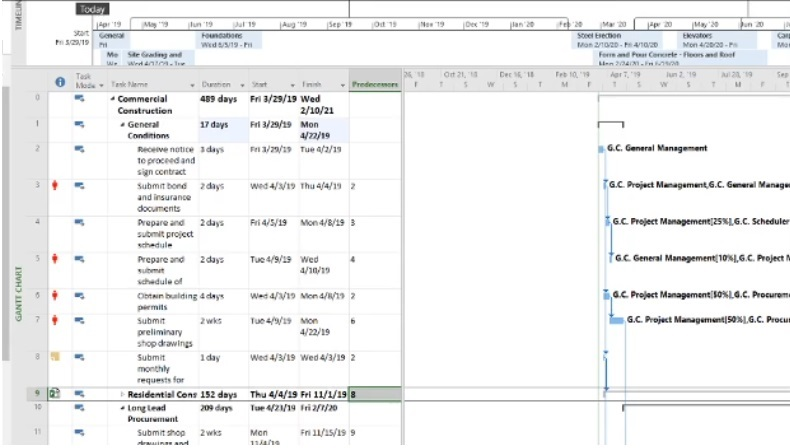
- subproject
- linked file
- custom field
- resource pool
Q39. You are using work breakdown structure (WBS) codes for an in-progress project. Due to some schedule changes, tasks have been moved around, which has modified the WBS. How do you fix the WBS codes?
- From the Project tab on the ribbon, click WBS > Define Code.
- From the Project tab on the ribbon, click WBS > Renumber.
- From the View tab on ribbon, click Sort.
- From the View tab on the ribbon, in the Data group, select Group by.
Q40. You are managing a construction project schedule with key tasks that have dependencies on each other. You need to supply key materials to your team they begin to build different of the building. All materials must be inventoried before they can be used for the project. The completion of the materials delivery and inventory task, which will take longer than the different building sections, will drive the completion of the building sections. You need to create a link from the delivery and inventory task to of building task. Which link type is appropriate?
- Finish-to-Finish (FF)
- Start-to-Start (SS)
- Start-to-Finish (SF)
- Finish-to-Start (FS)
Q41. When breaking down the work that needs to be done on a project, what is the smallest unit of work known as?
- work package
- duration
- work breakdown structure
- task assignment
Q42. A resource’s hours have increased over the span of five days for a particular task. The duration has not changed, and the task is effort driven. What element can you add to the Task Usage view to see what has changed?
- Add a column for the actual duration.
- Add a column for the level assignments.
- Add a column for the Peak value.
- Add a column for the assignment.
Q43. You are modifying a project’s work breakdown structure (WBS) code. What is the default length for any selected sequence type?
- any
- 5
- 3
- 1
Q44. You are working on a project schedule. You need two tasks to end at the same time so that your review team can do their work on both tasks. Which link type is appropriate?
- Start-to-Start (SS)
- Finish-to-Start (FS)
- Start-to-Finish (SF)
- Finish-to-Finish (FF)
Q45. In a project, duration can have different units. Which duration unit is not valid?
- weeks
- hours
- days
- quarters
Q46. You would like to import a CSV file into a Microsoft Project file. Project displays a message about opening a file in an older format. How can you open this file?
- Add a place in the Open File window.
- Use the Advanced tab in the Project Options dialog box.
- Use the General tab in the Project Options dialog box.
- Use the Microsoft Project Trust Center.
Q47. A certain resource has a workload that varies for a task. The task spans five days and is slow to start, ramps up in the middle, and then eventually tapers off as it comes to an end. Which approach would you use to adjust and represent varying workload?
- resource contouring
- resource constraining
- resource leveling
- resource splitting
Q48. What is the purpose of a “Critical Path” in a Microsoft Project schedule, and how is it determined?
- It is a path of high-priority tasks in the project.
- It is a path that must be followed for project success.
- it is the longest sequence of tasks that determine the project’s overall duration.
- It is a path that includes all non-critical tasks.
Q49. In Microsoft Project, what does the term “Resource Overallocation” refer to, and how can it be resolved?
- Resource Overallocation means having too many resources allocated to a task. It can be resolved by adjusting task dependencies.
- Resource Overallocation means a shortage of resources for a task. It can be resolved by leveling resources or adjusting resource calendars.
- Resource Overallocation means having too few resources allocated to a task. It can be resolved by crashing the project schedule.
- Resource Overallocation means not having any resources assigned to a task. It can be resolved by adding more resources.
Q49. In Microsoft Project, what does “PERT” stand for?
- Project Evaluation and Review Technique
- Project Expense Reporting Tool
- Project Enhancement and Resource Tracking
- Project Execution and Reporting Task
Q49. What is a “Resource Calendar” used for in Microsoft Project?
- To track task deadlines
- To specify working hours for specific tasks
- To manage resource availability and working hours
- To create Gantt charts
Q50. Which of the following is not a type of baseline in Microsoft Project?
- Project Baseline
- Baseline
- Milestone Baseline
- Resource Baseline
Q51. What is the purpose of creating a resource calendar in Microsoft Project?
- To define work schedules for tasks
- To define work schedules for resources
- To set project-level working time
- To manage dependencies between tasks
Q52. Which of the following is not a valid cost field in Microsoft Project?
- Actual Cost
- Remaining Cost
- Projected Cost
- Budgeted Cost
Q53. What does the Critical Path in Microsoft Project represent?
- The sequence of tasks with the least total duration
- The sequence of tasks with the most resources assigned
- The sequence of tasks that determine the total project duration
- The sequence of tasks with the highest cost
Q54. What is the purpose of the Gantt Chart view in Microsoft Project?
- To display resource assignments and allocation
- To track earned value metrics
- To visualize the project schedule and task dependencies
- To manage project-level calendars
Q55. How can you create a task dependency in Microsoft Project?
- By linking task start and finish dates
- By using the Predecessors and Successors fields
- By defining task constraints
- By assigning shared resources to tasks
Q56. What is the purpose of a Task Constraint in Microsoft Project?
- To limit the availability of a resource
- To set a specific start or finish date for a task
- To control when a task can start or finish
- To manage the critical path of the project
Q57. Which of the following is not a type of earned value metric in Microsoft Project?
- Schedule Performance Index (SPI)
- Cost Performance Index (CPI)
- Resource Performance Index (RPI)
- Planned Value (PV)
Q58. Which view in Microsoft Project displays the current status of tasks and resources?
- Tracking Gantt
- Resource Usage
- Task Usage
- Team Planner
Q59. How can you create a custom calendar in Microsoft Project?
- By modifying the Default calendar
- By creating a new calendar and defining its working time
- By changing the project calendar settings
- By applying a predefined template calendar
Q60. What is the purpose of the Network Diagram view in Microsoft Project?
- To display task dependencies and critical path
- To visualize the sequence and relationships of tasks
- To track resource allocations and assignments
- To manage project-level costs and budgets
Q61. How can you customize the appearance of a Gantt Chart in Microsoft Project?
- By modifying the project-level formatting options
- By using the Format menu and the Gantt Chart Tools ribbon
- By creating a custom view
- By applying a predefined template
Q62. What is the purpose of the Team Planner view in Microsoft Project?
- To manage project-level costs and budgets
- To display the critical path of the project
- To visualize resource assignments and availability
- To track earned value metrics
Q63. How can you set a specific start or finish date for a task in Microsoft Project?
- By using the Task Information dialog
- By defining a task constraint
- By modifying the Gantt Chart
- By adjusting the project calendar settings
Q64. Which of the following is not a type of resource in Microsoft Project?
- Work resource
- Material resource
- Consumable resource
- Cost resource
Q65. What is the purpose of the Split Task feature in Microsoft Project?
- To divide a task into multiple segments
- To interrupt a task’s duration and resume it later
- To create subtasks within a parent task
- To manage task dependencies and relationships
Q66. How can you track the actual progress of tasks in Microsoft Project?
- By updating the % Complete field
- By entering Actual Start and Actual Finish dates
- By adjusting the task durations
- By modifying the Gantt Chart bars
Q67. What is the purpose of the Network Diagram Toolbar in Microsoft Project?
- To manage project-level costs and budgets
- To customize the appearance of the Gantt Chart
- To navigate and interact with the Network Diagram view
- To track earned value metrics
Q68. How can you define resource availability in Microsoft Project?
- By adjusting the project calendar settings
- By modifying the Gantt Chart
- By editing the resource’s work schedule in the Resource Sheet
- By creating a custom view
Q69. Which of the following is not a type of constraint in Microsoft Project?
- As Soon As Possible
- Finish No Earlier Than
- Finish No Later Than
- Must Start On
Q70. What is the purpose of the Cost table in Microsoft Project?
- To manage project-level calendars
- To track resource assignments and allocations
- To display and analyze project-level costs
- To customize the appearance of the Gantt Chart
Q71. How can you create a summary task in Microsoft Project?
- By linking individual tasks
- By indenting subtasks under a parent task
- By defining a task constraint
- By modifying the Gantt Chart
Q72. What is the purpose of the Tracking Gantt view in Microsoft Project?
- To manage project-level costs and budgets
- To visualize the progress of tasks and the project timeline
- To customize the appearance of the Gantt Chart
- To track earned value metrics
Q73. How can you assign a resource to a task in Microsoft Project?
- By modifying the Gantt Chart
- By using the Resource Assignment dialog
- By defining a task constraint
- By adjusting the project calendar settings
Q74. What is the purpose of the Task Inspector feature in Microsoft Project?
- To manage project-level calendars
- To track earned value metrics
- To identify and troubleshoot issues with tasks
- To customize the appearance of the Gantt Chart
Q75. How can you view the critical path in Microsoft Project?
- By using the Network Diagram view
- By modifying the Gantt Chart
- By applying the Critical Path filter or highlighting
- By adjusting the project calendar settings
Q76. What is the purpose of the Project Summary task in Microsoft Project?
- To manage resource availability and assignments
- To provide a high-level overview of the entire project
- To customize the appearance of the Gantt Chart
- To track earned value metrics
Q77. How can you manage task dependencies in Microsoft Project?
- By modifying the Gantt Chart
- By using the Predecessors and Successors fields
- By adjusting the project calendar settings
- By creating a custom view
Q78. What is the purpose of the Resource Leveling feature in Microsoft Project?
- To manage project-level costs and budgets
- To customize the appearance of the Gantt Chart
- To resolve resource overallocation and conflicts
- To track earned value metrics
Q79. How can you display the current status of a task in Microsoft Project?
- By modifying the Gantt Chart
- By entering Actual Start and Actual Finish dates
- By adjusting the project calendar settings
- By creating a custom view
Q80. What is the purpose of the Work Breakdown Structure (WBS) in Microsoft Project?
- To manage resource availability and assignments
- To customize the appearance of the Gantt Chart
- To organize and structure the project’s tasks and deliverables
- To track earned value metrics
Q81. How can you manage project-level costs and budgets in Microsoft Project?
- By using the Task Usage view
- By utilizing the Cost table and related cost fields
- By adjusting the project calendar settings
- By creating a custom view
Q82. What is the purpose of the Team Planner view in Microsoft Project?
- To manage project-level costs and budgets
- To display the critical path of the project
- To visualize resource assignments and availability
- To track earned value metrics
Q83. How can you create a custom view in Microsoft Project?
- By modifying the Gantt Chart
- By adjusting the project calendar settings
- By using the Customize View dialog
- By entering Actual Start and Actual Finish dates
Q84. What is the purpose of the Baseline feature in Microsoft Project?
- To manage resource availability and assignments
- To save a snapshot of the project plan for comparison
- To customize the appearance of the Gantt Chart
- To track earned value metrics
Q85. How can you manage task constraints in Microsoft Project?
- By modifying the Gantt Chart
- By using the Task Information dialog
- By adjusting the project calendar settings
- By creating a custom view
Q86. What is the purpose of the Earned Value Analysis feature in Microsoft Project?
- To manage resource availability and assignments
- To customize the appearance of the Gantt Chart
- To measure and analyze the project’s cost and schedule performance
- To create a custom view
Q87. How can you manage resource availability and assignments in Microsoft Project?
- By using the Resource Sheet and Resource Usage views
- By modifying the Gantt Chart
- By adjusting the project calendar settings
- By entering Actual Start and Actual Finish dates
Q88. What is the purpose of the Milestone task in Microsoft Project?
- To manage project-level costs and budgets
- To mark significant events or deliverables in the project
- To customize the appearance of the Gantt Chart
- To track earned value metrics
Q89. How can you create a recurring task in Microsoft Project?
- By modifying the Gantt Chart
- By adjusting the project calendar settings
- By using the Task Information dialog
- By entering Actual Start and Actual Finish dates
Q90. What is the purpose of the Resource Availability table in Microsoft Project?
- To manage project-level costs and budgets
- To display and analyze the availability of resources
- To customize the appearance of the Gantt Chart
- To track earned value metrics
Q91. How can you manage task dependencies in Microsoft Project?
- By modifying the Gantt Chart
- By using the Predecessors and Successors fields
- By adjusting the project calendar settings
- By creating a custom view
Q92. What is the purpose of the Project Information dialog in Microsoft Project?
- To manage resource availability and assignments
- To define project-level settings and properties
- To customize the appearance of the Gantt Chart
- To track earned value metrics
Q93. How can you apply a calendar to a specific resource in Microsoft Project?
- By modifying the Gantt Chart
- By editing the resource’s working time in the Resource Sheet
- By adjusting the project calendar settings
- By entering Actual Start and Actual Finish dates
Q94. What is the purpose of the Task Usage view in Microsoft Project?
- To manage project-level costs and budgets
- To customize the appearance of the Gantt Chart
- To display task assignments and resource allocations
- To track earned value metrics
Q95. How can you manage project-level calendars in Microsoft Project?
- By modifying the Gantt Chart
- By using the Project Calendar dialog
- By entering Actual Start and Actual Finish dates
- By creating a custom view
Q96. What is the purpose of the Resource Graph view in Microsoft Project?
- To manage project-level costs and budgets
- To visualize resource allocations and availability
- To customize the appearance of the Gantt Chart
- To track earned value metrics
Q97. How can you apply a task constraint in Microsoft Project?
- By modifying the Gantt Chart
- By using the Task Information dialog
- By adjusting the project calendar settings
- By entering Actual Start and Actual Finish dates
Q98. What is the purpose of the Resource Leveling feature in Microsoft Project?
- To manage project-level costs and budgets
- To customize the appearance of the Gantt Chart
- To resolve resource overallocation and conflicts
- To track earned value metrics
Q99. How can you customize the appearance of the Gantt Chart in Microsoft Project?
- By using the Format menu and the Gantt Chart Tools ribbon
- By modifying the project-level formatting options
- By creating a custom view
- By applying a predefined template
Q100. Which view in Microsoft Project allows you to see the project timeline and the resources assigned to each task?
- Gantt Chart view
- Resource Graph view
- Task Usage view
- Network Diagram view
Q101. What feature in Microsoft Project allows you to create a custom report that displays the actual costs compared to the planned costs for your project?
- Cost Variance report
- Baseline report
- Custom report
- Cost report
Q102. Which filter in Microsoft Project allows you to view only the tasks that are currently in progress?
- Active Tasks filter
- In Progress filter
- Ongoing Tasks filter
- Current Tasks filter
Q103. How can you group tasks in Microsoft Project based on the resource assigned to each task?
- By selecting the “Group by Resource” option in the Grouping menu
- By applying the “Resource” group
- By creating a custom group based on the Resource field
- All of the above
Q104. What is the purpose of the “Leveling Delay” field in Microsoft Project?
- To adjust the duration of a task based on resource availability
- To specify the amount of time a resource should be delayed before being assigned to a task
- To control the amount of time a resource is delayed when leveling is applied
- To set the priority for resource leveling
Q105. In Microsoft Project, how can you create a custom field that displays the percentage of a task that has been completed?
- By creating a new custom text field and manually entering the percentage
- By creating a new custom percentage field
- By using the built-in “% Complete” field
- By creating a new custom number field and entering the percentage as a decimal
Q106. Which sorting option in Microsoft Project allows you to display tasks in order of their start dates?
- Sort by Task Name
- Sort by Task ID
- Sort by Start Date
- Sort by Finish Date
Q107. What report in Microsoft Project can help you identify tasks that are behind schedule?
- Baseline report
- Project Summary report
- Variance report
- Resource report
Q108. How can you filter the tasks in Microsoft Project to display only those that are assigned to a specific resource?
- By creating a custom filter based on the Resource field
- By applying the “Resource” filter
- By using the “Assigned to” filter
- By selecting the resource in the Resource Sheet view and choosing “Filter to Selection”
Q109. Which view in Microsoft Project allows you to see a Gantt chart, network diagram, and resource usage all in one place?
- Task Usage view
- Resource Graph view
- Tracking Gantt view
- Detailed Gantt view
Q110. How can you create a custom field in Microsoft Project that calculates the duration of a task in days?
- By creating a new custom text field and manually entering the duration
- By creating a new custom number field and entering the duration as a decimal
- By creating a new custom duration field
- By using the built-in “Duration” field
Q111. What is the purpose of the “Baseline” feature in Microsoft Project?
- To track the actual progress of a project against the planned schedule
- To create a snapshot of the current project plan
- To save a copy of the original project plan for comparison
- To automatically level resources and adjust the schedule
Q112. How can you filter the tasks in Microsoft Project to display only those that are critical to the project’s timeline?
- By creating a custom filter based on the “Critical” field
- By applying the “Critical Tasks” filter
- By using the “Critical” filter
- By selecting the critical tasks in the Gantt Chart view and choosing “Filter to Selection”
Q113. Which field in Microsoft Project can be used to display the amount of work required for a task, measured in hours?
- Duration
- Work
- Effort
- Resource Effort
Q114. How can you group tasks in Microsoft Project based on their priority?
- By selecting the “Group by Priority” option in the Grouping menu
- By applying the “Priority” group
- By creating a custom group based on the Priority field
- All of the above
Q115. What is the purpose of the “Deadline” feature in Microsoft Project?
- To set the target completion date for a task
- To track the actual completion date of a task
- To indicate the latest date a task should be completed
- To adjust the schedule based on resource constraints
Q116. How can you sort the tasks in Microsoft Project based on their percentage of completion?
- By selecting the “Sort by % Complete” option in the Sorting menu
- By applying the “% Complete” sort
- By creating a custom sort based on the “% Complete” field
- All of the above
Q117. Which report in Microsoft Project can help you identify tasks that are at risk of missing their deadlines?
- Project Summary report
- Resource report
- Task report
- Deadline report
Q118. How can you filter the tasks in Microsoft Project to display only those that are not yet started?
- By creating a custom filter based on the “Status” field
- By using the “Not Started” filter
- By applying the “Active Tasks” filter and selecting “Not Started”
- By selecting the not-started tasks in the Gantt Chart view and choosing “Filter to Selection”
Q119. What is the purpose of the “Earned Value” feature in Microsoft Project?
- To track the actual progress of a project against the planned schedule
- To measure the project’s performance based on budgeted cost and actual work completed
- To adjust the schedule based on resource constraints
- To create a snapshot of the current project plan
Q120. How can you create a custom field in Microsoft Project that displays the total cost of a task?
- By creating a new custom text field and manually entering the cost
- By creating a new custom number field and entering the cost as a decimal
- By creating a new custom cost field
- By using the built-in “Cost” field
Q121. Which view in Microsoft Project allows you to see the work assignments for each resource over time?
- Gantt Chart view
- Resource Graph view
- Task Usage view
- Network Diagram view
Q122. What is the purpose of the “Variance” report in Microsoft Project?
- To track the actual progress of a project against the planned schedule
- To measure the project’s performance based on budgeted cost and actual work completed
- To identify tasks that are ahead of or behind schedule
- To create a snapshot of the current project plan
Q123. How can you filter the tasks in Microsoft Project to display only those that are on the critical path?
- By creating a custom filter based on the “Critical” field
- By applying the “Critical Tasks” filter
- By using the “Critical” filter
- By selecting the critical tasks in the Gantt Chart view and choosing “Filter to Selection”
Q124. Which field in Microsoft Project can be used to specify the maximum amount of time a resource can work on a task?
- Work
- Max Units
- Resource Availability
- Resource Effort
Q125. How can you group tasks in Microsoft Project based on their status (e.g., not started, in progress, completed)?
- By selecting the “Group by Status” option in the Grouping menu
- By applying the “Status” group
- By creating a custom group based on the “Status” field
- All of the above
Q126. What is the purpose of the “Baseline” feature in Microsoft Project when used in conjunction with the “Variance” report?
- To track the actual progress of a project against the planned schedule
- To identify tasks that are ahead of or behind schedule
- To measure the project’s performance based on budgeted cost and actual work completed
- To create a snapshot of the current project plan
Q127. How can you create a custom field in Microsoft Project that displays the total number of resources assigned to a task?
- By creating a new custom text field and manually entering the resource count
- By creating a new custom number field and entering the resource count
- By creating a new custom resource field
- By using the built-in “Resource Names” field
Q128. Which view in Microsoft Project allows you to see the work assignments for each resource over time, including their availability?
- Gantt Chart view
- Resource Sheet view
- Resource Usage view
- Team Planner view
Q129. What is the purpose of the “Deadline” feature in Microsoft Project when used in conjunction with the “Deadline” column in the Gantt Chart view?
- To set the target completion date for a task
- To track the actual completion date of a task
- To indicate the latest date a task should be completed and highlight tasks that are at risk of missing their deadlines
- To adjust the schedule based on resource constraints
Q130. How can you filter the tasks in Microsoft Project to display only those that are assigned to a specific resource and are currently in progress?
- By creating a custom filter based on the “Resource” and “Status” fields
- By applying the “Assigned to” and “In Progress” filters
- By selecting the resource in the Resource Sheet view and choosing “Filter to Selection”, then filtering for “In Progress” tasks
- All of the above
Q131. Which field in Microsoft Project can be used to specify the priority of a task, with a higher number indicating a higher priority?
- Duration
- Work
- Priority
- Resource Effort
Q132. What is the purpose of the “Leveling Delay” field in Microsoft Project when used in conjunction with resource leveling?
- To adjust the duration of a task based on resource availability
- To control the amount of time a resource is delayed when leveling is applied
- To set the priority for resource leveling
- To specify the amount of time a resource should be delayed before being assigned to a task
Q133. How can you create a custom view in Microsoft Project that displays a combination of fields, such as task name, duration, and resource assignments?
- By selecting the “Custom View” option in the View menu and choosing the fields to display
- By creating a new view and manually adding the desired fields
- By selecting the “Organizer” option and creating a new custom view with the selected fields
- By modifying an existing view and saving it as a new custom view
Q134. Which report in Microsoft Project can help you identify tasks that are at risk of going over budget?
- Project Summary report
- Cost report
- Variance report
- Resource report
Q135. How can you filter the tasks in Microsoft Project to display only those that are assigned to a specific resource, regardless of their status?
- By creating a custom filter based on the “Resource Names” field
- By applying the “Assigned to” filter
- By selecting the resource in the Resource Sheet view and choosing “Filter to Selection”
- All of the above
Q136. What is the purpose of the “Earned Value” feature in Microsoft Project when used in conjunction with the “Earned Value” report?
- To track the actual progress of a project against the planned schedule
- To measure the project’s performance based on budgeted cost and actual work completed
- To adjust the schedule based on resource constraints
- To create a snapshot of the current project plan
Q137. How can you create a custom field in Microsoft Project that displays the number of days a task is scheduled to take?
- By creating a new custom text field and manually entering the duration
- By creating a new custom number field and entering the duration as a decimal
- By creating a new custom duration field
- By using the built-in “Duration” field
Q138. Which view in Microsoft Project allows you to see a graphical representation of the project timeline, including task dependencies and critical path?
- Gantt Chart view
- Resource Graph view
- Task Usage view
- Network Diagram view
Q139. What is the purpose of the “Deadline” feature in Microsoft Project when used in conjunction with the “Deadline Missed” column in the Gantt Chart view?
- To set the target completion date for a task
- To track the actual completion date of a task
- To highlight tasks that are at risk of missing their deadlines
- To adjust the schedule based on resource constraints
Q140. How can you filter the tasks in Microsoft Project to display only those that are currently in progress and are assigned to a specific resource?
- By creating a custom filter based on the “Resource” and “Status” fields
- By applying the “Assigned to” and “In Progress” filters
- By selecting the resource in the Resource Sheet view and choosing “Filter to Selection”, then filtering for “In Progress” tasks
- All of the above
Q141. Which field in Microsoft Project can be used to specify the amount of time a resource is available to work on a task?
- Work
- Max Units
- Resource Availability
- Resource Effort
Q142. What is the purpose of the “Baseline” feature in Microsoft Project when used in conjunction with the “Baseline” column in the Gantt Chart view?
- To track the actual progress of a project against the planned schedule
- To measure the project’s performance based on budgeted cost and actual work completed
- To compare the current schedule to the original plan and identify tasks that are ahead of or behind schedule
- To adjust the schedule based on resource constraints
Q143. How can you create a custom field in Microsoft Project that displays the total cost of a task based on the assigned resources and their rates?
- By creating a new custom text field and manually entering the cost
- By creating a new custom number field and entering the cost as a decimal
- By creating a new custom cost field that references the resource rates and assignments
- By using the built-in “Cost” field
Q144. Which view in Microsoft Project allows you to see the work assignments for each resource over time, including their availability and any overallocation?
- Gantt Chart view
- Resource Sheet view
- Resource Graph view
- Resource Usage view
Q145. What is the purpose of the “Variance” report in Microsoft Project when used in conjunction with the “Baseline” feature?
- To track the actual progress of a project against the planned schedule
- To identify tasks that are ahead of or behind schedule
- To measure the project’s performance based on budgeted cost and actual work completed
- To create a snapshot of the current project plan
Q146. How can you create a custom group in Microsoft Project that displays tasks based on their priority and status?
- By selecting the “Group by Priority” and “Group by Status” options in the Grouping menu
- By applying the “Priority” and “Status” groups
- By creating a custom group that references the “Priority” and “Status” fields
- All of the above
Q147. Which report in Microsoft Project can help you identify resources that are overallocated or underutilized?
- Project Summary report
- Task report
- Resource report
- Cost report
Q148. How can you filter the tasks in Microsoft Project to display only those that are on the critical path and have a duration greater than 5 days?
- By creating a custom filter based on the “Critical” and “Duration” fields
- By applying the “Critical Tasks” filter and manually adjusting the duration
- By selecting the critical tasks in the Gantt Chart view, then creating a filter based on the duration
- All of the above
Q149. What is the purpose of the “Earned Value” feature in Microsoft Project when used in conjunction with the “Earned Value Analysis” report?
- To track the actual progress of a project against the planned schedule
- To measure the project’s performance based on budgeted cost and actual work completed
- To adjust the schedule based on resource constraints
- To create a snapshot of the current project plan
Q150. Which feature in Microsoft Project helps identify and resolve resource overallocation?
- Task View
- Resource Leveling
- Timeline
- Work Breakdown Structure
Q151. What is the purpose of the Team Planner view in Microsoft Project?
- To display resource assignments and availability over time
- To manage project tasks and dependencies
- To visualize resource assignments and workload across the team
- To create custom reports for the project
Q152. How can you add a resource to the Resource Pool in Microsoft Project?
- By importing a resource list from another file
- By creating a new resource in the Resource Sheet
- By both creating a new resource and importing a resource list
- You cannot add resources to the Resource Pool in Microsoft Project
Q153. What is the primary function of the Resource Graph in Microsoft Project?
- To display resource utilization over time
- To visualize resource availability and assignments
- To manage resource cost and budgets
- To create resource-based schedules
Q154. When should you use the Resource Leveling feature in Microsoft Project?
- When you need to adjust task durations to fit within the available resource hours
- When you want to optimize the project schedule for the most efficient use of resources
- When you need to reassign tasks to different resources
- When you have resource overallocation issues that need to be resolved
Q155. How can you identify resource overallocation in Microsoft Project?
- By reviewing the Resource Sheet
- By checking the Resource Usage view
- By analyzing the Resource Graph
- By using all of the above methods
Q156. What is the purpose of the Resource Pool in Microsoft Project?
- To manage project costs and budgets
- To centrally manage and share resources across multiple projects
- To display resource availability and assignments
- To create resource-based schedules
Q157. How can you adjust resource assignments in Microsoft Project to resolve overallocation?
- By changing the work hours or availability of the overallocated resource
- By reassigning tasks to other available resources
- By splitting tasks among multiple resources
- By using all of the above methods
Q158. What is the difference between a Work resource and a Material resource in Microsoft Project?
- Work resources represent people, while Material resources represent physical items
- Work resources have assigned work hours, while Material resources have assigned units
- Work resources have associated costs, while Material resources do not
- Work resources are used to track task progress, while Material resources are used for project budgeting
Q159. How can you view the workload of resources in Microsoft Project?
- By using the Team Planner view
- By reviewing the Resource Graph
- By checking the Resource Usage view
- By using all of the above methods
Q160. What is the purpose of the “Leveling Delay” field in the Resource Information dialog in Microsoft Project?
- To specify the maximum number of days a task can be delayed during leveling
- To set the priority for resource leveling when multiple resources are overallocated
- To determine the number of days a task can be delayed to resolve resource overallocation
- To adjust the work hours or availability of a resource during leveling
Q161. How can you customize the Resource Pool in Microsoft Project to better manage your resources?
- By adding custom fields to the Resource Sheet
- By creating resource calendars with different work schedules
- By assigning cost rates and budgets to resources
- By using all of the above methods
Q162. What is the purpose of the “Leveling Order” field in the Task Information dialog in Microsoft Project?
- To specify the priority of a task during resource leveling
- To determine the number of days a task can be delayed to resolve resource overallocation
- To control the order in which tasks are scheduled during resource leveling
- To adjust the work hours or availability of a resource during leveling
Q163. How can you identify and resolve resource overallocation in a project using Microsoft Project?
- By reviewing the Resource Sheet and Resource Usage view
- By using the Resource Leveling feature to automatically resolve overallocation
- By reassigning tasks to other available resources
- By using all of the above methods
Q164. What is the purpose of the “Effort Driven” setting in Microsoft Project?
- To automatically adjust task durations based on resource assignments
- To ensure that the total work for a task remains constant as resources are added or removed
- To prioritize the scheduling of high-effort tasks during resource leveling
- To calculate the cost of a task based on the effort required
Q165. How can you use the Team Planner view in Microsoft Project to manage resource assignments?
- By viewing the overall project schedule and task dependencies
- By adjusting resource availability and work schedules
- By reassigning tasks to different resources
- By using all of the above methods
Q166. What is the purpose of the “Overallocation” indicator in Microsoft Project?
- To highlight tasks that are scheduled to take longer than their duration
- To identify resources with insufficient work hours to complete their assigned tasks
- To indicate when a resource has been assigned more work than they can complete during their available work hours
- To track the total cost of overallocated resources in the project
Q167. How can you use the Resource Graph in Microsoft Project to manage resource utilization?
- By visualizing the availability and assignments of individual resources over time
- By identifying resources that are underutilized or overallocated
- By adjusting resource assignments to optimize the project schedule
- By using all of the above methods
Q168. What is the purpose of the “Resource Leveling” feature in Microsoft Project?
- To automatically assign resources to tasks based on availability
- To resolve resource overallocation by delaying or splitting tasks
- To track the cost and budget of resources used in the project
- To create custom resource calendars and work schedules
Q169. How can you use the Resource Pool in Microsoft Project to manage resources across multiple projects?
- By sharing resources between projects and tracking their availability
- By creating resource cost rates and budgets for each project
- By assigning resources to tasks and monitoring their workload
- By using all of the above methods
Q170. What is the difference between a “Work” resource and a “Material” resource in Microsoft Project?
- Work resources represent people, while Material resources represent physical items
- Work resources have assigned work hours, while Material resources have assigned units
- Work resources have associated costs, while Material resources do not
- Work resources are used to track task progress, while Material resources are used for project budgeting
Q171. How can you use the Team Planner view in Microsoft Project to manage resource assignments?
- By viewing the overall project schedule and task dependencies
- By adjusting resource availability and work schedules
- By reassigning tasks to different resources
- By using all of the above methods
Q172. What is the purpose of the “Leveling Delay” field in the Resource Information dialog in Microsoft Project?
- To specify the maximum number of days a task can be delayed during leveling
- To set the priority for resource leveling when multiple resources are overallocated
- To determine the number of days a task can be delayed to resolve resource overallocation
- To adjust the work hours or availability of a resource during leveling
Q173. How can you customize the Resource Pool in Microsoft Project to better manage your resources?
- By adding custom fields to the Resource Sheet
- By creating resource calendars with different work schedules
- By assigning cost rates and budgets to resources
- By using all of the above methods
Q174. What is the purpose of the “Leveling Order” field in the Task Information dialog in Microsoft Project?
- To specify the priority of a task during resource leveling
- To determine the number of days a task can be delayed to resolve resource overallocation
- To control the order in which tasks are scheduled during resource leveling
- To adjust the work hours or availability of a resource during leveling
Q175. How can you identify and resolve resource overallocation in a project using Microsoft Project?
- By reviewing the Resource Sheet and Resource Usage view
- By using the Resource Leveling feature to automatically resolve overallocation
- By reassigning tasks to other available resources
- By using all of the above methods
Q176. What is the purpose of the “Effort Driven” setting in Microsoft Project?
- To automatically adjust task durations based on resource assignments
- To ensure that the total work for a task remains constant as resources are added or removed
- To prioritize the scheduling of high-effort tasks during resource leveling
- To calculate the cost of a task based on the effort required
Q177. How can you use the Resource Graph in Microsoft Project to manage resource utilization?
- By visualizing the availability and assignments of individual resources over time
- By identifying resources that are underutilized or overallocated
- By adjusting resource assignments to optimize the project schedule
- By using all of the above methods
Q178. What is the purpose of the “Resource Leveling” feature in Microsoft Project?
- To automatically assign resources to tasks based on availability
- To resolve resource overallocation by delaying or splitting tasks
- To track the cost and budget of resources used in the project
- To create custom resource calendars and work schedules
Q179. How can you use the Resource Pool in Microsoft Project to manage resources across multiple projects?
- By sharing resources between projects and tracking their availability
- By creating resource cost rates and budgets for each project
- By assigning resources to tasks and monitoring their workload
- By using all of the above methods
Q180. What is the difference between a “Work” resource and a “Material” resource in Microsoft Project?
- Work resources represent people, while Material resources represent physical items
- Work resources have assigned work hours, while Material resources have assigned units
- Work resources have associated costs, while Material resources do not
- Work resources are used to track task progress, while Material resources are used for project budgeting
Q181. How can you use the “Overallocation” indicator in Microsoft Project to identify resource overallocation issues?
- By reviewing the Resource Sheet and Resource Usage view
- By using the Resource Leveling feature to automatically resolve overallocation
- By reassigning tasks to other available resources
- By using all of the above methods
Q182. What is the purpose of the “Effort Driven” setting in Microsoft Project?
- To automatically adjust task durations based on resource assignments
- To ensure that the total work for a task remains constant as resources are added or removed
- To prioritize the scheduling of high-effort tasks during resource leveling
- To calculate the cost of a task based on the effort required
Q183. How can you use the Team Planner view in Microsoft Project to manage resource assignments?
- By viewing the overall project schedule and task dependencies
- By adjusting resource availability and work schedules
- By reassigning tasks to different resources
- By using all of the above methods
Q184. What is the purpose of the “Leveling Delay” field in the Resource Information dialog in Microsoft Project?
- To specify the maximum number of days a task can be delayed during leveling
- To set the priority for resource leveling when multiple resources are overallocated
- To determine the number of days a task can be delayed to resolve resource overallocation
- To adjust the work hours or availability of a resource during leveling
Q185. How can you customize the Resource Pool in Microsoft Project to better manage your resources?
- By adding custom fields to the Resource Sheet
- By creating resource calendars with different work schedules
- By assigning cost rates and budgets to resources
- By using all of the above methods
Q186. What is the purpose of the “Leveling Order” field in the Task Information dialog in Microsoft Project?
- To specify the priority of a task during resource leveling
- To determine the number of days a task can be delayed to resolve resource overallocation
- To control the order in which tasks are scheduled during resource leveling
- To adjust the work hours or availability of a resource during leveling
Q187. How can you use the Resource Graph in Microsoft Project to manage resource utilization?
- By visualizing the availability and assignments of individual resources over time
- By identifying resources that are underutilized or overallocated
- By adjusting resource assignments to optimize the project schedule
- By using all of the above methods
Q188. What is the purpose of the “Resource Leveling” feature in Microsoft Project?
- To automatically assign resources to tasks based on availability
- To resolve resource overallocation by delaying or splitting tasks
- To track the cost and budget of resources used in the project
- To create custom resource calendars and work schedules
Q189. How can you use the Resource Pool in Microsoft Project to manage resources across multiple projects?
- By sharing resources between projects and tracking their availability
- By creating resource cost rates and budgets for each project
- By assigning resources to tasks and monitoring their workload
- By using all of the above methods
Q190. What is the purpose of the “Overallocation” indicator in Microsoft Project?
- To highlight tasks that are scheduled to take longer than their duration
- To identify resources with insufficient work hours to complete their assigned tasks
- To indicate when a resource has been assigned more work than they can complete during their available work hours
- To track the total cost of overallocated resources in the project
Q191. How can you use the “Overallocation” indicator in Microsoft Project to identify resource overallocation issues?
- By reviewing the Resource Sheet and Resource Usage view
- By using the Resource Leveling feature to automatically resolve overallocation
- By reassigning tasks to other available resources
- By using all of the above methods
Q192. What is the purpose of the “Effort Driven” setting in Microsoft Project?
- To automatically adjust task durations based on resource assignments
- To ensure that the total work for a task remains constant as resources are added or removed
- To prioritize the scheduling of high-effort tasks during resource leveling
- To calculate the cost of a task based on the effort required
Q193. How can you use the Team Planner view in Microsoft Project to manage resource assignments?
- By viewing the overall project schedule and task dependencies
- By adjusting resource availability and work schedules
- By reassigning tasks to different resources
- By using all of the above methods
Q194. What is the purpose of the “Leveling Delay” field in the Resource Information dialog in Microsoft Project?
- To specify the maximum number of days a task can be delayed during leveling
- To set the priority for resource leveling when multiple resources are overallocated
- To determine the number of days a task can be delayed to resolve resource overallocation
- To adjust the work hours or availability of a resource during leveling
Q195. How can you customize the Resource Pool in Microsoft Project to better manage your resources?
- By adding custom fields to the Resource Sheet
- By creating resource calendars with different work schedules
- By assigning cost rates and budgets to resources
- By using all of the above methods
Q196. What is the purpose of the “Leveling Order” field in the Task Information dialog in Microsoft Project?
- To specify the priority of a task during resource leveling
- To determine the number of days a task can be delayed to resolve resource overallocation
- To control the order in which tasks are scheduled during resource leveling
- To adjust the work hours or availability of a resource during leveling
Q197. How can you use the Resource Graph in Microsoft Project to manage resource utilization?
- By visualizing the availability and assignments of individual resources over time
- By identifying resources that are underutilized or overallocated
- By adjusting resource assignments to optimize the project schedule
- By using all of the above methods
Q198. What is the purpose of the “Resource Leveling” feature in Microsoft Project?
- To automatically assign resources to tasks based on availability
- To resolve resource overallocation by delaying or splitting tasks
- To track the cost and budget of resources used in the project
- To create custom resource calendars and work schedules
Q199. How can you use the Resource Pool in Microsoft Project to manage resources across multiple projects?
- By sharing resources between projects and tracking their availability
- By creating resource cost rates and budgets for each project
- By ass
Q200. What is the default task type in Microsoft Project?
- Fixed Units
- Fixed Duration
- Fixed Work
- Variable
Q201. When a task is set to “Effort Driven”, how does Microsoft Project calculate the work?
- It calculates work based on the task’s duration and the assigned resources’ work contours.
- It calculates work based on the task’s duration and the assigned resources’ units.
- It calculates work based on the task’s duration and the assigned resources’ units, adjusting the work as resources are added or removed.
- It calculates work based on the task’s duration and the assigned resources’ work contours, adjusting the work as resources are added or removed.
Q202. How does Microsoft Project calculate work for a task with a Fixed Units task type?
- Work = Duration x Units
- Work = Duration / Units
- Work = Duration + Units
- Work = Duration
Q203. What happens when you change the task type from “Fixed Duration” to “Fixed Work” for a task that has a duration and assigned resources?
- The duration and work remain the same, but the units are recalculated.
- The duration is recalculated, the work remains the same, and the units are recalculated.
- The work is recalculated, the duration remains the same, and the units are recalculated.
- The duration, work, and units remain the same.
Q204. You have a task with a duration of 5 days and an assigned resource with a 100% unit assignment. What is the work for this task?
- 5 hours
- 40 hours
- 40 hours
- 50 hours
Q205. You have a task with a duration of 5 days and an assigned resource with a 50% unit assignment. What is the work for this task?
- 20 hours
- 20 hours
- 40 hours
- 50 hours
Q206. You have a task with a duration of 5 days and an assigned resource with a 200% unit assignment. What is the work for this task?
- 20 hours
- 40 hours
- 80 hours
- 100 hours
Q207. You have a task with a duration of 5 days and an assigned resource with a 50% unit assignment. You then add a second resource with a 50% unit assignment. How does this affect the work for the task?
- The work remains the same at 20 hours.
- The work increases to 40 hours.
- The work increases to 40 hours.
- The work decreases to 10 hours.
Q208. You have a task with a duration of 5 days and an assigned resource with a 100% unit assignment. You then add a second resource with a 100% unit assignment. How does this affect the work for the task?
- The work remains the same at 40 hours.
- The work remains the same at 40 hours.
- The work increases to 80 hours.
- The work decreases to 20 hours.
Q209. You have a task with a duration of 5 days and an assigned resource with a 100% unit assignment. You then remove the resource. How does this affect the work for the task?
- The work remains the same at 40 hours.
- The work decreases to 0 hours.
- The work increases to 50 hours.
- The work becomes 0 hours.
Q210. You have a task with a duration of 5 days and an assigned resource with a 50% unit assignment. You then remove the resource. How does this affect the work for the task?
- The work remains the same at 20 hours.
- The work becomes 0 hours.
- The work decreases to 10 hours.
- The work increases to 25 hours.
Q211. You have a task with a duration of 5 days and an assigned resource with a 200% unit assignment. You then remove the resource. How does this affect the work for the task?
- The work remains the same at 80 hours.
- The work decreases to 40 hours.
- The work becomes 0 hours.
- The work increases to 100 hours.
Q212. You have a task with a duration of 5 days and an assigned resource with a 100% unit assignment. You then change the task type from “Fixed Duration” to “Fixed Work”. How does this affect the work and duration for the task?
- The work remains the same at 40 hours, and the duration is recalculated.
- The work is recalculated, and the duration remains the same at 5 days.
- The work remains the same at 40 hours, and the duration is recalculated.
- The work and duration both remain the same.
Q213. You have a task with a duration of 5 days and an assigned resource with a 50% unit assignment. You then change the task type from “Fixed Duration” to “Fixed Work”. How does this affect the work and duration for the task?
- The work remains the same at 20 hours, and the duration is recalculated.
- The work remains the same at 20 hours, and the duration is recalculated.
- The work is recalculated, and the duration remains the same at 5 days.
- The work and duration both remain the same.
Q214. You have a task with a duration of 5 days and an assigned resource with a 200% unit assignment. You then change the task type from “Fixed Duration” to “Fixed Work”. How does this affect the work and duration for the task?
- The work remains the same at 80 hours, and the duration is recalculated.
- The work is recalculated, and the duration remains the same at 5 days.
- The work remains the same at 80 hours, and the duration is recalculated.
- The work and duration both remain the same.
Q215. You have a task with a duration of 5 days and an assigned resource with a 100% unit assignment. You then change the task type from “Fixed Duration” to “Fixed Units”. How does this affect the work and duration for the task?
- The work remains the same at 40 hours, and the duration is recalculated.
- The work is recalculated, and the duration remains the same at 5 days.
- The work remains the same at 40 hours, and the duration is recalculated.
- The work and duration both remain the same.
Q216. You have a task with a duration of 5 days and an assigned resource with a 50% unit assignment. You then change the task type from “Fixed Duration” to “Fixed Units”. How does this affect the work and duration for the task?
- The work remains the same at 20 hours, and the duration is recalculated.
- The work is recalculated, and the duration remains the same at 5 days.
- The work is recalculated, and the duration remains the same at 5 days.
- The work and duration both remain the same.
Q217. You have a task with a duration of 5 days and an assigned resource with a 200% unit assignment. You then change the task type from “Fixed Duration” to “Fixed Units”. How does this affect the work and duration for the task?
- The work remains the same at 80 hours, and the duration is recalculated.
- The work is recalculated, and the duration remains the same at 5 days.
- The work remains the same at 80 hours, and the duration is recalculated.
- The work and duration both remain the same.
Q218. What is the effect of setting a task to “Effort Driven” in Microsoft Project?
- Microsoft Project will automatically adjust the task’s duration based on the assigned resources’ work contours.
- Microsoft Project will automatically adjust the task’s work based on the assigned resources’ units.
- Microsoft Project will automatically adjust the task’s work as resources are added or removed.
- Microsoft Project will automatically adjust the task’s duration based on the assigned resources’ units.
Q219. What is the effect of setting a task to “Fixed Work” in Microsoft Project?
- The task’s work will be recalculated based on the task’s duration and assigned resources’ units.
- The task’s work will remain fixed regardless of changes to the task’s duration or assigned resources.
- The task’s work will be recalculated based on the task’s duration and assigned resources’ work contours.
- The task’s work will be recalculated based on the task’s duration and assigned resources’ units.
Q220. What is the effect of setting a task to “Fixed Units” in Microsoft Project?
- The task’s units will remain fixed regardless of changes to the task’s duration or work.
- The task’s units will be recalculated based on the task’s duration and work.
- The task’s units will be recalculated based on the task’s work and assigned resources.
- The task’s units will be recalculated based on the task’s duration and work.
Q221. You have a task with a duration of 5 days and an assigned resource with a 100% unit assignment. The task type is “Fixed Duration”. You then change the task type to “Fixed Units”. What happens to the task’s work?
- The work remains the same at 40 hours.
- The work is recalculated based on the task’s duration and the assigned resource’s units.
- The work is recalculated based on the task’s duration and the assigned resource’s units.
- The work is recalculated based on the task’s duration and the assigned resource’s work contours.
Q222. You have a task with a duration of 5 days and an assigned resource with a 100% unit assignment. The task type is “Fixed Duration”. You then change the task type to “Fixed Work”. What happens to the task’s duration?
- The duration remains the same at 5 days.
- The duration is recalculated based on the task’s work and the assigned resource’s units.
- The duration is recalculated based on the task’s work and the assigned resource’s work contours.
- The duration is recalculated based on the task’s work and the assigned resource’s units.
Q223. You have a task with a duration of 5 days and an assigned resource with a 100% unit assignment. The task type is “Fixed Duration”. You then change the task type to “Effort Driven”. What happens to the task’s work?
- The work remains the same at 40 hours.
- The work is recalculated based on the task’s duration and the assigned resource’s work contours.
- The work is recalculated as resources are added or removed.
- The work is recalculated based on the task’s duration and the assigned resource’s units.
Q224. You have a task with a duration of 5 days and an assigned resource with a 100% unit assignment. The task type is “Fixed Duration”. You then change the task type to “Effort Driven” and add a second resource with a 100% unit assignment. What happens to the task’s work?
- The work remains the same at 40 hours.
- The work is recalculated based on the task’s duration and the assigned resources’ work contours.
- The work is recalculated based on the task’s duration and the assigned resources’ units.
- The work is recalculated as resources are added or removed.
Q225. You have a task with a duration of 5 days and an assigned resource with a 100% unit assignment. The task type is “Fixed Duration”. You then change the task type to “Effort Driven” and remove the assigned resource. What happens to the task’s work?
- The work remains the same at 40 hours.
- The work becomes 0 hours.
- The work is recalculated based on the task’s duration and the assigned resource’s work contours.
- The work is recalculated based on the task’s duration and the assigned resource’s units.
Q226. You have a task with a duration of 5 days and an assigned resource with a 50% unit assignment. The task type is “Fixed Duration”. You then change the task type to “Fixed Work” and the work to 20 hours. What happens to the task’s duration?
- The duration remains the same at 5 days.
- The duration is recalculated based on the task’s work and the assigned resource’s work contours.
- The duration is recalculated based on the task’s work and the assigned resource’s units.
- The duration is recalculated based on the task’s work and the assigned resource’s units.
Q227. You have a task with a duration of 5 days and an assigned resource with a 100% unit assignment. The task type is “Fixed Duration”. You then change the task type to “Fixed Work” and the work to 40 hours. What happens to the task’s duration?
- The duration remains the same at 5 days.
- The duration is recalculated based on the task’s work and the assigned resource’s work contours.
- The duration is recalculated based on the task’s work and the assigned resource’s units.
- The duration is recalculated based on the task’s work and the assigned resource’s units.
Q228. You have a task with a duration of 5 days and an assigned resource with a 200% unit assignment. The task type is “Fixed Duration”. You then change the task type to “Fixed Work” and the work to 80 hours. What happens to the task’s duration?
- The duration remains the same at 5 days.
- The duration is recalculated based on the task’s work and the assigned resource’s work contours.
- The duration is recalculated based on the task’s work and the assigned resource’s units.
- The duration is recalculated based on the task’s work and the assigned resource’s units.
Q229. You have a task with a duration of 5 days and an assigned resource with a 100% unit assignment. The task type is “Fixed Duration”. You then change the task type to “Fixed Units” and the units to 40 hours. What happens to the task’s work and duration?
- The work remains the same at 40 hours, and the duration is recalculated.
- The work is recalculated, and the duration remains the same at 5 days.
- The work is recalculated, and the duration remains the same at 5 days.
- The work and duration both remain the same.
Q230. You have a task with a duration of 5 days and an assigned resource with a 50% unit assignment. The task type is “Fixed Duration”. You then change the task type to “Fixed Units” and the units to 20 hours. What happens to the task’s work and duration?
- The work remains the same at 20 hours, and the duration is recalculated.
- The work is recalculated, and the duration remains the same at 5 days.
- The work is recalculated, and the duration remains the same at 5 days.
- The work and duration both remain the same.
Q231. You have a task with a duration of 5 days and an assigned resource with a 200% unit assignment. The task type is “Fixed Duration”. You then change the task type to “Fixed Units” and the units to 80 hours. What happens to the task’s work and duration?
- The work remains the same at 80 hours, and the duration is recalculated.
- The work is recalculated, and the duration remains the same at 5 days.
- The work is recalculated, and the duration remains the same at 5 days.
- The work and duration both remain the same.
Q232. You have a task with a duration of 5 days and an assigned resource with a 100% unit assignment. The task type is “Fixed Duration”. You then change the task type to “Fixed Units” and the units to 40 hours. What happens to the task’s work and duration?
- The work remains the same at 40 hours, and the duration is recalculated.
- The work is recalculated, and the duration remains the same at 5 days.
- The work is recalculated, and the duration remains the same at 5 days.
- The work Here are 50 high-quality Microsoft Project quiz questions (Q250-Q299):
Q250. Which template in Microsoft Project is used as the default starting point for new projects?
- Blank Project
- Global.mpt
- Project Overview
- Enterprise Template
Q251. What is the purpose of the Global.mpt template in Microsoft Project?
- It stores global settings and options for all new projects
- It provides a starting point for creating custom project templates
- It serves as the default template for new projects
- It contains macros and custom code for advanced project management
Q252. How can you create a new custom template in Microsoft Project?
- Save an existing project file with a .mpt extension
- Use the “Save As” command and choose the “Project Template (*.mpt)” file type
- Copy the Global.mpt file and modify it
- There is no way to create a custom template in Microsoft Project
Q253. What is the purpose of the “Organizer” feature in Microsoft Project?
- To manage resource assignments and allocations
- To copy and share custom elements between projects or global templates
- To generate project reports and dashboards
- To automate project tasks using macros
Q254. How can you create a new macro in Microsoft Project?
- Directly edit the VBA code in the Project VBA Editor
- Use the “Macros” dialog to record a series of actions
- Import a macro from a text file or Excel worksheet
- All of the above
Q255. What is the purpose of the “Customize” feature in Microsoft Project?
- To modify the default project template (Global.mpt)
- To personalize the user interface and available features
- To create custom project phases and tasks
- To configure project-level settings and options
Q256. Which of the following is not a supported way to customize the Microsoft Project interface?
- Adding custom Ribbon tabs and commands
- Modifying the default project template (Global.mpt)
- Importing and using custom project views, tables, and reports
- Directly editing the project’s XML files
Q257. How can you create a custom project calendar in Microsoft Project?
- Use the “Change Working Time” feature to define work schedules
- Create a new calendar in the Resource Sheet and apply it to the project
- Select “Change Working Time” from the Project tab and customize the calendar
- There is no way to create a custom calendar in Microsoft Project
Q258. What is the purpose of the “Organizer” feature in the context of Microsoft Project macros?
- To record and playback a series of actions as a macro
- To copy and share macros between different projects or the global template
- To manage the execution of macros and their triggers
- To create custom VBA code for advanced project management
Q259. Which of the following is a best practice when creating custom macros in Microsoft Project?
- Use a descriptive name that clearly explains the macro’s purpose
- Store macros in the Global.mpt template for easy access
- Thoroughly test the macro to ensure it works as expected
- All of the above
Q260. How can you make a custom project template available to all new projects in Microsoft Project?
- Save the template to the default project templates folder
- Copy the custom template to the Global.mpt file
- Use the “Organizer” feature to copy the template to the Global.mpt
- There is no way to make a custom template the default in Microsoft Project
Q261. Which of the following is not a valid way to customize the default Project Summary task in Microsoft Project?
- Rename the task
- Modify the task’s start and finish dates
- Delete the Project Summary task
- Change the task’s duration and work values
Q262. How can you create a custom Project Calendar in Microsoft Project?
- Use the “Change Working Time” feature on the Project tab
- Define work schedules in the Resource Sheet and apply the calendar
- Both of the above
- There is no way to create a custom calendar in Microsoft Project
Q263. What is the purpose of the “Organizer” feature in Microsoft Project?
- To manage resource assignments and allocations
- To copy and share custom elements between projects or global templates
- To generate project reports and dashboards
- To automate project tasks using macros
Q264. How can you make a custom Microsoft Project template available to all new projects?
- Save the template to the default project templates folder
- Copy the custom template to the Global.mpt file
- Use the “Organizer” feature to copy the template to the Global.mpt
- There is no way to make a custom template the default in Microsoft Project
Q265. Which of the following is a valid way to customize the default Project Summary task in Microsoft Project?
- Rename the task
- Modify the task’s start and finish dates
- Change the task’s duration and work values
- All of the above
Q266. What is the purpose of the “Global.mpt” template in Microsoft Project?
- It stores global settings and options for all new projects
- It provides a starting point for creating custom project templates
- It serves as the default template for new projects
- It contains macros and custom code for advanced project management
Q267. How can you create a new custom template in Microsoft Project?
- Save an existing project file with a .mpt extension
- Use the “Save As” command and choose the “Project Template (*.mpt)” file type
- Copy the Global.mpt file and modify it
- There is no way to create a custom template in Microsoft Project
Q268. What is the purpose of the “Customize” feature in Microsoft Project?
- To modify the default project template (Global.mpt)
- To personalize the user interface and available features
- To create custom project phases and tasks
- To configure project-level settings and options
Q269. Which of the following is not a supported way to customize the Microsoft Project interface?
- Adding custom Ribbon tabs and commands
- Modifying the default project template (Global.mpt)
- Importing and using custom project views, tables, and reports
- Directly editing the project’s XML files
Q270. How can you create a custom project calendar in Microsoft Project?
- Use the “Change Working Time” feature to define work schedules
- Create a new calendar in the Resource Sheet and apply it to the project
- Select “Change Working Time” from the Project tab and customize the calendar
- There is no way to create a custom calendar in Microsoft Project
Q271. What is the purpose of the “Organizer” feature in the context of Microsoft Project macros?
- To record and playback a series of actions as a macro
- To copy and share macros between different projects or the global template
- To manage the execution of macros and their triggers
- To create custom VBA code for advanced project management
Q272. Which of the following is a best practice when creating custom macros in Microsoft Project?
- Use a descriptive name that clearly explains the macro’s purpose
- Store macros in the Global.mpt template for easy access
- Thoroughly test the macro to ensure it works as expected
- All of the above
Q273. How can you create a custom Microsoft Project template and make it the default for new projects?
- Save the template to the default project templates folder
- Copy the custom template to the Global.mpt file
- Use the “Organizer” feature to copy the template to the Global.mpt
- There is no way to make a custom template the default in Microsoft Project
Q274. Which of the following is a valid way to customize the default Project Summary task in Microsoft Project?
- Rename the task
- Modify the task’s start and finish dates
- Change the task’s duration and work values
- All of the above
Q275. What is the purpose of the “Global.mpt” template in Microsoft Project?
- It stores global settings and options for all new projects
- It provides a starting point for creating custom project templates
- It serves as the default template for new projects
- It contains macros and custom code for advanced project management
Q276. How can you create a new custom template in Microsoft Project?
- Save an existing project file with a .mpt extension
- Use the “Save As” command and choose the “Project Template (*.mpt)” file type
- Copy the Global.mpt file and modify it
- There is no way to create a custom template in Microsoft Project
Q277. What is the purpose of the “Customize” feature in Microsoft Project?
- To modify the default project template (Global.mpt)
- To personalize the user interface and available features
- To create custom project phases and tasks
- To configure project-level settings and options
Q278. Which of the following is not a supported way to customize the Microsoft Project interface?
- Adding custom Ribbon tabs and commands
- Modifying the default project template (Global.mpt)
- Importing and using custom project views, tables, and reports
- Directly editing the project’s XML files
Q279. How can you create a custom project calendar in Microsoft Project?
- Use the “Change Working Time” feature to define work schedules
- Create a new calendar in the Resource Sheet and apply it to the project
- Select “Change Working Time” from the Project tab and customize the calendar
- There is no way to create a custom calendar in Microsoft Project
Q280. What is the purpose of the “Organizer” feature in the context of Microsoft Project macros?
- To record and playback a series of actions as a macro
- To copy and share macros between different projects or the global template
- To manage the execution of macros and their triggers
- To create custom VBA code for advanced project management
Q281. Which of the following is a best practice when creating custom macros in Microsoft Project?
- Use a descriptive name that clearly explains the macro’s purpose
- Store macros in the Global.mpt template for easy access
- Thoroughly test the macro to ensure it works as expected
- All of the above
Q282. How can you make a custom Microsoft Project template available to all new projects?
- Save the template to the default project templates folder
- Copy the custom template to the Global.mpt file
- Use the “Organizer” feature to copy the template to the Global.mpt
- There is no way to make a custom template the default in Microsoft Project
Q283. Which of the following is a valid way to customize the default Project Summary task in Microsoft Project?
- Rename the task
- Modify the task’s start and finish dates
- Change the task’s duration and work values
- All of the above
Q284. What is the purpose of the “Global.mpt” template in Microsoft Project?
- It stores global settings and options for all new projects
- It provides a starting point for creating custom project templates
- It serves as the default template for new projects
- It contains macros and custom code for advanced project management
Q285. How can you create a new custom template in Microsoft Project?
- Save an existing project file with a .mpt extension
- Use the “Save As” command and choose the “Project Template (*.mpt)” file type
- Copy the Global.mpt file and modify it
- There is no way to create a custom template in Microsoft Project
Q286. What is the purpose of the “Customize” feature in Microsoft Project?
- To modify the default project template (Global.mpt)
- To personalize the user interface and available features
- To create custom project phases and tasks
- To configure project-level settings and options
Q287. Which of the following is not a supported way to customize the Microsoft Project interface?
- Adding custom Ribbon tabs and commands
- Modifying the default project template (Global.mpt)
- Importing and using custom project views, tables, and reports
- Directly editing the project’s XML files
Q288. How can you create a custom project calendar in Microsoft Project?
- Use the “Change Working Time” feature to define work schedules
- Create a new calendar in the Resource Sheet and apply it to the project
- Select “Change Working Time” from the Project tab and customize the calendar
- There is no way to create a custom calendar in Microsoft Project
Q289. What is the purpose of the “Organizer” feature in the context of Microsoft Project macros?
- To record and playback a series of actions as a macro
- To copy and share macros between different projects or the global template
- To manage the execution of macros and their triggers
- To create custom VBA code for advanced project management
Q290. Which of the following is a best practice when creating custom macros in Microsoft Project?
- Use a descriptive name that clearly explains the macro’s purpose
- Store macros in the Global.mpt template for easy access
- Thoroughly test the macro to ensure it works as expected
- All of the above
Q291. How can you make a custom Microsoft Project template available to all new projects?
- Save the template to the default project templates folder
- Copy the custom template to the Global.mpt file
- Use the “Organizer” feature to copy the template to the Global.mpt
- There is no way to make a custom template the default in Microsoft Project
Q292. Which of the following is a valid way to customize the default Project Summary task in Microsoft Project?
- Rename the task
- Modify the task’s start and finish dates
- Change the task’s duration and work values
- All of the above
Q293. What is the purpose of the “Global.mpt” template in Microsoft Project?
- It stores global settings and options for all new projects
- It provides a starting point for creating custom project templates
- It serves as the default template for new projects
- It contains macros and custom code for advanced project management
Q294. How can you create a new custom template in Microsoft Project?
- Save an existing project file with a .mpt extension
- Use the “Save As” command and choose the “Project Template (*.mpt)” file type
- Copy the Global.mpt file and modify it
- There is no way to create a custom template in Microsoft Project
Q295. What is the purpose of the “Customize” feature in Microsoft Project?
- To modify the default project template (Global.mpt)
- To personalize the user interface and available features
- To create custom project phases and tasks
- To configure project-level settings and options
Q296. Which of the following is not a supported way to customize the Microsoft Project interface?
- Adding custom Ribbon tabs and commands
- Modifying the default project template (Global.mpt)
- Importing and using custom project views, tables, and reports
- Directly editing the project’s XML files
Q297. How can you create a custom project calendar in Microsoft Project?
- Use the “Change Working Time” feature to define work schedules
- Create a new calendar in the Resource Sheet and apply it to the project
- Select “Change Working Time” from the Project tab and customize the calendar
- There is no way to create a custom calendar in Microsoft Project
Q298. What is the purpose of the “Organizer” feature in the context of Microsoft Project macros?
- To record and playback a series of actions as a macro
- To copy and share macros between different projects or the global template
- To manage the execution of macros and their triggers
- To create custom VBA code for advanced project management
Q299. Which of the following is a best practice when creating custom macros in Microsoft Project?
- Use a descriptive name that clearly explains the macro’s purpose
- Store macros in the Global.mpt template for easy access
- Thoroughly test the macro to ensure it works as expected
- All of the above
Q300. Which feature in Microsoft Project allows you to integrate with SharePoint for team collaboration?
- Gantt Chart
- Project Web App
- Resource Sheet
- Task Tracking
Q301. How can you use Power BI to visualize data from a Microsoft Project plan?
- Create a custom dashboard in Power BI and connect to the Project data
- Export the Project data to Excel and then connect to Power BI
- Use the Microsoft Project connector in Power BI to directly access the Project data
- There is no native integration between Microsoft Project and Power BI
Q302. What is the purpose of the Project Server database in a Microsoft Project Server environment?
- To store resource availability and capacity information
- To manage project schedules and tasks
- To store all project-related data, including enterprise resource data
- To handle project reporting and analytics
Q303. Which Microsoft Project feature allows you to create custom views to display specific project information?
- Timeline
- Resource Sheet
- Custom Views
- Reporting
Q304. How can you use Excel to enhance the project planning experience in Microsoft Project?
- Export the project plan to Excel, make changes, and then import back into Project
- Use Excel-based templates and add-ins to streamline data entry and analysis
- There is no integration between Microsoft Project and Excel
- Excel can only be used for basic project reporting, not planning
Q305. What is the purpose of the Project Online feature in Microsoft Project?
- To provide a cloud-based version of the standalone Microsoft Project application
- To integrate Microsoft Project with other Office 365 applications
- To enable enterprise-level project and portfolio management in the cloud
- To allow multiple users to collaborate on a project plan simultaneously
Q306. How can you use the Microsoft Project timeline view to effectively communicate project progress?
- The timeline view is only useful for planning, not progress tracking
- The timeline view does not provide any information about project progress
- The timeline view can be customized to display key milestones, task progress, and other visual indicators
- The timeline view is not a native feature in Microsoft Project
Q307. Which Microsoft Project feature allows you to track project risks and issues?
- Resource Sheet
- Project Schedule
- Project Management Information System (PMIS)
- Reporting
Q308. How can you use Microsoft Project to integrate with other Microsoft applications for improved project management?
- There is no integration between Microsoft Project and other Microsoft applications
- Integration is only possible with Excel, not other Microsoft applications
- Microsoft Project can integrate with Office 365, SharePoint, Power BI, and other Microsoft tools
- Integration is limited to basic data exchange, not advanced functionality
Q309. What is the purpose of the Project Online Desktop Client in a Microsoft Project Server environment?
- To provide a cloud-based version of the Microsoft Project application
- To enable real-time collaboration on project plans
- To allow users to access and manage projects stored in the Project Server database
- To integrate Microsoft Project with other Office 365 applications
Q310. How can you use Microsoft Project to analyze resource utilization and capacity across multiple projects?
- Microsoft Project does not have the capability to analyze resource utilization and capacity
- Use the Resource Sheet, Resource Usage, and Resource Leveling features to manage resource allocations
- Export the project data to Excel and use pivot tables to analyze resource utilization
- Integrate Microsoft Project with a separate resource management tool
Q311. What is the purpose of the Project Web App (PWA) in a Microsoft Project Server environment?
- To provide a web-based interface for managing individual project schedules
- To integrate Microsoft Project with other Office 365 applications
- To enable enterprise-level project and portfolio management capabilities
- To allow multiple users to collaborate on a project plan simultaneously
Q312. How can you use Microsoft Project to track and report on project financial data?
- Microsoft Project does not have the capability to track or report on project financial data
- You can only track financial data by integrating Microsoft Project with a separate accounting system
- Use the Cost and Budget features in Microsoft Project to plan, track, and report on project costs
- Financial data must be managed in a separate project management tool, not Microsoft Project
Q313. What is the purpose of the Microsoft Project Workflow feature?
- To automate project approval and review processes
- To integrate Microsoft Project with other business applications
- To enable custom business processes and approval workflows for project management
- There is no Workflow feature in Microsoft Project
Q314. How can you use Microsoft Project to manage project portfolios and prioritize initiatives?
- Microsoft Project is designed for individual project management, not portfolio management
- Use the Project Portfolio Management (PPM) features in Microsoft Project Server to prioritize and manage multiple projects
- You can only manage project portfolios by integrating Microsoft Project with a separate portfolio management tool
- There are no portfolio management capabilities in Microsoft Project
Q315. What is the purpose of the Microsoft Project Power BI Connector?
- To allow you to create custom reports and dashboards in Power BI using Microsoft Project data
- To provide advanced data analysis and visualization capabilities within the Microsoft Project application
- To enable seamless integration between Microsoft Project and Power BI for enterprise-level reporting and analytics
- There is no native integration between Microsoft Project and Power BI
Q316. How can you use Microsoft Project to manage project dependencies and task relationships?
- Microsoft Project does not have the capability to manage project dependencies and task relationships
- You can only manage dependencies and relationships by integrating Microsoft Project with a separate project management tool
- Use the Predecessor/Successor, Lag/Lead, and Task Dependency features in Microsoft Project to define and manage task relationships
- Dependencies and relationships must be managed in a separate spreadsheet or document, not within Microsoft Project
Q317. What is the purpose of the Microsoft Project Server Interface (PSI) in a Microsoft Project Server environment?
- To provide a web-based interface for managing individual project schedules
- To enable integration between Microsoft Project and other business applications
- To allow developers to build custom applications and solutions that interact with the Project Server database
- There is no PSI feature in Microsoft Project Server
Q318. How can you use Microsoft Project to manage project baselines and track changes over time?
- Microsoft Project does not have the capability to manage project baselines
- Use the Baseline feature in Microsoft Project to save a snapshot of the project plan and track progress against it
- Baselines can only be managed by integrating Microsoft Project with a separate project management tool
- Baselines must be managed in a separate spreadsheet or document, not within Microsoft Project
Q319. What is the purpose of the Microsoft Project Reporting features?
- To provide basic project status updates, but not comprehensive reporting capabilities
- Reporting in Microsoft Project is limited and requires integration with a separate BI tool
- To enable the creation of a wide range of project reports and dashboards for analysis and communication
- There are no native reporting features in Microsoft Project
Q320. How can you use Microsoft Project to manage project risks and issues?
- Microsoft Project does not have the capability to manage project risks and issues
- Risks and issues must be managed in a separate document or tool, not within Microsoft Project
- Use the Risk and Issue tracking features in Microsoft Project to identify, analyze, and mitigate project-related risks and issues
- Risk and issue management in Microsoft Project is limited to basic tracking, not comprehensive management
Q321. What is the purpose of the Microsoft Project Server Resource Center?
- To manage resource availability and capacity across multiple projects
- To provide a centralized view of all project-related documents and files
- To enable enterprise-level resource management and optimization across the organization
- There is no Resource Center feature in Microsoft Project Server
Q322. How can you use Microsoft Project to manage project schedules and track progress?
- Microsoft Project does not have the capability to manage project schedules or track progress
- Schedule management and progress tracking must be done in a separate tool, not within Microsoft Project
- Use the Gantt Chart, Task Tracking, and Progress Reporting features in Microsoft Project to plan, schedule, and monitor project progress
- Schedule management and progress tracking in Microsoft Project are limited to basic functionality
Q323. What is the purpose of the Microsoft Project Online feature?
- To provide a cloud-hosted version of the Microsoft Project desktop application
- To enable real-time collaboration on project plans
- To deliver enterprise-level project and portfolio management capabilities in the cloud
- There is no Microsoft Project Online feature
Q324. How can you use Microsoft Project to manage project team members and their assignments?
- Microsoft Project does not have the capability to manage project team members or their assignments
- Team member management and assignment must be done in a separate HR or resource management tool
- Use the Resource Sheet, Resource Usage, and Resource Leveling features in Microsoft Project to plan, assign, and manage project resources
- Team member management in Microsoft Project is limited to basic resource allocation, not comprehensive team management
Q325. What is the purpose of the Microsoft Project Server Project Sites feature?
- To provide a centralized location for all project-related documents and files
- To enable real-time collaboration on project plans
- To create dedicated SharePoint sites for individual projects, allowing team members to collaborate and share information
- There is no Project Sites feature in Microsoft Project Server
Q326. How can you use Microsoft Project to integrate with other Microsoft applications for improved project reporting?
- Microsoft Project does not have the capability to integrate with other Microsoft applications for reporting
- Reporting in Microsoft Project is limited to the built-in reports and cannot be customized
- Use the Microsoft Project Power BI Connector, Excel integration, and SharePoint integration to enhance project reporting and data visualization
- Reporting in Microsoft Project can only be achieved by exporting data to a separate tool, not through native integrations
Q327. What is the purpose of the Microsoft Project Server Resource Pools feature?
- To manage project schedules and track progress across multiple projects
- To provide a centralized view of all project-related documents and files
- To enable enterprise-level resource management and optimization across the organization
- There is no Resource Pools feature in Microsoft Project Server
Q328. How can you use Microsoft Project to manage project portfolios and align initiatives with organizational strategies?
- Microsoft Project is designed for individual project management, not portfolio management
- Portfolio management in Microsoft Project is limited to basic reporting and analysis
- Use the Project Portfolio Management (PPM) features in Microsoft Project Server to prioritize, select, and manage project portfolios
- Portfolio management in Microsoft Project requires integration with a separate portfolio management tool
Q329. What is the purpose of the Microsoft Project Server Project Web App (PWA)?
- To provide a web-based interface for managing individual project schedules
- To enable enterprise-level project and portfolio management capabilities in a web-based environment
- To integrate Microsoft Project with other Office 365 applications
- There is no Project Web App feature in Microsoft Project Server
Q330. How can you use Microsoft Project to manage project documents and collaborate with team members?
- Microsoft Project does not have the capability to manage project documents or enable team collaboration
- Document management and team collaboration must be done in a separate tool, not within Microsoft Project
- Integrate Microsoft Project with SharePoint to store and share project-related documents, and enable team collaboration
- Document management and team collaboration in Microsoft Project are limited to basic file storage and messaging
Q331. What is the purpose of the Microsoft Project Server Resource Center?
- To manage individual project schedules and track progress
- To provide a centralized location for all project-related documents and files
- To enable enterprise-level resource management and optimization across the organization
- There is no Resource Center feature in Microsoft Project Server
Q332. How can you use Microsoft Project to automate project approval workflows and business processes?
- Microsoft Project does not have the capability to automate project approval workflows
- Workflow automation must be done in a separate tool, not within Microsoft Project
- Use the Workflow feature in Microsoft Project Server to define and implement custom approval processes and business rules
- Workflow automation in Microsoft Project is limited to basic task approvals, not comprehensive business processes
Q333. What is the purpose of the Microsoft Project Server Portfolio Analyzer?
- To manage individual project schedules and track progress
- To analyze and optimize the project portfolio based on strategic alignment, resource availability, and other factors
- To provide a centralized location for all project-related documents and files
- There is no Portfolio Analyzer feature in Microsoft Project Server
Q334. How can you use Microsoft Project to manage project finances and track costs?
- Microsoft Project does not have the capability to manage project finances or track costs
- Project financial management must be done in a separate accounting or ERP system, not within Microsoft Project
- Use the Cost and Budget features in Microsoft Project to plan, track, and report on project-related expenses and financial data
- Financial management in Microsoft Project is limited to basic cost tracking, not comprehensive project accounting
Q335. What is the purpose of the Microsoft Project Server Timesheet feature?
- To manage individual project schedules and track progress
- To provide a centralized location for all project-related documents and files
- To enable team members to submit timesheets for project-related work, which can be used for resource management and cost tracking
- There is no Timesheet feature in Microsoft Project Server
Q336. How can you use Microsoft Project to manage project risks and issues?
- Microsoft Project does not have the capability to manage project risks and issues
- Risks and issues must be managed in a separate tool, not within Microsoft Project
- Use the Risk and Issue tracking features in Microsoft Project to identify, analyze, and mitigate project-related risks and issues
- Risk and issue management in Microsoft Project is limited to basic tracking, not comprehensive risk management
Q337. What is the purpose of the Microsoft Project Server Enterprise Resource Pool?
- To manage individual project schedules and track progress
- To enable enterprise-level resource management and optimization across the organization
- To provide a centralized location for all project-related documents and files
- There is no Enterprise Resource Pool feature in Microsoft Project Server
Q338. How can you use Microsoft Project to integrate with other business applications and systems?
- Microsoft Project does not have the capability to integrate with other business applications
- Integration with other systems is limited to basic data exchange, not advanced functionality
- Use the Project Server Interface (PSI) and other integration features to connect Microsoft Project with a wide range of business applications and data sources
- Integration with other systems must be done through custom development, not native features in Microsoft Project
Q339. What is the purpose of the Microsoft Project Server Team Planner?
- To manage individual project schedules and track progress
- To provide a centralized location for all project-related documents and files
- To enable resource managers to plan and optimize resource assignments across multiple projects
- There is no Team Planner feature in Microsoft Project Server
Q340. How can you use Microsoft Project to visualize project data and communicate progress?
- Microsoft Project has limited data visualization and reporting capabilities
- Visualizing project data requires integration with a separate business intelligence tool
- Use the built-in reporting features, Gantt charts, and other visualizations in Microsoft Project to effectively communicate project status and progress
- Visualizing project data in Microsoft Project is limited to basic charts and graphs, not comprehensive dashboards
Q341. What is the purpose of the Microsoft Project Server Project Sites feature?
- To manage individual project schedules and track progress
- To create dedicated SharePoint sites for individual projects, enabling team collaboration and document management
- To provide a centralized location for all project-related documents and files
- There is no Project Sites feature in Microsoft Project Server
Q342. How can you use Microsoft Project to manage project resource allocations and leveling?
- Microsoft Project does not have the capability to manage resource allocations and leveling
- Resource management must be done in a separate HR or resource planning tool, not within Microsoft Project
- Use the Resource Sheet, Resource Usage, and Resource Leveling features in Microsoft Project to plan, assign, and optimize resource utilization across projects
- Resource management in Microsoft Project is limited to basic resource assignment, not comprehensive resource planning and optimization
Q343. What is the purpose of the Microsoft Project Server Timesheet feature?
- To manage individual project schedules and track progress
- To provide a centralized location for all project-related documents and files
- To enable team members to submit timesheets for project-related work, which can be used for resource management and cost tracking
- There is no Timesheet feature in Microsoft Project Server
Q344. How can you use Microsoft Project to integrate with Power BI for advanced reporting and analytics?
- Microsoft Project does not have the capability to integrate with Power BI
- Reporting in Microsoft Project is limited to the built-in reports and cannot be customized
- Use the Microsoft