linkedin-skill-assessments-quizzes
Python (Langage de Programmation)
Note: Ceci est une traduction française du quiz d’évaluation des compétences Python de LinkedIn. Pour la version originale en anglais, consultez python-quiz.md.
Q1. Qu’est-ce qu’une classe abstraite ?
- Une classe abstraite est le nom de n’importe quelle classe à partir de laquelle vous pouvez instancier un objet.
- Les classes abstraites doivent être redéfinies chaque fois qu’un objet en est instancié.
- Les classes abstraites doivent hériter de classes concrètes.
- Une classe abstraite existe uniquement pour que d’autres classes “concrètes” puissent en hériter.
Q2. Que se passe-t-il lorsque vous utilisez la fonction intégrée any() sur une liste ?
- La fonction
any()retourne aléatoirement n’importe quel élément de la liste. - La fonction
any()renvoie True si n’importe quel élément de la liste s’évalue à True. Sinon, elle renvoie False. - La fonction
any()prend comme arguments la liste à vérifier et l’élément à rechercher. Si “n’importe lequel” des éléments de la liste correspond à l’élément recherché, la fonction renvoie True. - La fonction
any()renvoie une valeur booléenne qui répond à la question “Y a-t-il des éléments dans cette liste ?”
exemple
if any([True, False, False, False]) == True:
    print('Yes, there is True')
>>> 'Yes, there is True'
Q3. À quelle structure de données un arbre binaire dégénère-t-il s’il n’est pas correctement équilibré ?
- liste chaînée
- file d’attente
-
ensemble
- Les méthodes statiques sont appelées statiques car elles renvoient toujours
None. - Les méthodes statiques peuvent être liées soit à une classe, soit à une instance d’une classe.
- Les méthodes statiques servent principalement de méthodes utilitaires ou d’assistance, car elles ne peuvent pas accéder à l’état d’une classe ni le modifier.
- Les méthodes statiques peuvent accéder à l’état d’une classe ou d’une instance d’une classe et le modifier.
Q112. Quelle est la syntaxe correcte pour définir une méthode d’instance ?
- :
def get_next_card():
  # corps de la méthode ici
- :
def get_next_card(self):
  # corps de la méthode ici
- :
def self.get_next_card():
  # corps de la méthode ici
- :
def self.get_next_card(self):
  # corps de la méthode ici
Q113. Quelle est la syntaxe correcte pour créer une variable liée à un dictionnaire ?
my_list = (2, 'apple', 3.5)my_list = [2, 'apple', 3.5]my_list = [2, 'apple', 3.5].to_list()my_list = to_list(2, 'apple', 3.5)
Q114. Quelle est la manière correcte d’appeler une fonction ?
get_max_num([57, 99, 31, 18])call.(get_max_num)def get_max_num([57, 99, 31, 18])call.get_max_num([57, 99, 31, 18])
Q115. Quelle est la manière correcte d’appeler une méthode d’instance sur une classe nommée Game ?
my_game = Game(self) self.my_game.roll_dice()my_game = Game() self.my_game.roll_dice()my_game = Game() my_game.roll_dice()my_game = Game(self) my_game.roll_dice(self)
Q117. Ce code fournit le _ de la liste de nombres.
num_list = [21, 13, 19, 3, 11, 5, 18]
num_list.sort()
num_list[len(num_list) // 2]
- mode
- moyenne (average)
- moyenne arithmétique (mean)
- médiane (median)
Explication : // est l’opérateur de division entière, qui est une opération de division normale qui retourne le plus grand entier possible, inférieur ou égal au résultat de la division normale. Ici, il est utilisé pour trouver la médiane, qui est la valeur séparant la moitié supérieure de la moitié inférieure d’un échantillon de données, en trouvant l’index de l’élément de la liste au milieu de la liste. (Ceci est suffisant pour une liste avec un nombre impair d’éléments ; si la liste avait un nombre pair d’éléments, vous feriez la moyenne des valeurs des deux éléments du milieu pour trouver la valeur médiane.)
Q118. Quelles sont les deux principales structures de données dans la bibliothèque Pandas ?
- Arrays et DataFrames
- Series et Matrixes
- Matrixes et DataFrames
- Series et DataFrames
Q119. Supposons que vous ayez une variable nommée vector de type np.array avec 10 000 éléments. Comment pouvez-vous transformer vector en une variable nommée matrix avec des dimensions 100x100 ?
matrix = (vector.shape = (100,100))matrix = vector.to_matrix(100,100)matrix = matrix(vector,100,100)matrix = vector.reshape(100, 100)
Q120. Quel choix est un type de données immuable ?
- Dictionary (Dictionnaire)
- List (Liste)
- Set (Ensemble)
- String (Chaîne de caractères)
Q121. Quelle est la sortie de ce code ?
def myFunction(country = "France"):
    print(f"Hello, I am from {country}")

myFunction("Spain")
myFunction("")
myFunction()
- :
Hello, I am from Spain
Hello, I am from
Hello, I am from
- :
Hello, I am from France
Hello, I am from France
Hello, I am from France
- :
Hello, I am from Spain
Hello, I am from
Hello, I am from France
- :
Hello, I am from Spain
Hello, I am from France
Hello, I am from France
Q122. Choisissez l’option ci-dessous pour laquelle une instance de la classe ne peut PAS être créée.
- Classe Anonyme
- Classe Parente
- Classe Imbriquée
- Classe Abstraite
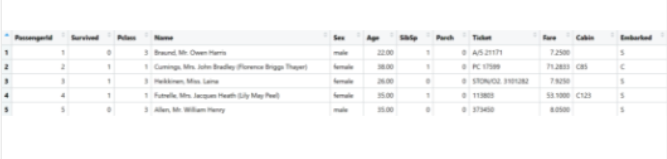
Q123. En utilisant Pandas, nous chargeons un ensemble de données de Kaggle, structuré comme dans l’image ci-dessous. Quelle commande retournera le nombre total de survivants ?
sum(titanic['Survived'])[x for x in titanic['Survived'] if x == 1]len(titanic["Survived"])sum(titanic['Survived']==0)
Explication : Le titanic['Survived'] retourne un objet pandas.Series, qui contient la colonne Survived du DataFrame.
L’addition des valeurs de cette colonne (c’est-à-dire sum(titanic['Survived'])) retourne le nombre total de survivants car un survivant est représenté par un 1 et une perte par 0.
Q124. Comment créeriez-vous une liste de tuples correspondant à ces listes de personnages et d’acteurs ?
characters = ["Iron Man", "Spider Man", "Captain America"]
actors = ["Downey", "Holland", "Evans"]

# sortie exemple : [("IronMan", "Downey"), ("Spider Man", "Holland"), ("Captain America", "Evans")]
[(x,y)] for x in characters for y in actors]zip(characters, actors)-
d = {}

for x in range(1, len(characters)):
    d[x] = actors[x]
{x:y for x in characters for y in actors}
Q125. Que retournera cette instruction ?
{x : x*x for x in range(1,100)}
- Un dictionnaire avec
xcomme clé, etxau carré comme valeur ; de 1 à 100. - Un dictionnaire avec
xcomme clé, etxau carré comme valeur ; de 1 à 99. - Un ensemble de tuples, composé de (
x,xau carré) ; de 1 à 99. - Une liste avec tous les nombres au carré de 1 à 99.
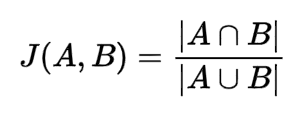
Q126. La similarité de Jaccard est une formule qui vous indique à quel point deux ensembles sont similaires. Elle est définie comme la cardinalité de l’intersection divisée par la cardinalité de l’union. Quel choix est une implémentation exacte en Python ?
def jaccard(a, b): return len (a | b) / len (a & b)def jaccard(a, b): return len (a & b) / len (a | b)def jaccard(a, b): return len (a && b) / len (a || b)def jaccard(a, b): return a.intersection(b) / a.union(b)
Q127. Quel choix n’est PAS un type numérique natif en Python ?
- Long
- Int
- Float
- Double
Q128. Quelle sera la sortie de ce code ?
[1,2,3] * 3
[3,2,3][1, 2, 3, 1, 2, 3, 1, 2, 3]- Vous obtiendrez une erreur de type.
[3,6,9]
Q129. Étant donné une liste définie comme numbers = [1,2,3,4], quelle est la valeur de numbers[-2] ?
- 1
- 3
- 2
- Une exception IndexError est levée.
Q130. Quelle affirmation sur les chaînes de caractères en Python est vraie ?
- Les chaînes de caractères peuvent être entourées de guillemets doubles (“) ou de guillemets simples (‘).
- Les chaînes de caractères ne peuvent être entourées que de guillemets simples (‘).
- Les chaînes de caractères d’un seul caractère doivent être entourées de guillemets simples (‘), et les autres doivent être entourées de guillemets doubles (“).
- Les chaînes de caractères ne peuvent être entourées que de guillemets doubles (“).
Q131. Quelle est la syntaxe correcte pour définir une méthode __init__() qui ne prend aucun paramètre ?
def __init__(self): passclass __init__(self): passclass __init__(): pass-
def __init__(): pass using math.sinimport math.sinfrom math import sinimport sin from math
Explication : L’instruction from..import vous permet d’importer des fonctions/variables spécifiques d’un module au lieu de tout importer.
Q133. Qu’obtenez-vous si vous appliquez numpy.sum() à une liste qui ne contient que des valeurs booléennes ?
0le nombre de toutes les valeurs Trueune erreur de typeNone
Q134. Qu’imprimera ce code ?
print("foo" if (256).bit_length() > 8 else "bar")
Truefoo- Vous obtiendrez un message d’erreur car les valeurs entières constantes ne sont pas des classes.
bar
Q135. Si vous ne retournez pas explicitement une valeur d’une fonction, que se passe-t-il ?
- Si le mot-clé return est absent, la fonction retournera
True. - La fonction entrera dans une boucle infinie car elle ne saura pas quand arrêter d’exécuter son code.
- La fonction retournera une
RuntimeErrorsi vous ne retournez pas de valeur. - Si le mot-clé return est absent, la fonction retournera
None.
Q136. Il est souvent le cas que la bibliothèque pandas est utilisée pour les données _ et NumPy pour les données _.
- chaînes de caractères ; numériques
- non structurées ; structurées
- numériques ; tabulaires
- tabulaires ; numériques
Explication : La bibliothèque Pandas est couramment utilisée pour travailler avec des données tabulaires, telles que des données sous forme de tableaux ou de feuilles de calcul. Elle fournit des structures de données et des fonctions pour la manipulation et l’analyse de données. D’autre part, NumPy est une bibliothèque puissante pour le calcul numérique en Python, et elle est souvent utilisée pour effectuer des opérations mathématiques sur des données numériques, telles que des tableaux et des matrices.
Q137. Que devez-vous faire pour installer des packages supplémentaires dans Python ?
- Utiliser un compilateur C comme
gccouclang. - Utiliser un gestionnaire de packages comme
pipouconda. - Utiliser un IDE comme Notepad++ ou Idle.
- Utiliser un gestionnaire de packages comme NPM ou NuGet.
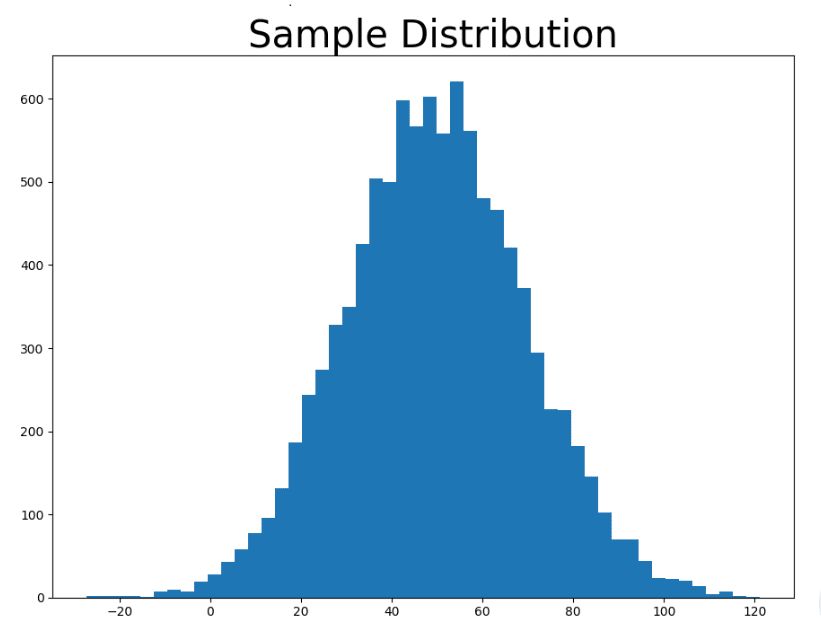
Q138. L’image ci-dessous a été créée en utilisant Matplotlib. C’est un graphique de distribution d’une liste d’entiers remplis de nombres en utilisant la fonction _ et tracé avec _.
random.uniform(0,50);plt.histrandom.gauss(50,20);plt.histrandom();plt.scatterrandom.triangular(0,50);plt.bar
Q139. Dans ce fragment de code, quelles seront les valeurs de a et b ?
import numpy as np

a = np.arange(100)
b = a[50:60:2]
a: tous les entiers de 0 à 99 (inclus) ;b: tous les entiers pairs de 50 à 58 (inclus).a: tous les entiers de 0 à 100 (inclus) ;b: tous les entiers pairs de 50 à 60 (inclus).a: tous les entiers de 0 à 99 (inclus) ;b: tous les entiers pairs de 50 à 60 (inclus).a: tous les entiers de 0 à 99 (inclus) ;b: tous les entiers impairs de 49 à 59 (inclus).
Q140. Lors de l’utilisation de NumPy en Python, comment vérifiez-vous la dimensionnalité (nombre et longueur des dimensions) d’un objet appelé my_object ?
my_object.get_shape()my_object.shapemy_object.dim()len(my_object)
Q141. Supposons que vous ayez une liste non vide nommée mylist et que vous souhaitiez rechercher une valeur spécifique. Le nombre minimum de comparaisons sera _ et le nombre maximum de comparaisons sera _ ?
len(mylist); len(mylist)1; len(mylist)2; len(mylist)0; len(mylist)
Explication : On peut utiliser une instruction break et la valeur recherchée peut être le premier élément de la liste, étant donné qu’elle est non vide.
Q142. Si une fonction n’a pas d’instruction return, que retourne-t-elle ?
0TrueNoneFalse
Q143. Supposons que vous souhaitiez vérifier si deux matrices peuvent être multipliées en utilisant NumPy à des fins de débogage. Comment compléteriez-vous ce fragment de code en remplissant les espaces vides avec les variables appropriées ?
import numpy as np

def can_matrices_be_multiplied (matrix1, matrix2):
    rowsMat1, columnsMat1 = matrix1.shape
    rowsMat2, columnsMat2 = matrix2.shape

    if _____ == ______ :
        print("Les matrices peuvent être multipliées !")
        return True
    else:
        return False
- columnsMat1; rowsMat1;
- columnsMat1; rowsMat2;
- columnsMat1; columnsMat2;
- columnsMat2; rowsMat1;
référence. Une matrice peut être multipliée par toute autre matrice qui a le même nombre de lignes que la première a de colonnes. Par exemple, une matrice avec 2 colonnes peut être multipliée par toute matrice avec 2 lignes
Q144. Quelle est la sortie de cette compréhension ?
[(x, x+1) for x in range(1,5)]
- [(1, 2), (2, 3), (3, 4), (4, 5), (5, 6)]
- [1,2,3,4,5]
- [(1, 2), (2, 3), (3, 4)]
- [(1, 2), (2, 3), (3, 4), (4, 5)]
Q145. En Python, une méthode de classe doit avoir _ comme décorateur de fonction, et le premier paramètre de la méthode sera une référence à _.
- @classmethod; la classe
- inline; la classe
- static; self
- @static; self
Q146. Quel extrait de code imprimera My name is Joffrey, son of Robert ?
- :
class Father():
    name = 'Robert'

class Person(Father):
    def __init__(self, name):
        self.fathername = super.name
        self.name = name

    def introduce(self):
        print(f"My name is {self.name} son of {self.fathername}")

king = Person("Joffrey")
king.introduce()
- :
class Father():
    name = 'Robert'


class Person(Father):
    def __init__(self, name):
        self.fathername = self.name
        self.name = name

    def introduce(self):
        print(f"My name is {self.name} son of {self.fathername}")


king = Person("Joffrey")
king.introduce()
- :
class Father():
    name = 'Robert'


class Person(Father):
    def __init__(self, name):
        self.name = name

    def introduce(self):
        print(f"My name is {self.name} son of {super.name}")

king = Person("Joffrey")
king.introduce()
- :
class Father():
    name = 'Robert'

class Person(Father):
    def __init__(self, name):
        self.name = name

    def introduce(self):
        print(f"My name is {self.name} son of {base.name}")

king = Person("Joffrey")
king.introduce()
Explication : Dans le premier, super n’a pas .name (devrait être self.name). Le troisième perd Robert, et base n’est pas défini dans le 4ème.
Q147. Qu’affichera ce code dans la console, en supposant que defaultdict a déjà été importé ?
animals = {
    'a': ['ant', 'antelope', 'armadillo'],
    'b': ['beetle', 'bear', 'bat'],
    'c': ['cat', 'cougar', 'camel']
}

animals = defaultdict(list, animals)

print(animals['b'])
print(animals['d'])
- A
      ['beetle', 'bear', 'bat']
      []
- B
      ['beetle', 'bear', 'bat']
      # an exception will be thrown
- C
      ['beetle', 'bear', 'bat']
      None
- D
      ['bat', 'bear', 'beetle']
      []
Explication : Les dictionnaires entraînent généralement une exception lors de l’utilisation de la syntaxe des crochets. Defaultdict ici retourne une valeur par défaut dédiée par le premier paramètre, donc au lieu de lever une exception, ils retournent la valeur par défaut. Notez que cela doit être importé comme suit : from collections import defaultdict
Q148. Que retournera cette ligne de code ? (Supposons que n est déjà défini comme toute valeur entière positive.)
[x*2 for x in range(1,n)]
- Une liste avec tous les nombres pairs inférieurs à 2*n.
- Un dictionnaire avec tous les nombres pairs inférieurs à 2*n.
- Une liste avec tous les nombres impairs inférieurs à 2*n.
- Une liste avec tous les nombres pairs inférieurs ou égaux à 2*n.
Q149. Qu’imprimera ce code dans la console ?
x = 18

if x > 10:
    if x > 15:
        print('A')
    else:
        print('B')
else:
    print('C')
CBABC
Q150. Quelle est la longueur maximale d’un identifiant Python ?
- 32
- 16
- 128
- Aucune longueur fixe n’est spécifiée.
référence Aucune longueur fixe n’est spécifiée mais Pep-8 spécifie sous “Longueur maximale de ligne” de “Limiter toutes les lignes à un maximum de 79 caractères”.
Q151. Quelle sera la valeur de la variable i lorsque la boucle suivante terminera son exécution ?
for i in range(5): pass
- 5
- La variable devient indisponible.
- 6
- 4
Q152. Les f-strings sont également appelées :
- Expressions de chaînes formatées.
- Chaînes fonctionnelles.
- Chaînes formatées modulo.
- Littéraux de chaînes formatées.
Q153. Combien de CPU (ou cœurs) la bibliothèque de threading Python exploitera-t-elle simultanément ?
- Un.
- Tous les CPU disponibles.
- Deux.
- Trois.
Explication : Le threading Python est limité à un seul CPU à la fois. La bibliothèque multiprocessing vous permettra d’exécuter du code sur différents processeurs.
Q154. Quelle sera la valeur de y dans ce code ?
x = 5
y = 1 + (20 if x < 5 else 30)
False21231
Explication : Si vous n’avez qu’une seule instruction à exécuter, une pour if et une pour else, vous pouvez tout mettre sur la même ligne.
x = 5
# This is the same statement expanded to multiple lines
y = 1
if (x < 5):
    y += 20
else:
    y += 30
Q155. Le processus de pickling en Python inclut ?
- La conversion d’une hiérarchie d’objets Python en flux d’octets.
- La conversion d’une table de données en liste.
- La conversion d’un flux d’octets en hiérarchie d’objets Python.
- La conversion d’une liste en table de données.
référence
“Pickling” est le processus par lequel une hiérarchie d’objets Python est convertie en flux d’octets, et “unpickling” est l’opération inverse, par laquelle un flux d’octets (provenant d’un fichier binaire ou d’un objet de type bytes) est reconverti en hiérarchie d’objets.
Q156. Qu’est-ce que the output of the following program?
print("codescracker".endswith("er"))
True12False
Q157. Is the list mutable in Python?
- True
- False
Q158. Qu’est-ce que the output of the following program?
print("programming".center())
crprogramming- Error says
TypeError: center expected at least 1 argument, got 0. - None of the above.
reference. The center() method will center align the string, using a specified character (space is the default) as the fill character.
Syntax: string.center(length, character) where length is required!
Q159. Who created the Python programming language?
- Tim Berners-Lee
- Ada Lovelace
- Guido van Rossum
- Alan Turing
Q160. Quel(le) collection is ordered, changeable, and allows duplicate members?
- Set
- Tuple
- Dictionary
- List
Q161. Que va be printed in the console if you run this code?
x = 1j
print(x**2 == -1)
- A runtime error telling you that the variable
jhas not been initialized. True1jFalse
Explanation: The letter j acts as the imaginary unit in Python, therefore x**2 means j**2 which is equal to -1. The statement x**2 == -1 is evaluated as True.
Q162. Que va be printed in the console if you run this code?
print(0xA + 0xB + 0xC)
33630xA + 0xB + 0xCNone
Explanation: A, B and C are hexadecimal integers with values 10, 11 and 12 respectively, so the sum of A, B and C is 33.
Q163. Que va this code output to the screen?
for i in range(5):
    print(i)
else:
    print("Done!")
- A
1
2
3
4
5
Done!
- B
0
1
2
3
4
5
Done!
- C
0
1
2
3
4
Done!
- D: You will get a syntax error.
Q164. Quel(le) comparison of lists and tuples in Python is correct?
- Use lists instead of tuples when you have a collection of related but dissimilar objects.
- Use tuples instead of lists when you have a common collection of similar objects.
- Use tuples instead of lists for functions that need to return multiple values.
- Use lists instead of tuples when the position of elements is important.
Q165. Consider the following code snippet that uses decorators to calculate the execution time of the execution_fn function:
import functools
import time

def timer(MISSING_ARG_1):
    @functools.wraps(func)
    def wrapper(*args, **kwargs):
        start_time = time.perf_counter()
        rval = func(*args, **kwargs)
        end_time = time.perf_counter()
        duration = end_time - start_time
        print(f"Executed in {duration:.4f} seconds")
        return MISSING_ARG_2
    return MISSING_ARG_3

@timer
def execution_fn():
    for i in range(3):
        time.sleep(1)

execution_fn()
Which of the following choices are the missing arguments?
- :
MISSING_ARG_1 = wrapper

MISSING_ARG_2 = rval

MISSING_ARG_3 = func
- :
MISSING_ARG_1 = func

MISSING_ARG_2 = rval

MISSING_ARG_3 = wrapper
- :
MISSING_ARG_1 is empty

MISSING_ARG_2 = rval

MISSING_ARG_3 = wrapper
- :
MISSING_ARG_1 is empty

MISSING_ARG_2 = rval

MISSING_ARG_3 = func
Q166. Quel(le) of the following statements defines a new object type named Dog in Python?
class Dog:Dog class:Dog:class Dog
Q167. To use pipelines in scikit-learn, import from the scikit-learn._ submodule.
preprocessingpipelinefilterspipe_filter
reference The correct syntax is actually: from sklearn.pipeline import Pipeline
Q168. You should pass in a value of _ for the axis argument to the Pandas apply method to apply the function to each row.
- row
- col
- 1
- 0
Q169. Data points in Pyplot are called…
- … pointers.
- … points.
- … markers.
- … none of these.
Q170. Que fait this code print?
a = np.array([[1, 2], [3, 4], [5, 6]])
c = a[(a > 3) & (a < 11)]
print(c)
[[3, 4], [5, 6]][False, False, False, True, True, True][[0,0], [3, 4], [5, 6]][4 5 6]
Q171. Assume m, n, and p are positive integers. In the following comprehension, how many times will the function randint be called?
[ [ [ randint(1,100) for i in range(m) ] for j in range(n) ] for k in range(p) ]
m * n * p- The greater value of
(m,n,p). - 1 million.
m + n + p
Q172. Suppose you have a class named MyClass which has multiple inheritance and methods with the same name in its ancestors. Quel(le) class method could you call to see which method will get priority when invoked?
MyClass.__mro__MyClass.hierarchy()callable(MyClass)dir(MyClass)
Explanation: MRO stands for Method Resolution Order. It returns a list of types the class is derived from, in the order they are searched for methods.
Q173. Suppose you have a list of employees described by the code below. You want to assign Alice the same salary as Charlie. Quel(le) choice will accomplish that?
employees = {
    'alice':{
        'position':'Lead Developer',
        'salary':1000
    },
    'bob':{
        'position': 'Lead Artist',
        'salary':2000
    },
    'charlie':{
        'position':'cfo',
        'salary':3000
    }
}
employess['alice']['salary'] = employees['charlie']['salary']employees.alice.salary = employees.charlie.salaryemployees['alice'][1] = employees['charlie'][1]employees['alice'].salary = employees['charlie'].salary
Explanation: This is accessing a key in a dictionary nested inside another dictionary. The command employees['alice']['salary'] = employees['charlie']['salary'] assigns the value of the salary key in the dictionary of the employee charlie to the value of the salary key in the dictionary of the employee alice.
Q174. You are given this piece of code. Assume m and n are already defined as some positive integer value. Quand it completes, how many tuples will my list contain?
mylist = []

for i in range(m):
    for j in range(n):
        mylist.append((i,j))
mm + nnm \* n
Explanation: This code will run for m x n times, if you run this code, it will create m x n tuples.
The first loop runs for m times and the inner loop will run for n times. The single iteration of the first loop will only be completed when all of the n iterations of an inner loop are completed. This is the same process for 2nd, and 3rd, … mth iterations for outer loop. Overall, both loops will run m x n times.
Q175. Que va this comprehension provide you?
{x : [y for y in range (1, x) if x % y == 0] for x in range (2, 100)}
- A dictionary whose keys are the numbers from 2 to 99 (inclusive), and their respective values are their factors.
- A dictionary whose keys are the numbers from 2 to 99 (inclusive), and their respective values are a list from 1 to the key value itself (inclusive).
- A dictionary whose keys are the numbers from 2 to 99 (inclusive), and their respective values are the even numbers from 1 to the key value itself (inclusive).
- A dictionary whose keys are the numbers from 2 to 99 (inclusive), and their respective values are the odd numbers from 1 to the key value itself (inclusive).
Q176. Qu’est-ce que a common use of Python’s sys library?
- to take a snapshot of all the packages and libraries in your virtual environment
- to connect various systems, such as connecting a web front end, an API service, a database, and a mobile app
- to capture command-line arguments given at a file’s runtime
- to scan the health of your Python ecosystem while inside a virtual environment
Q177. Qu’est-ce que the output of 17 % 15 ?
- 17
- 15
- 2
- 16
Q178. Let the lists ‘characters’ and ‘actors’ be defined as given. Quel(le) of the following lines of code gives the desired output?
characters = ["Iron Man", "Spider Man", "Captain America"]
actors = ["Downey", "Holland", "Evans"]

#Desired output : [("Iron Man", "Downey), ("Spider Man", "Holland"), ("Captain America", "Evans")]
- print( zip( characters, actors ) )
- print( { x: y for x in characters for y in actors } )
- print( [ ( x, y ) for x in characters for y in actors ] )
- print( list( zip( characters, actors ) ) )
Explanation: zip() is the correct function for this usecase. However, zip() makes a zip type object which is an iterator. Therefore, using list() is necessary to convert the zip object into a list of tuples that can be displayed or accessed directly. The other options have logical errors.
Q179. Quand is the if __name__ == "__main__": block executed in a Python script?
- Always, as it is required in every Python script.
- Only when the script is executed directly from the command line or as the main program.
- Only when the script contains syntax errors.
- Only when the script is imported as a module in another script.
The if __name__ == "__main__": block is executed when the script is run directly but not when it’s imported as a module in another script.
reference
Q180. Que va be the output of the following Python code?
def square(x):
    return x * x

numbers = [1, 2, 3, 4, 5]
squared_numbers = map(square, numbers)
result = list(squared_numbers)
print(result)
[1, 4, 9, 16, 25][1, 2, 3, 4, 5][1, 8, 27, 64, 125][2, 4, 6, 8, 10]
The code defines a square function to calculate the square of a number. It then uses the map function to apply this function to each element in the numbers list, resulting in a new iterable. Finally, the list constructor is used to convert this iterable into a list. The output will be a list of squared numbers.
reference
Q181. Quel(le) of the following is not a valid built-in function in Python?
- int
- string
- boolean
- array
Q182. Quel(le) of the following is not a valid Python data type?
- int
- char
- float
- str
Q183. In Python, which function is used to read a line from the console input?
- input()
- read_line()
- console_input()
- getline()
Q184. Que va be the output of the following Python code?
print("Hello {name1} and {name2}".format(name1='foo', name2='bin'))
- Hello foo and bin
- Hello {name1} and {name2}
- Error
- Hello and
Q185. What will be the ouput of the following code snippet?
def outer_func(x):
    y = x + 1
    def inner_func():
        return y + x
    return inner_func

x = 10
y = 20
closure_func = outer_func(x)
print(closure_func())
- 30
- 21
- 11
- 31
Explanation: When outer_func(10) is called, y is set to 11 within outer_func. The inner_func, which has access to outer_func’s scope, returns y + x. When closure_func() is called, it uses y = 11 (from outer_func) and x = 10 from the global scope, not from the function’s argument. Therefore, closure_func() returns 11 + 10 = 21.
Q186. What is the output of the following Python code?
x = 5
def func():
    x = 10
    print(x)
func()
print(x)
- 10, 5
- 10, 10
- 5, 5
- 5, 10
Explanation: The correct answer is 10, 5.
In the given code, the variable x is first defined in the global scope with a value of 5. Inside the func() function, a new local variable x is created and assigned the value of 10. When func() is called, it prints the value of the local x, which is 10.
After the function call, the print statement outside the function refers to the global x, which still has the value of 5.
Therefore, the output is 10, 5.
Q187. What is the output of the following Python code?
def func(a, b=2, c=3):
    print(a, b, c)

func(10)
func(10, 20)
func(10, 20, 30)
- 10 2 3, 10 20 3, 10 20 30
- 10 2 3, 10 2 3, 10 2 3
- 10 2 3, 10 20 2, 10 20 30
- 10 2 3, 10 20 3, 10 20 30
Explanation: The correct answer is 10 2 3, 10 20 3, 10 20 30.
In the given code, the func() function has three parameters: a, b, and c. b and c have default values of 2 and 3, respectively.
When func(10) is called, only the first parameter a is provided, so b and c take their default values of 2 and 3, respectively.
When func(10, 20) is called, the first parameter a is 10, and the second parameter b is 20. The third parameter c takes its default value of 3.
When func(10, 20, 30) is called, all three parameters are provided, so a is 10, b is 20, and c is 30.
Therefore, the output is: 10 2 3 10 20 3 10 20 30
Q188. What is the output of the following Python code?
x = [1, 2, 3]
y = x
y.append(4)
print(x)
- [1, 2, 3]
- [1, 2, 3, 4]
- [4, 1, 2, 3]
- Error
Explanation: The correct answer is [1, 2, 3, 4].
In Python, assigning y = x does not create a new list; both x and y refer to the same object in memory. So when we call y.append(4), it modifies the original list that both variables point to. Thus, printing x will display the updated list [1, 2, 3, 4].
Q189. What is the output of the following Python code?
def add_item(item, item_list=[]):
    item_list.append(item)
    return item_list

print(add_item(1))
print(add_item(2))
print(add_item(3, []))
- [1] [2] [3]
- [1] [1,2] [3]
- [1,2,3] [1,2,3] [3]
- [1] [2] [3,1,2]
Explanation: The correct answer is [1] [1, 2] [3].
In Python, default mutable arguments (like lists) are evaluated only once when the function is defined — not each time it’s called. That means the first two calls to add_item() share the same default list, so it accumulates values [1] and then [1, 2].
However, in the third call add_item(3, []), we pass a new empty list, so it creates a separate list [3].
Q190. Quel(le) method is used to implement the len() function for a custom class?
__length__()__len__()__size__()__count__()
Q191. Que va this code output?
def decorator(func):
    def wrapper(*args, **kwargs):
        print("Before function call")
        result = func(*args, **kwargs)
        print("After function call")
        return result
    return wrapper

@decorator
def greet(name):
    print(f"Hello, {name}!")

greet("Alice")
Before function call,Hello, Alice!,After function callHello, Alice!Before function call,After function calldecorator
Q192. Quel(le) statement about Python generators is correct?
- Generators store all values in memory at once
- Generators produce values on-demand using the
yieldkeyword - Generators can only be created with list comprehensions
- Generators cannot be iterated multiple times
Q193. Qu’est-ce que the output of this code?
class Parent:
    def method(self):
        print("Parent method")

class Child(Parent):
    def method(self):
        super().method()
        print("Child method")

obj = Child()
obj.method()
Parent method,Child methodChild method,Parent methodChild methodParent method
Q194. Quel(le) method is used to implement string representation for debugging?
__str__()__repr__()__format__()__debug__()
Reference String Representation
Q195. Que va this code output?
from functools import lru_cache

@lru_cache(maxsize=None)
def fibonacci(n):
    if n < 2:
        return n
    return fibonacci(n-1) + fibonacci(n-2)

print(fibonacci(10))
print(fibonacci.cache_info())
55and cache statistics55andNoneRecursionErrorTypeError
Q196. Quel(le) statement about Python’s with statement is correct?
- It can only be used with file objects
- It ensures proper resource cleanup by calling
__exit__method - It creates a new scope for variables
- It can only be used once per program
Q197. Qu’est-ce que the output of this code?
class Counter:
    def __init__(self):
        self.count = 0

    def __call__(self):
        self.count += 1
        return self.count

counter = Counter()
print(counter())
print(counter())
print(counter.count)
1,2,20,1,21,1,1TypeError
Q198. Quel(le) method is used to implement the in operator for a custom class?
__in__()__contains__()__has__()__includes__()
Q199. Que va this code output?
from dataclasses import dataclass

@dataclass
class Point:
    x: int
    y: int

    def distance_from_origin(self):
        return (self.x ** 2 + self.y ** 2) ** 0.5

p = Point(3, 4)
print(p)
print(p.distance_from_origin())
Point(x=3, y=4)and5.0<Point object>and5.0Point(3, 4)and5SyntaxError
Q200. Quel(le) statement about Python’s Global Interpreter Lock (GIL) is correct?
- GIL allows true parallelism for CPU-bound tasks
- GIL prevents multiple native threads from executing Python bytecodes simultaneously
- GIL only affects I/O operations
- GIL can be disabled in Python
Q201. Qu’est-ce que the output of this code?
class Singleton:
    _instance = None

    def __new__(cls):
        if cls._instance is None:
            cls._instance = super().__new__(cls)
        return cls._instance

a = Singleton()
b = Singleton()
print(a is b)
print(id(a) == id(b))
TrueandTrueFalseandFalseTrueandFalseFalseandTrue
Q202. Quel(le) method is used to implement iteration protocol?
__iterate__()__iter__()and__next__()__loop__()__foreach__()
Q203. Que va this code output?
from enum import Enum

class Color(Enum):
    RED = 1
    GREEN = 2
    BLUE = 3

print(Color.RED)
print(Color.RED.name)
print(Color.RED.value)
Color.RED,RED,11,RED,Color.REDRED,1,Color.RED<Color.RED: 1>,RED,1
Q204. Quel(le) statement about Python’s *args and **kwargs is correct?
*argscaptures keyword arguments,**kwargscaptures positional arguments*argscaptures positional arguments,**kwargscaptures keyword arguments- Both capture the same type of arguments
- They can only be used together
Q205. Qu’est-ce que the output of this code?
class MyClass:
    class_var = 0

    def __init__(self):
        MyClass.class_var += 1
        self.instance_var = MyClass.class_var

a = MyClass()
b = MyClass()
print(a.instance_var, b.instance_var)
print(MyClass.class_var)
1 2and20 1and21 1and12 2and2
Reference Class vs Instance Variables
Q206. Quel(le) method is used to implement the + operator for a custom class?
__plus__()__add__()__sum__()__combine__()
Reference Arithmetic Operations
Q207. Que va this code output?
from collections import namedtuple

Person = namedtuple('Person', ['name', 'age', 'city'])
p = Person('Alice', 30, 'New York')
print(p.name)
print(p[1])
print(p._fields)
Alice,30,('name', 'age', 'city')Alice,Alice,['name', 'age', 'city']Person,30,('name', 'age', 'city')AttributeError
Q208. Quel(le) statement about Python’s lambda functions is correct?
- Lambda functions can contain multiple statements
- Lambda functions can only contain a single expression
- Lambda functions cannot take arguments
- Lambda functions are faster than regular functions
Q209. Qu’est-ce que the output of this code?
from functools import partial

def multiply(x, y, z):
    return x * y * z

double = partial(multiply, 2)
result = double(3, 4)
print(result)
24126TypeError
Q210. Quel(le) method is used to implement comparison operations like <, >, <=, >=?
__compare__()__lt__(),__gt__(),__le__(),__ge__()__cmp__()__order__()
Reference Rich Comparison Methods
Q211. Que va this code output?
class MyContext:
    def __enter__(self):
        print("Entering context")
        return self

    def __exit__(self, exc_type, exc_val, exc_tb):
        print("Exiting context")
        return False

with MyContext() as ctx:
    print("Inside context")
Entering context,Inside context,Exiting contextInside context,Entering context,Exiting contextEntering context,Exiting context,Inside contextInside context
Reference Context Manager Protocol
Q212. Quel(le) statement about Python’s yield from is correct?
- It’s the same as regular
yield - It delegates to another generator or iterable
- It can only be used with lists
- It creates a new thread
Q213. Qu’est-ce que the output of this code?
class Descriptor:
    def __get__(self, obj, objtype=None):
        return "Descriptor value"

    def __set__(self, obj, value):
        print(f"Setting value: {value}")

class MyClass:
    attr = Descriptor()

obj = MyClass()
print(obj.attr)
obj.attr = "new value"
print(obj.attr)
Descriptor value,Setting value: new value,Descriptor valueDescriptor value,Setting value: new value,new valueNone,Setting value: new value,new valueAttributeError
Q214. Quel(le) method is used to implement the hash() function for a custom class?
__hashcode__()__hash__()__digest__()__checksum__()
Q215. Que va this code output?
from typing import List, Dict

def process_data(items: List[int]) -> Dict[str, int]:
    return {"count": len(items), "sum": sum(items)}

result = process_data([1, 2, 3, 4, 5])
print(result)
print(type(result))
{'count': 5, 'sum': 15}and<class 'dict'>{'count': 5, 'sum': 15}and<class 'Dict'>TypeErrorSyntaxError
Q216. Quel(le) statement about Python’s __slots__ is correct?
__slots__increases memory usage__slots__restricts attribute creation and can reduce memory usage__slots__is only for methods__slots__enables multiple inheritance
Q217. Qu’est-ce que the output of this code?
class MRO_A:
    def method(self):
        print("A")

class MRO_B(MRO_A):
    def method(self):
        print("B")
        super().method()

class MRO_C(MRO_A):
    def method(self):
        print("C")
        super().method()

class MRO_D(MRO_B, MRO_C):
    def method(self):
        print("D")
        super().method()

obj = MRO_D()
obj.method()
D,B,C,AD,B,AD,C,AA,B,C,D
Reference Method Resolution Order
Q218. Quel(le) method is used to implement the del statement for a custom class?
__del__()__delete__()__remove__()__destroy__()
Q219. Que va this code output?
from contextlib import contextmanager

@contextmanager
def my_context():
    print("Setup")
    try:
        yield "resource"
    finally:
        print("Cleanup")

with my_context() as resource:
    print(f"Using {resource}")
Setup,Using resource,CleanupUsing resource,Setup,CleanupSetup,Cleanup,Using resourceSetup,Using resource
Reference contextlib.contextmanager
Q220. Quel(le) statement about Python’s property decorator is correct?
- It can only be used for read-only attributes
- It allows methods to be accessed like attributes
- It creates class variables
- It can only be used with strings
Q221. Qu’est-ce que the output of the following code?
class Meta(type):
    def __new__(cls, name, bases, attrs):
        attrs['class_id'] = f"{name}_123"
        return super().__new__(cls, name, bases, attrs)

class MyClass(metaclass=Meta):
    pass

print(MyClass.class_id)
MyClass_123Meta_123AttributeErrorclass_id
Q222. Quel(le) method is used to create a context manager in Python?
__init__and__del____enter__and__exit____start__and__stop____open__and__close__
Q223. Que va this code output?
import asyncio

async def fetch_data(delay):
    await asyncio.sleep(delay)
    return f"Data after {delay} seconds"

async def main():
    result = await fetch_data(1)
    print(result)

asyncio.run(main())
Data after 1 seconds<coroutine object fetch_data>SyntaxErrorNone
Q224. Quel(le) decorator is used to create a property that can be set?
class Circle:
    def __init__(self, radius):
        self._radius = radius

    @property
    def radius(self):
        return self._radius

    @radius.setter
    def radius(self, value):
        if value < 0:
            raise ValueError("Radius cannot be negative")
        self._radius = value
@property.getter@radius.setter@property.setter@setter
Q225. Qu’est-ce que the output of this code?
from collections import defaultdict

dd = defaultdict(list)
dd['key1'].append('value1')
dd['key2'].append('value2')
print(len(dd))
print(dd['key3'])
print(len(dd))
2,[],22,[],32,KeyError,23,[],3